

Key takeaways
- For a multi-country trader, the first stock problem is usually visibility: nobody sees every warehouse, incoming cargo and supplier performance together.
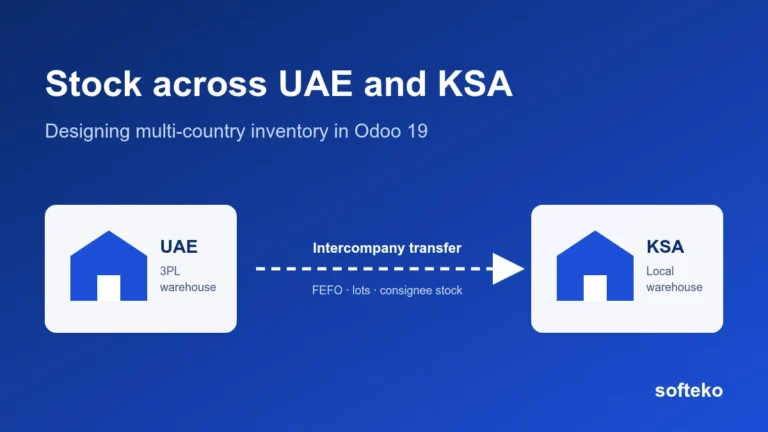
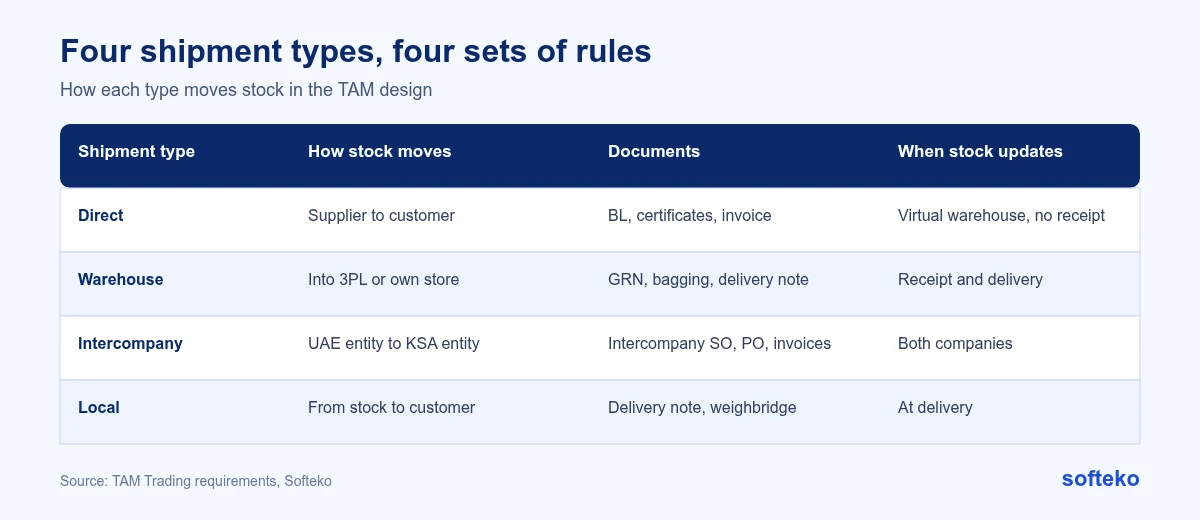
- For TAM Trading, we designed four shipment types (direct, warehouse, intercompany and local) with their own stock rules.
- The warehouse design includes locations for bulk, bagging, damaged and quarantined stock, FEFO picking with temperature logs, and separate tracking of customer-owned stock.
- Odoo 19 supports FEFO with lots and expiry dates, stock owned by another party, and intercompany transactions between companies in one database [1][2][3].
Overview
TAM Trading ships direct from suppliers, through 3PL warehouses, intercompany from the UAE to KSA, or locally from stock. When we documented TAM’s requirements, procurement could buy new stock without checking other warehouses or regions, so one location had excess while another ran short. Older stock was sometimes picked last because it was harder to reach, and expired. Customer-owned stock sat alongside company stock without clear identification.
This article explains the stock design we wrote for TAM and how it maps to Odoo 19. It describes the agreed design, not results from a live system.
Why stock goes wrong for a multi-country trader
- Each warehouse is a separate spreadsheet. Sales sees one location and promises stock that is in another country.
- Incoming cargo is invisible. Goods on the water are not counted, so teams buy again.
- Old stock is picked last. The newest pallets are at the front, and older batches expire at the back.
- Customer stock looks like company stock. Goods a customer already paid for are offered to someone else.
- 3PL data arrives late. Receipts and dispatches at a third-party warehouse are reported days later.
- Units do not match. Stock is bought in tonnes, stored in bags and sold in either.
Each of these is a design question before it is a software question.
Four shipment types, four sets of rules
Every sales order is tagged with a shipment type, and the type decides how Supply Chain fulfils it:
| Type | How stock moves |
|---|---|
| Direct | Supplier to customer through a virtual warehouse, so inventory reconciles without a physical receipt at TAM |
| Warehouse | Received into a 3PL or own warehouse, often bagged, then delivered |
| Intercompany | Between TAM entities, for example UAE to KSA, with defined transfer margins |
| Local | Picked from physical stock and delivered with a weighbridge record |
Warehouses and locations
TAM’s design supports several warehouses, for example a UAE 3PL warehouse and a KSA warehouse. Each has internal locations for bulk stock, bagging, damaged stock and quarantine. Warehouse capacity is recorded for each warehouse so planners can see space as well as stock.
An illustrative location structure for one warehouse:
| Location | Used for |
|---|---|
| Bulk | Product received loose or in jumbo bags before repacking |
| Bagging | Stock being repacked into 25 kg bags |
| Finished bags | Bagged stock ready to sell |
| Quarantine | Stock waiting for quality release |
| Damaged | Stock that cannot be sold as normal |
| Consignee | Stock owned by customers, held for them |
Because each location is separate in Odoo, a stock report can show what is available to sell, not just what is physically in the building.
FEFO and temperature logs
Chemicals expire. The design applies first-expired, first-out (FEFO) when allocating stock, and allows temperature readings at set intervals, linked to each batch. This addresses the problem of older stock being left behind until it can no longer be sold. Manufacturers use the same lot logic for film; see lot tracking in a packaging plant.
How to set up FEFO in Odoo 19
FEFO in Odoo works on lots with expiry dates [1]:
- In Inventory › Configuration › Settings, under Traceability, enable Lots & Serial Numbers, then Expiration Date.
- On each product, track inventory By Lots and enable expiration dates. Set the expiration, best before, removal and alert dates as needed.
- Assign lot numbers at receipt, or through an inventory count for existing stock.
- Set First Expiry First Out (FEFO) as the removal strategy on the product category or the stock location.
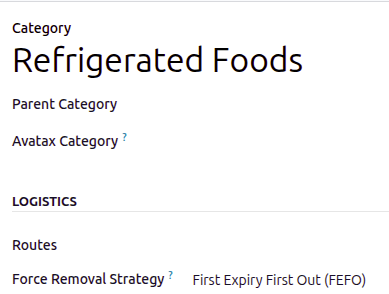
When a delivery is prepared, Odoo then proposes the lots with the earliest removal date first.
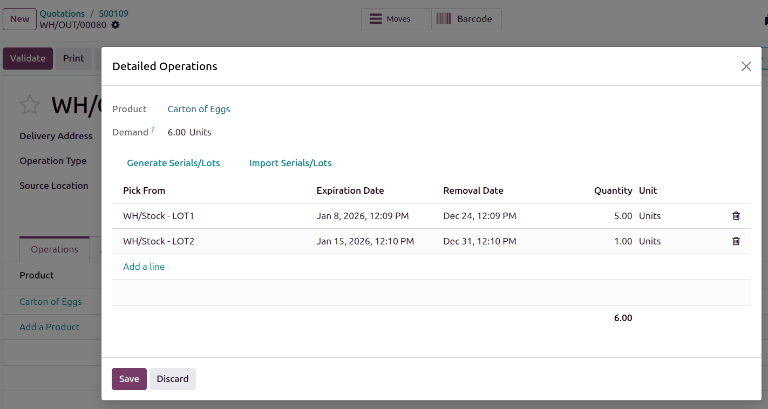
Temperature logs per batch are not a standard Odoo feature. In TAM’s design they were specified as readings recorded against the lot.
Customer-owned (consignee) stock
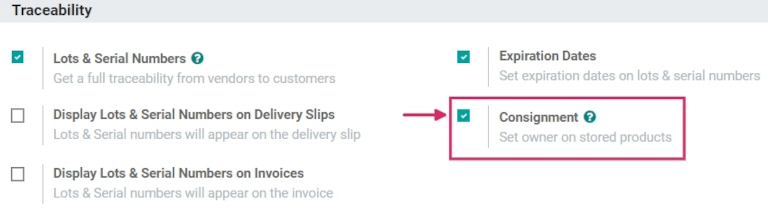
Some TAM customers buy product that stays in TAM’s warehouse. The design tracks this consignee stock separately so it is never sold twice. For urgent local orders, it also allows temporary borrowing from consignee stock, recorded as a consignee stock shortfall to be replaced.
Odoo 19’s Consignment setting adds an owner to stock, so goods owned by another party are kept apart from your own [2]. It is described for supplier-owned stock, but the same owner field works for stock held for a customer. The borrowing and shortfall rule in TAM’s design needs configuration on top.
Stock and incoming cargo at the pre-sales review
Before a quotation is drafted, Supply Chain confirms current stock, incoming shipment ETAs and any batch restrictions as part of the pre-sales review. For local sales, the system checks FEFO-available stock in the selected warehouse before the order is confirmed. On partial shipments, it tracks the remaining quantity and blocks over-delivery. This check is part of the pre-sales review.
In Odoo, incoming purchase orders already show in the forecasted quantity of each product. The difference in TAM’s design is that the pre-sales review shows stock and incoming cargo for every warehouse and company together, so Sales does not have to ask.
If your sales team confirms delivery dates without seeing every warehouse, we can show how it would work in Odoo.
Supplier assessment after every delivery
TAM already had a supplier and 3PL delivery assessment form (TAM-F-014). In the design, Logistics creates a delivery assessment after each receipt. It covers quantity accuracy, quality condition, supplier cooperation and responsiveness, and quoted price compared with what actually happened. The Commercial team reviews it, the Head of Supply Chain approves it, and the results feed on-time-in-full reporting by supplier and route. Quantities are also matched on the vendor bill through three-way matching.
Intercompany: UAE to KSA
One TAM route runs from the UAE entity to the KSA entity. In the design, the KSA company’s purchase order is treated as a customer order by the UAE company, with transfer margins and payment terms. Goods leaving the Free Zone need the Free Zone clearance invoice, and invoices in KSA must follow ZATCA e-invoicing in Odoo.
Odoo 19’s Inter-Company Transactions feature can create the matching document in the other company automatically: a sales order when a purchase order is confirmed, a purchase order when a sales order is confirmed, or a vendor bill when an invoice is posted. It can also synchronise stock moves [3]. Note that warehouses for each additional company must be created manually [3].
On the finance side, TAM’s design includes shared cost allocation between entities, elimination of intercompany balances at consolidation, FX translation differences, and automatic 5% reverse-charge VAT on cross-border intercompany expenses.
Before go-live, test one intercompany order end to end: the KSA purchase order, the UAE sales order, both deliveries and receipts, both invoices, and the VAT on each side.
Checklist for multi-country stock in Odoo
- Map every stock location (own, 3PL, consignee) to a warehouse and a company.
- Decide how each shipment type moves stock, including direct shipments that never touch your warehouse.
- Decide where FEFO applies and which products need lots, expiry dates and temperature logs.
- Agree how 3PL receipts and dispatches reach Odoo, and how often.
- Turn your supplier assessment into fields recorded after each receipt.
- Test one intercompany order end to end, including invoices and VAT on both sides.
FAQ
Can Odoo manage stock for several companies in one database?
Yes. Each company has its own warehouses, which must be created for each company [3].
How do I set up FEFO in Odoo 19?
Enable lots and expiration dates, track products by lots, and set FEFO as the removal strategy on the product category or location [1].
Can Odoo keep stock owned by someone else separate?
Yes. The Consignment setting adds an owner to stock, so it is not mixed with your own [2].
Can Odoo handle direct shipments from supplier to customer?
Yes. TAM’s design routes them through a virtual warehouse so inventory reconciles without a physical receipt.
Does Odoo create intercompany orders automatically?
It can. With Inter-Company Transactions enabled, Odoo creates the matching document in the other company [3].
See all your stock before you promise it
If your sales team checks several spreadsheets before confirming a delivery date, we can show how the same check would work in Odoo 19. See how we approach Odoo for trading and distribution projects.
References
[1] Odoo, FEFO removal, Odoo 19.0 documentation. https://www.odoo.com/documentation/19.0/applications/inventory_and_mrp/inventory/shipping_receiving/removal_strategies/fefo.html
[2] Odoo, Consignment: buy and sell stock without owning it, Odoo 19.0 documentation. https://www.odoo.com/documentation/19.0/applications/inventory_and_mrp/inventory/shipping_receiving/daily_operations/owned_stock.html
[3] Odoo, Multi-company, Odoo 19.0 documentation. https://www.odoo.com/documentation/19.0/applications/general/companies/multi_company.html
[4] Screenshots: Odoo S.A., Odoo 19.0 documentation (FEFO removal, Consignment), licensed under CC BY-SA 4.0 (https://creativecommons.org/licenses/by-sa/4.0/). https://www.odoo.com/documentation/19.0/