


Key takeaways
- We split the business into six modules that follow the customer journey: enquiry, requirement, quotation, order and artwork, production, and invoicing.
- Each module is configured and tested on its own, so the client can review working parts early instead of waiting for one big launch.
- Where the client had not decided something, we wrote it down as an open item instead of guessing. The specification lists 14 of them.
- The most useful findings were not features. They were conflicts between departments, such as quoting wastage against production wastage, and FIFO issue against average-cost valuation.
Overview
Sahl Pack (Modern Sahl Industries) is a Saudi flexible packaging company. It used to trade packaging sourced from China and is now manufacturing pouches, roll stock and labels itself. It ran its business on AirTable and Excel, needed ZATCA-compliant invoicing, and plans to sell in the US, Europe and Australia.
We started the Odoo project in May 2026. Between May and August we held a series of requirements meetings, including a detailed production planning session, and combined them into one software requirements specification.
This article explains how we did that and what we learned. The project is being delivered in phases and is not yet live, so it does not report results. You can use the same method, and the templates in this article, for your own plant.
Step 1: Follow the customer journey
We organised the specification into six modules, in the order a job moves through the business:
| Module | Covers |
|---|---|
| 1. Lead management and CRM | Website and WhatsApp leads, review, customer tiers, document checks |
| 2. Requirement form and feasibility | Bag type, layers, finishes, machine limits |
| 3. Costing and quotation | Calculator, price range, approvals |
| 4. Order and artwork | Advance payment, design numbers, prepress and plates |
| 5. Operations, manufacturing and warehouse | Item codes, purchasing, receipts, issue and return, BoMs, production orders |
| 6. Finance and cross-cutting | ZATCA e-invoicing, multi-currency, access rights, mobile use |
They share one Odoo database, but each is a separate configuration area, so each can be built and tested on its own. Enquiry to sales order was built first. Each module has its own guide: CRM and requirement form, costing and quotation, order and artwork, operations and warehouse, production orders and ZATCA e-invoicing.
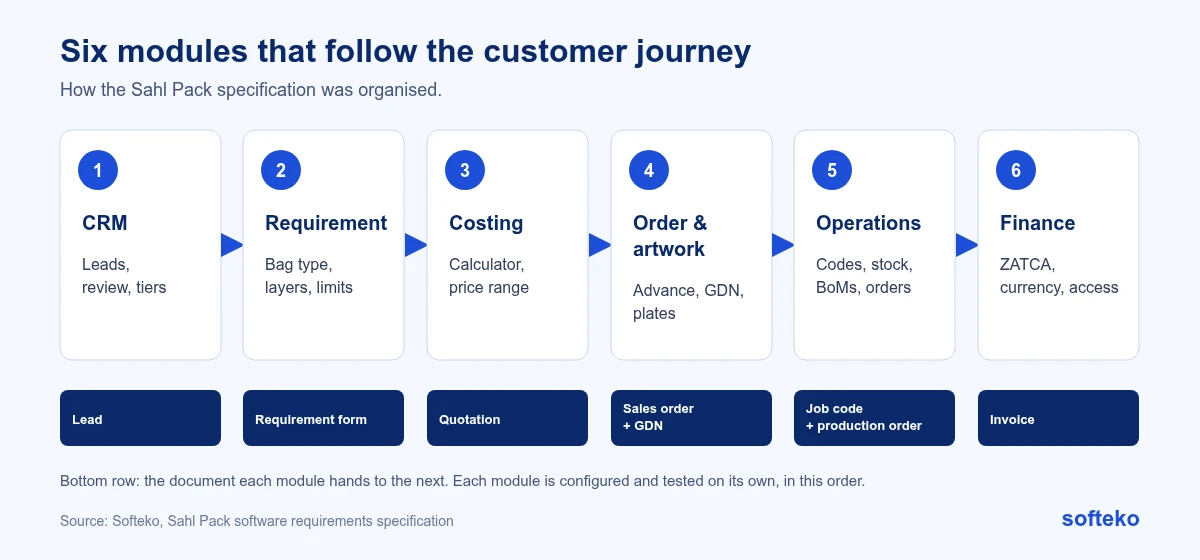
Splitting by the customer journey, rather than by Odoo app, has one practical benefit. Each module ends with a document the next team can check: a requirement form, a quotation, a sales order. If that document is wrong, the problem is found at the hand-over, not at the invoice.
Step 2: Use the client’s own diagrams
The client drew its process flows before we arrived: enquiry to sales order, design file to plate making, and a swimlane of the standard job. We used them as the starting point and recorded where the agreed flow later changed. For example, the artwork approval order was revised in a June 2026 meeting, and the specification records both the original diagram and the revised flow.
Step 3: Define who does what
Roles shape access rights and approvals, so we listed them early:
| Role | Main responsibilities |
|---|---|
| Sales manager and salespeople | Leads, requirement forms, quotations, parent job codes, follow-up after delivery |
| Senior management | High-complexity accounts and low-margin exceptions |
| Production and planning reviewers | Manual feasibility review, artwork approval |
| Planner | Item and job codes, purchase requests, production release, BoMs, wastage per job |
| Purchasing | Purchase orders with supplier, price and arrival dates |
| Store and warehouse | Goods receipts, material issue and return, transfers |
| Quality control | Incoming material and finished goods inspection |
| Production | Running jobs, logging output, returning unused material |
| Artwork (prepress) | Design files, plate maker coordination, customer approvals |
| Finance | Advance payment confirmation, cost centre inputs, e-invoicing |
| Administrator | Confidential cost inputs such as machine rates |
In Odoo 19: from the role table to access rights
Each row of the role table becomes a set of access rights. In Odoo 19, an administrator opens Settings › Users & Companies › Users [2], selects a user, and sets a level for each app on the Access Rights tab. For Sales, the levels are User: Own Documents Only, User: All Documents and Administrator [1].
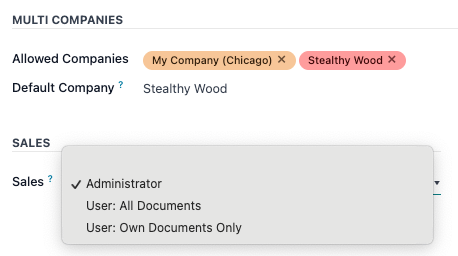
For example, a salesperson might get Own Documents Only, so they see their own quotations, and the sales manager All Documents. Rules that go further, such as hiding machine rates from sales, need extra groups and record rules. Those are set in developer mode, on the user’s Technical Access Rights tab [1]. Odoo warns that careless changes here can lock every user out of access settings, so test them on a copy of the database first [1].
Write the role table before anyone designs screens. It is much easier to hide a field that was planned as confidential than to remove one people have already seen.
Step 4: Write down what is not decided
Requirements meetings always leave gaps. Our rule is to record each gap as an open item with the requirement it affects, and to resolve it before that part is built. Some examples from the specification:
- The exact machine web-width limit was quoted differently in two meetings.
- The number and names of warehouse locations were not final.
- Whether standard Odoo Manufacturing fits the linked, multi-process production order, or needs customisation.
- Whether Odoo Maintenance fits impression-based plate life tracking.
- The final scope and timeline for the feasibility and costing calculators, which were the most complex parts.
While the calculators were being finalised, we used dummy data so the other modules were not blocked.
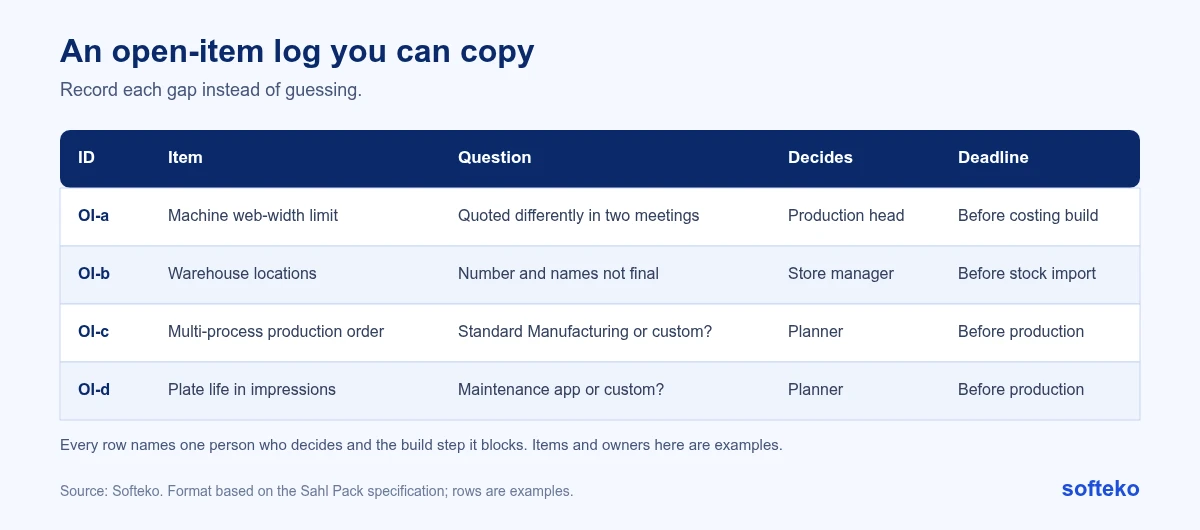
A log like this needs only five columns: an ID, the item, the question, who decides, and which build step it blocks. The deadline is not a date but a build step. That keeps the conversation on what the decision holds up, not on when someone promised to answer.
Step 5: Find the conflicts between departments
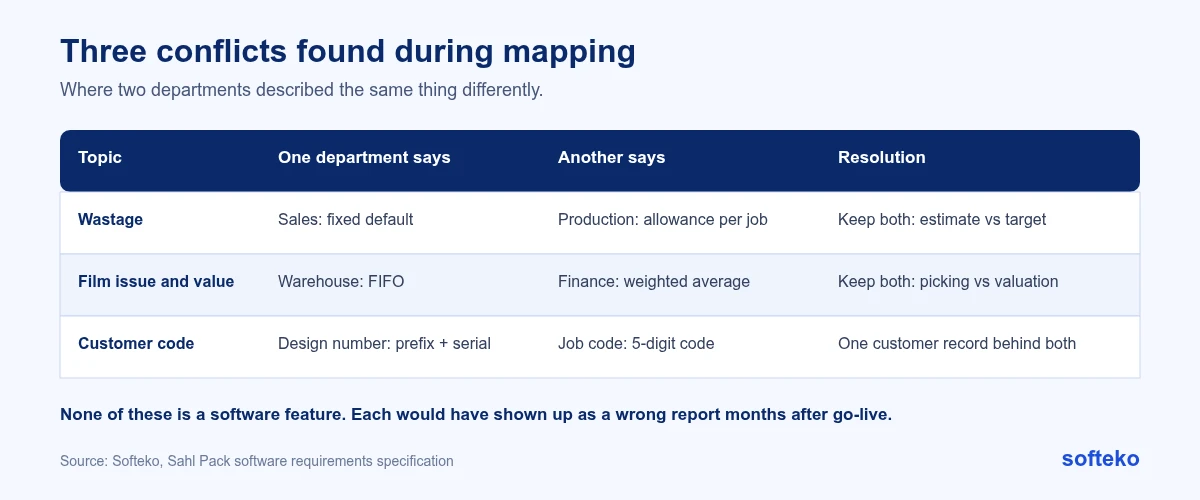
The most useful part of mapping is finding where two departments describe the same thing differently. Three examples:
- Wastage. Sales costing uses a fixed default. Production wants a different allowance for each job. Both are right: one is a quoting estimate, the other is a production target. The specification now says so.
- FIFO and average cost. The warehouse issues film first in, first out. Finance values stock at weighted average cost. In Odoo these are separate settings, one for picking and one for valuation, so both can apply.
- Customer codes. The design number uses a country prefix and a customer serial. The job code uses a five-digit customer code. We flagged that both must point to one customer record.
Each of these, if missed, would have surfaced as wrong reports months after go-live.
How to find them in your own plant: ask each department for the number it would quote for the same thing, such as wastage on a given job, then compare the answers. Where they differ, one of them is not wrong. They are usually measuring different things, and the system needs to hold both.
Step 6: Keep standard Odoo first
We planned about 60% standard Odoo, 30% configuration and 10% development. Development is kept for things standard Odoo does not do, such as the feasibility calculator, linked production orders and plate life tracking. Every custom feature has to be carried through future upgrades, so we only build where it is needed. See what Odoo covers as standard for how that split looks in practice.
The test we apply to each requirement is in this order:
- Can standard Odoo do it, perhaps with a change to how the team works?
- If not, can configuration do it: custom fields, views, approval rules, document layouts?
- Only then, does it need development?
What we would tell another packaging manufacturer
- Bring your real documents: quotes, job tickets, delivery notes, the costing spreadsheet. They show the data you actually use.
- Name one person who can decide each open item. Projects slow down when nobody owns a decision.
- Agree code formats for materials, designs, jobs and plates before importing anything.
- Decide who must not see costs and margins before you design screens.
- Expect your process to change during mapping. The artwork flow changed during ours.
We follow the same approach for traders; see how we plan an implementation for a trader.
FAQ
How long does requirements mapping take for a packaging plant?
For Sahl Pack, the meetings ran from May to August 2026, alongside building the first module. The time depends mostly on how quickly decisions are made.
Should we document processes before choosing an ERP?
Yes. A process map lets you compare vendors on your real workflows rather than on demos.
What slows down an implementation most?
In our experience, waiting for documents and for decisions. An open-item log with one named owner per decision keeps both visible.
How do we decide who sees costs and margins?
Write the role table first, then map each role to access rights in Odoo. Hiding specific cost fields from some roles needs extra groups and record rules [1].
Do we need a full specification before starting?
No. We started building the enquiry-to-order module while later modules were still being mapped.
Start with one real job
Pick a recent job and follow it from enquiry to invoice: every person, document and system it touched. That is the first page of your specification. Read more about our Odoo implementation service.
References
[1] Odoo, Access rights, Odoo 19.0 documentation. https://www.odoo.com/documentation/19.0/applications/general/users/access_rights.html
[2] Odoo, Users, Odoo 19.0 documentation. https://www.odoo.com/documentation/19.0/applications/general/users.html
[3] Screenshot: Odoo S.A., Odoo 19.0 documentation (Access rights), licensed under CC BY-SA 4.0 (https://creativecommons.org/licenses/by-sa/4.0/). https://www.odoo.com/documentation/19.0/