

Your trading business rarely decides to replace its existing systems because someone recommends new software. The decision usually comes after years of growth expose operational weaknesses that become too costly to ignore.
One warehouse becomes three. Suppliers increase from a few to hundreds. Sales expands into multiple countries. Procurement manages different currencies and shipping routes, while Finance struggles to calculate true order profitability. Meanwhile, Operations spends more time coordinating departments than moving products.
At first, spreadsheets, emails, and messaging apps seem enough. Experienced employees know where information is stored and who to contact when problems arise. Eventually, however, those workarounds stop scaling.
Sales promises inventory that is already committed. Procurement buys stock that exists in another warehouse. Finance discovers unexpected costs after shipments arrive. Management receives reports explaining last month’s performance instead of today’s operational reality.
These problems do not happen because your business is poorly managed. They happen because operational complexity grows faster than the systems controlling it.
That is when many companies begin searching for ERP software for trading businesses. Yet choosing the right ERP quickly becomes another challenge. Every vendor promises visibility, every demonstration looks polished, and every product claims to support growth.
The real question is not whether you need an ERP. It is how to evaluate one without making an expensive mistake.
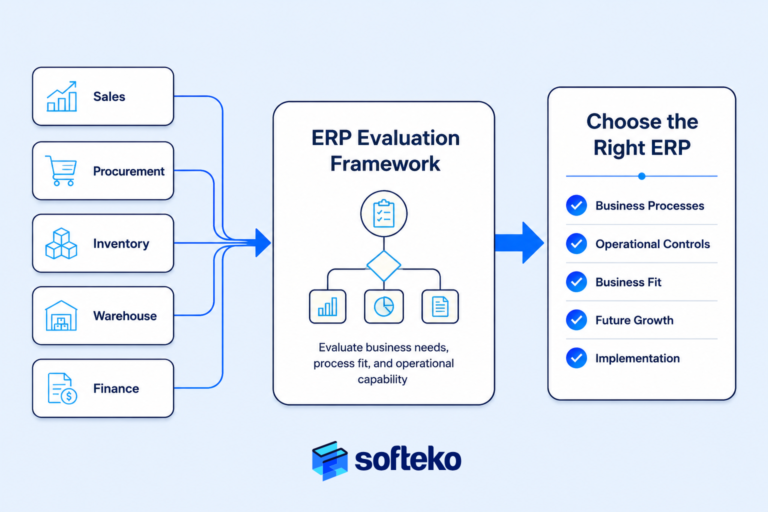
Experienced trading businesses look beyond feature lists and software demonstrations. Instead, they evaluate whether an ERP can support the way their business buys, sells, stores, ships, invoices, and controls information every day.
This guide explains how to evaluate ERP systems using operational requirements instead of marketing claims. You’ll learn when ERP becomes necessary, which capabilities matter most, how to compare solutions objectively, avoid costly selection mistakes, and determine whether Odoo fits your trading business.
Key takeaways
- Between 55–75% of ERP implementations fail to meet their original objectives, 68% overrun their timeline, and 62% of organisations cite data migration as their biggest challenge.[1] Your ERP selection is a high-stakes trading operations decision, not a software purchase.
- Furthermore, 70% of digital transformations fail because the organisation, not the software, is unprepared.[2] For your trading business, process discipline decides the outcome before the ERP is even installed.
- Research shows human factors matter 6× more than technical factors in ERP success,[3] and 62% of leaders name top management support as the single most critical success factor.[4]
- If you run disconnected systems for sales, procurement, inventory, and finance today, your employees are already paying an efficiency tax — they switch applications 1,200+ times a day, losing 9% of working time to context switching.[5]
- The fix is not the ERP with the longest feature list. Rather, it is the ERP that supports the way your trading business already needs to operate — mapped through a process-first evaluation and enforced through a disciplined implementation.
Why Growing Trading Businesses Eventually Need ERP Software
Your growing trading business will need ERP software for trading businesses when operational complexity becomes harder to manage than business growth itself. The warning signs rarely appear all at once. Instead, they emerge gradually as more customers, suppliers, warehouses, products, and employees create hundreds of daily decisions that depend on accurate information.
Adding more people rarely solves the problem. Without standardised workflows, every new employee also creates another source of manual coordination. Your business becomes increasingly dependent on individual knowledge instead of consistent processes.
An ERP should not be viewed as a reward for growth. Rather, it becomes necessary when you can no longer maintain operational control with disconnected systems.
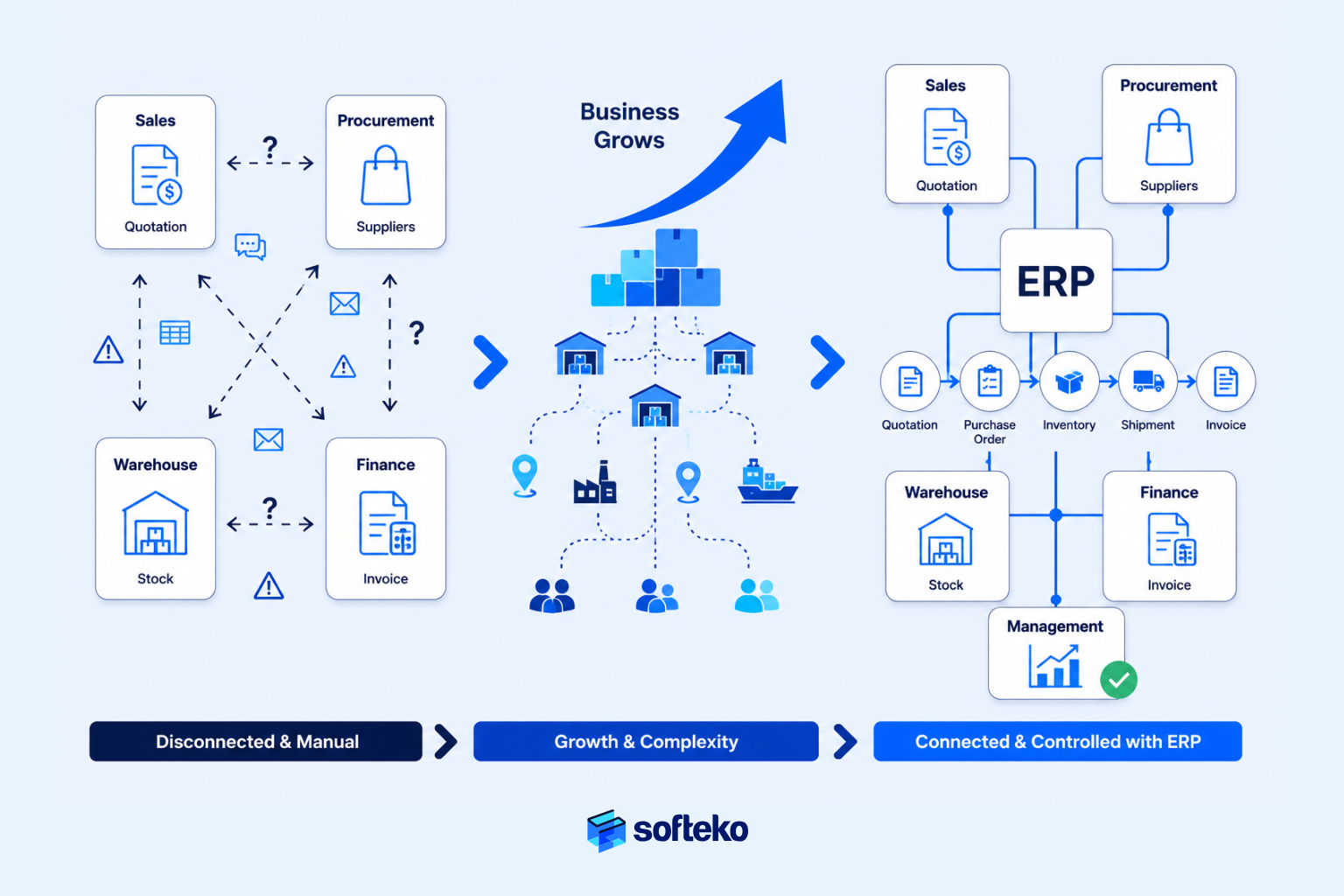
You outgrow manual systems when daily operations require multiple departments to work from the same information at the same time.
How Business Growth Makes Daily Operations Harder
Your trading company probably began with a simple workflow. A Sales Executive receives an inquiry. Procurement contacts suppliers. Finance approves the customer. The warehouse ships the order. Accounting issues the invoice.
When you handled a few transactions each day, your employees coordinated these activities through conversations, spreadsheets, and email. Problems were easy to identify because everyone knew every customer and every order.
Growth changes that environment completely.
You may now be sourcing products from multiple countries, serving different industries, operating several warehouses, and supporting customers with different payment terms and delivery requirements. Each department now depends on information created by another department.
- Sales cannot quote confidently without procurement costs.
- Procurement cannot purchase efficiently without demand visibility.
- Warehouse teams cannot plan capacity without confirmed orders.
- Finance cannot calculate profitability until every operational cost has been recorded.
You are no longer managing individual transactions. Instead, you are managing connected workflows. That shift is where many organisations begin experiencing delays, duplicate work, and inconsistent decisions — not because employees lack experience, but because information no longer moves through the business in a controlled way.
Manual Work Creates Costs That Reports Do Not Show
You notice the visible costs first. Late deliveries. Customer complaints. Inventory shortages. Delayed quotations. Those are symptoms. The larger cost is the amount of manual coordination happening behind the scenes.
Your employees spend hours asking questions that should already have answers:
- Has Procurement placed the purchase order?
- Which warehouse has available stock?
- Has Finance approved this customer’s credit?
- Which quotation contains the latest negotiated price?
- Has Logistics confirmed the shipment schedule?
Every conversation introduces another opportunity for delay or misunderstanding. Instead of executing work, your employees spend their time locating information.
Those costs rarely appear on financial statements, yet they reduce productivity every day. You may respond by hiring additional staff, but more people cannot solve a process that lacks standardised operational controls. This is precisely the pattern Harvard Business Review research has quantified — employees switch between applications 1,200+ times a day and lose about 9% of working time to context switching.[5]
Disconnected Systems Give Each Department Different Data
You probably operate with specialised tools for different departments today. Sales manages customer information in one application. Accounting maintains financial records in another. Inventory sits inside warehouse software. Procurement tracks supplier activity through spreadsheets. Management receives reports compiled manually at the end of each month.
Each system may perform its own function well. However, none of them shares the complete operational picture.
- A customer order affects inventory.
- Inventory affects procurement.
- Procurement affects landed cost.
- Landed cost affects profitability.
- Profitability affects financial reporting.
When you manage these activities independently, every department develops its own version of reality. Sales believes inventory is available. Warehouse reports different stock levels. Finance calculates a different product cost. Consequently, management spends valuable time determining which report is correct instead of deciding what action to take.
An ERP does not eliminate departmental responsibilities. Rather, it creates one operational environment where every department works from the same business data, reducing conflicting information and improving decision quality.
Business Example: When Growth Outpaces Operational Control
Consider a distributor supplying industrial chemicals across several GCC countries. The company started with one warehouse and a small customer base. Sales Executives managed quotations manually, Procurement maintained supplier prices in spreadsheets, and Finance tracked receivables separately.
As demand increased, the business expanded into multiple warehouses and imported products from different suppliers. Soon, new operational problems appeared. Sales quoted prices using outdated supplier costs. Procurement purchased products already available in another warehouse. Finance discovered additional freight and customs costs only after shipments were completed. Management needed several days to prepare a profitability report for a single product category.
None of these issues resulted from poor employee performance. Each department completed its own responsibilities. The real problem was the absence of standardised operational controls connecting every stage of the trading process.
Instead of improving one department at a time, the company redesigned the entire order-to-cash and procure-to-pay workflow. Every transaction followed the same controlled process, every department worked from shared information, and management gained real-time visibility into commercial performance. The improvement came from establishing consistent business controls first. The ERP then enforced those controls across every department.
Research Shows Integrated Operations Improve Business Performance
This pattern is reflected in independent research. The APQC Process Classification Framework (PCF) v7.4 organises 1,000+ business processes across 13 enterprise categories — providing you with a common language for process management, benchmarking, and ERP alignment before you begin evaluating vendors.[6]
McKinsey has found that companies creating end-to-end process visibility make faster operational decisions because leaders spend less time reconciling conflicting information and more time managing exceptions.[2]
The lesson is straightforward. You rarely struggle because your employees work harder than before. You struggle because business processes become more interconnected than the systems you have were designed to support. That is the point where ERP stops being an IT investment and becomes an operational management decision.
When Is the Right Time to Invest in ERP Software for a Trading Business?
The right time to invest in ERP software for trading businesses is not when your operations have already become unmanageable. It is when manual coordination starts limiting growth, increasing business risk, or reducing management visibility. Waiting too long usually makes implementation more difficult because more processes, more data, and more employees have become dependent on disconnected systems.
Many business owners ask the wrong question. Instead of asking, “When should we buy an ERP?”, they ask, “Can we continue with our current system for another year?” Those are different questions — the first focuses on future operational capability; the second focuses on delaying change.
You should evaluate ERP before manual processes begin slowing sales, procurement, inventory, finance, and decision-making across your business.
Revenue Does Not Tell You When You Need ERP
Many organisations assume ERP decisions should be based on annual revenue. In reality, operational complexity is a much stronger indicator.
Your business with USD 8 million in annual revenue may require ERP if it operates across multiple countries, manages thousands of SKUs, imports products through different ports, and serves customers with varying payment terms. Another company generating USD 40 million may continue operating effectively with simpler systems because it sells a smaller product range through a single warehouse.
Several factors increase operational complexity:
- Multiple warehouses
- International sourcing
- Large product catalogues
- Different Incoterms and shipping routes
- Multi-currency purchasing and sales
- Complex pricing agreements
- Credit sales
- Multiple legal entities
- Growing employee count across departments
Each additional variable increases the number of business decisions that depend on accurate, shared information. Eventually, spreadsheets become coordination tools instead of analysis tools. That is usually your turning point.
Five Signs Manual Processes No Longer Work for Your Business
Most trading companies experience similar warning signs before deciding to evaluate ERP.
1. Your employees spend more time finding information than using it. Sales asks Procurement for supplier prices. Procurement asks Finance whether the customer has available credit. Warehouse staff confirm stock manually. Management requests reports that require several departments to combine spreadsheets. When your employees become information coordinators instead of business operators, operational efficiency begins to decline.
2. Different departments report different numbers. Sales reports available inventory. Warehouse reports something different. Finance calculates another product cost. Procurement works from a different supplier price list. When you spend meetings debating whose report is correct, you have a visibility problem rather than a reporting problem.
3. Your business depends on a few experienced employees. Everyone knows who to call, which spreadsheet contains the latest prices, and who remembers the supplier’s actual lead time. That approach works until those employees are unavailable, leave the organisation, or simply become overloaded. Healthy businesses rely on standardised processes. Unhealthy ones rely on individual memory.
4. Management learns about problems too late. A shipment delay. A pricing error. An unexpected landed cost. A customer exceeding their credit limit. A warehouse stock shortage. None of these should become surprises. Good operational control identifies exceptions while there is still time to act; poor control explains them after the financial impact has already occurred.
5. Growth requires hiring more coordinators instead of increasing productivity. You respond to growth by hiring additional Sales coordinators, Inventory Controllers, Procurement assistants, and administrative staff. Headcount increases. Manual work increases. Coordination increases. However, productivity remains largely unchanged. That is often a sign that you are scaling manual administration rather than improving operational processes.
Use This Checklist to Assess ERP Readiness
Instead of asking whether your company is “big enough” for ERP, evaluate whether your operations require greater control.
| Business situation | Manual systems still work | ERP evaluation should begin |
|---|---|---|
| One warehouse with simple inventory | ✓ | |
| Multiple warehouses | ✓ | |
| Imports from several suppliers | ✓ | |
| Multi-currency purchasing | ✓ | |
| Hundreds or thousands of SKUs | ✓ | |
| Cross-department approval workflows | ✓ | |
| Sales, procurement, inventory, and finance use separate systems | ✓ | |
| Management needs real-time operational reporting | ✓ |
The more items that fall into the second column, the stronger your business case for ERP becomes. Notably, none of these indicators mention software features. They focus entirely on business operations. That is exactly how experienced organisations evaluate readiness.
Business Example: Growth Changed the Business Faster Than the Processes
Consider a wholesale distributor that expanded from serving one country to operating across the GCC. Sales volumes increased steadily. New warehouses opened. Procurement established relationships with suppliers across several regions. Finance introduced different customer credit policies. Individually, every decision supported growth. Collectively, they created a more complex business than the original operating model could support.
The company continued using spreadsheets because each department believed its own process still worked. Sales maintained quotations. Procurement tracked supplier prices. Warehouse monitored inventory. Finance managed receivables. No single process appeared broken.
The problem only became visible when departments needed to work together. Customer quotations were delayed because Procurement needed updated costs. Purchase decisions ignored available stock in another warehouse. Management waited until month-end to understand profitability.
The business had not outgrown its employees. It had outgrown its operating model. Recognising that distinction helped leadership focus on redesigning workflows before selecting an ERP system.
Why Businesses Choose the Wrong ERP
Many ERP projects struggle long before the implementation team starts configuring the system. The problem is rarely the software itself. Rather, it begins much earlier, during the evaluation.
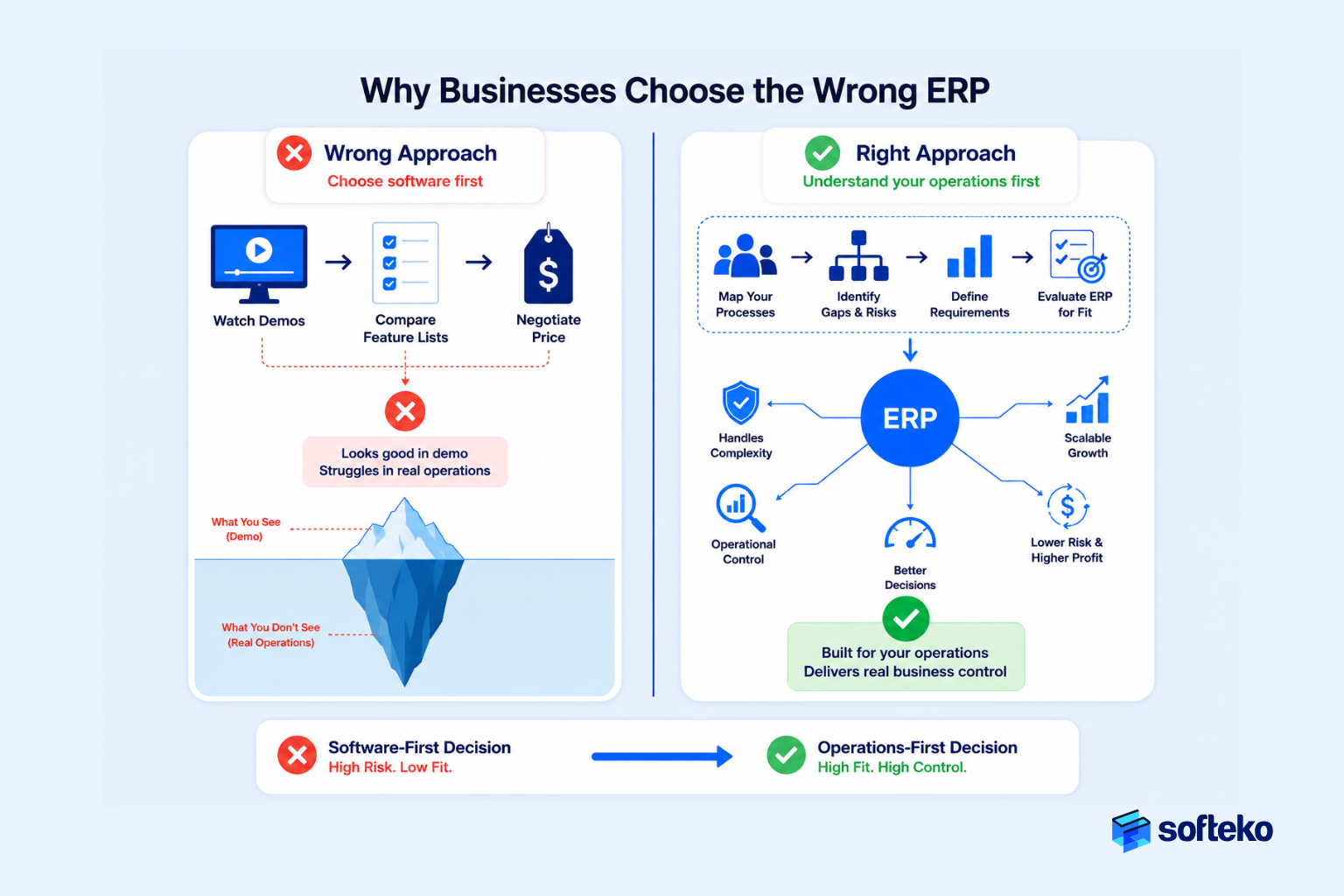
You often compare ERP systems by watching demonstrations, reviewing feature lists, or negotiating prices. Those activities are part of the buying process, but they should not be the starting point. An experienced trading business evaluates its own operations first. Only then does it evaluate software.
Most ERP selection mistakes happen because you compare software features instead of comparing how well each system supports your operational workflows.
Many Businesses Buy the Best Demonstration Instead of the Best Operational Fit
ERP demonstrations are designed to present software under ideal conditions. The data is clean. The workflows are predefined. Approvals happen instantly. Reports appear with a few clicks.
However, your trading operations rarely look like that. Customer requirements change after quotations are issued. Supplier prices fluctuate. Containers arrive late. Purchase orders are revised. Credit approvals take longer than expected. Landed costs increase after freight invoices are received.
The real question is not whether an ERP can demonstrate these processes. It is whether the system can control them when your daily operations become unpredictable. A successful ERP evaluation focuses less on what the software can show and more on what your business needs to control.
Feature Lists Rarely Explain Operational Capability
Many ERP comparisons look like this:
| Module | ERP A | ERP B |
|---|---|---|
| Sales | ✓ | ✓ |
| Purchase | ✓ | ✓ |
| Inventory | ✓ | ✓ |
| Accounting | ✓ | ✓ |
| CRM | ✓ | ✓ |
Almost every modern ERP offers these modules. Consequently, feature checklists do not help you understand how your business will actually operate. A better evaluation asks operational questions instead.
| Operational requirement | Why it matters for your trading business |
|---|---|
| Can Sales check real inventory before confirming delivery? | Prevents over-promising customers |
| Can Procurement purchase from approved suppliers only? | Improves supplier governance |
| Can landed costs update product profitability automatically? | Supports accurate pricing decisions |
| Can customer credit policies block risky orders? | Reduces financial exposure |
| Can management trace every order from inquiry to payment? | Improves accountability and visibility |
Notice the difference. Your discussion has shifted from software modules to business outcomes. That is how experienced implementation teams evaluate ERP suitability.
Every Trading Business Has Different Operational Priorities
No two trading companies operate in exactly the same way.
An importer focuses heavily on international procurement, customs documentation, and landed cost accuracy. A wholesale distributor may prioritise warehouse operations, inventory availability, and order fulfilment speed. A multi-country trading company may require strong intercompany workflows and consolidated financial reporting.
If you evaluate ERP without understanding your priorities, you often end up with unnecessary complexity. Some businesses purchase advanced capabilities they never use. Others overlook operational controls they eventually need. The objective is not to buy the ERP with the most features. Instead, it is to select the ERP that best supports the way your business operates today while allowing it to grow tomorrow.
Business Example: Two Companies Evaluate ERP Very Differently
Consider two trading businesses with similar annual revenue.
The first company creates a vendor scorecard comparing software features. It counts the number of available modules, dashboards, and reports.
The second company documents its operational workflows before contacting vendors. The management team maps every major process — customer inquiry, quotation approval, procurement, inventory allocation, shipment execution, invoicing, and collection. For each workflow, they identify three questions:
- Where do delays occur?
- Where do manual approvals create bottlenecks?
- Where does management lose visibility?
Only after answering those questions do they begin evaluating ERP systems.
Both companies purchase software. Only one purchases software that fits its business. The difference is not technical knowledge — it is evaluation discipline.
Use Your Current Workflow to Evaluate ERP
One of the most effective ways to evaluate ERP is to document how work currently moves through your business.
For each major process, identify:
- Who starts the process?
- Which department receives the work next?
- What information is required?
- What approvals are mandatory?
- What documents are created?
- What exceptions occur most often?
- How does the process end?
Once that workflow is visible, another question becomes much easier to answer: Can the ERP support this operational control? Instead of asking whether an ERP includes a purchase module, you ask whether it can enforce supplier approval rules, instead of asking whether it has inventory management, you ask whether it can reserve stock accurately across multiple warehouses. Again, instead of asking whether it includes accounting, you ask whether Finance can see commercial activity before month-end.
Those questions produce far better implementation outcomes because they reflect how your business actually operates.
Research Supports a Process-First ERP Evaluation
Implementation research consistently reaches the same conclusion. Organisations that define business processes before selecting technology achieve stronger implementation outcomes than organisations that begin with software demonstrations. The APQC Process Classification Framework exists precisely for this reason — a global standard of 1,000+ processes that you can use to map your trading workflows independently of any vendor.[6]
The reason is straightforward. Software should support an operating model. It should not define one. Experienced implementation teams therefore spend significant time documenting workflows, responsibilities, approval rules, reporting requirements, and operational controls before configuring the ERP. That same principle should guide your buying decision. Choose the business process first. Choose the software second.
Which Operational Capabilities Matter Most When Choosing ERP Software?
The most important capabilities in ERP software for trading businesses are not the longest feature lists or the most attractive dashboards. Rather, they are the operational controls that help your business execute its core workflows consistently, regardless of who performs the work.
Your trading company does not become more profitable because it owns an Inventory module or an Accounting module. It becomes more profitable because inventory is accurate, procurement follows approved policies, customer orders move without unnecessary delays, and management can identify problems before they become financial losses. Those outcomes come from operational capability, not software functionality.
Evaluate ERP based on how well it supports your business workflows — not how many modules or features it includes.
Start With Your Core Trading Business Processes
Every trading business depends on a small number of operational processes:
- Customer inquiry and quotation
- Customer order processing
- Procurement and supplier management
- Inventory management
- Warehouse operations
- Shipment execution
- Financial management
- Management reporting
The ERP should support these workflows as connected processes rather than isolated departmental activities. For example, confirming a customer order should automatically influence inventory availability, procurement planning, shipment scheduling, and financial forecasting. If each department still has to update its own spreadsheet after completing a task, the ERP has not eliminated the underlying coordination problem.
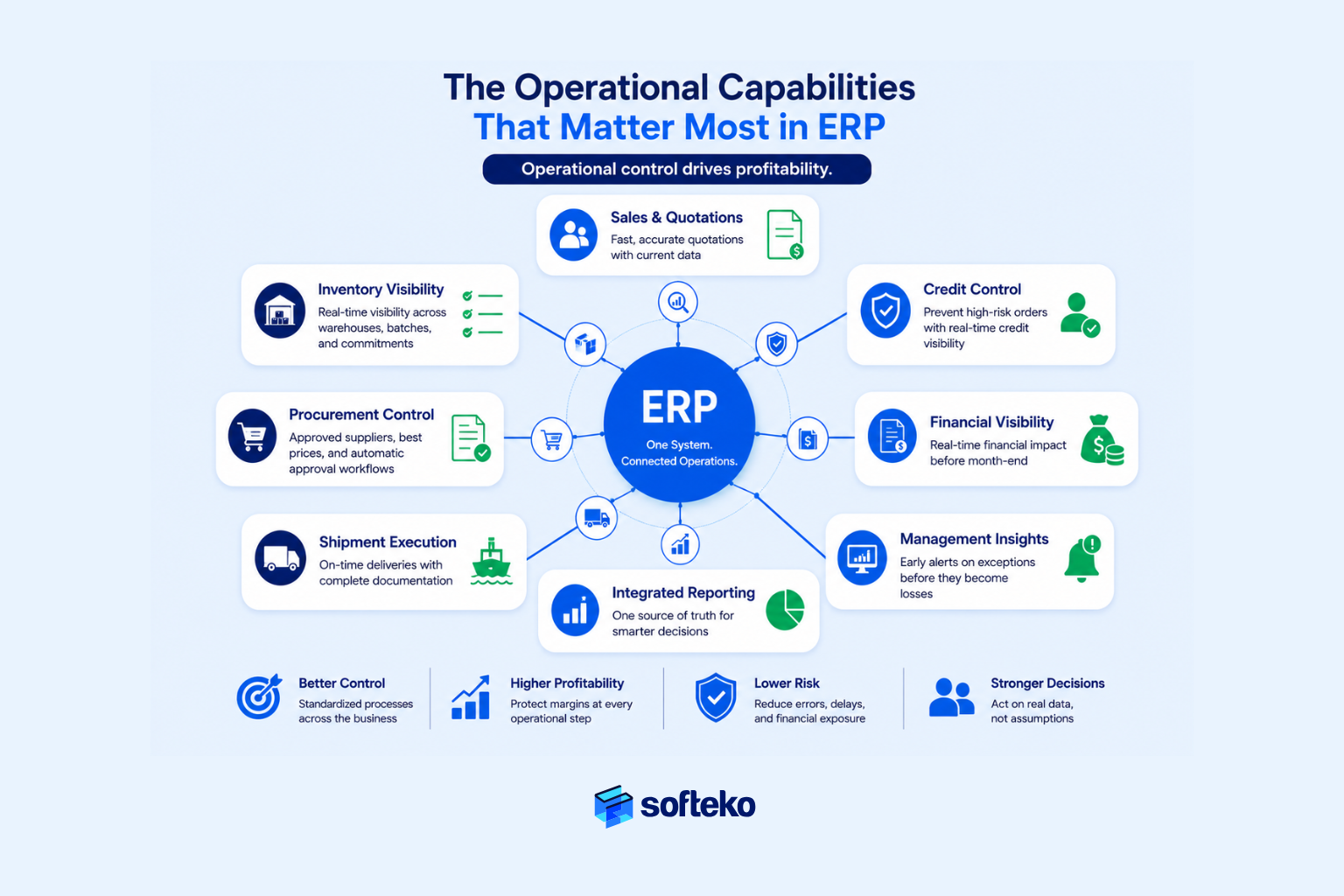
Choose ERP That Gives Real-Time Inventory Visibility
Almost every ERP can record inventory quantities. That alone is not enough.
Your trading business needs operational visibility. Your management should know:
- What inventory is currently available
- What inventory has already been committed to customer orders
- What inventory is expected through incoming shipments
- Which warehouse holds the stock
- Which batches expire first
- Which products are becoming slow-moving
Without this visibility, your inventory decisions become reactive. Sales promises unavailable stock. Procurement purchases products that already exist elsewhere. Warehouse teams spend unnecessary time locating materials.
An effective ERP establishes a single inventory view across your business. Instead of asking multiple departments where stock might be, everyone works from the same operational data. This matters because independent research shows average inventory accuracy is only 83%, while world-class organisations reach 95%.[7] For your trading business, closing that 12-point gap directly reduces stockouts, emergency purchases, and safety-stock overhang.
Choose Procurement Controls That Protect Profit Margins
Many organisations evaluate procurement based on whether the ERP can generate purchase orders. That is only a small part of procurement. The real objective is protecting your commercial margins.
A strong procurement workflow should help you answer questions such as:
- Are we purchasing from an approved supplier?
- Is this supplier offering the best available price?
- Does this purchase meet approval thresholds?
- How will freight affect landed cost?
- Will this purchase reduce expected profitability?
These controls reduce your financial risk before money is committed. For instance, trading businesses often require approval workflows based on purchase value or margin thresholds, supplier validation before procurement, freight cost estimation, and landed cost updates that reflect actual logistics expenses rather than estimates. Those controls protect profitability throughout the purchasing process rather than simply documenting transactions.
Sales Should Work With Current Business Information
Sales performance depends on speed. Profitability depends on accuracy. Good ERP systems help you balance both.
Before issuing a quotation, your Sales Executive should have visibility into:
- Current supplier pricing
- Available inventory
- Customer credit status
- Delivery capability
- Quotation history
- Product profitability
Without that information, quotations become assumptions rather than informed business decisions. This is particularly important for your trading company because quotations often lead directly to procurement commitments and shipment planning. The objective is not simply issuing quotations faster. Rather, it is issuing quotations that your business can actually fulfil profitably.
Help Finance See Operations Before Month-End
Your Finance department often receives information after operational decisions have already been made. Purchase orders have been issued. Goods have been shipped. Invoices have been prepared. Only then does Finance begin recording the financial impact. That approach limits proactive decision-making.
An ERP should give your Finance team visibility throughout the operational lifecycle:
- Customer credit exposure before order confirmation
- Expected landed costs before shipments arrive
- Outstanding supplier commitments
- Cash requirements for future purchases
- Gross margin during order execution
Instead of explaining financial performance after the month ends, Finance can help influence decisions while transactions are still in progress. That shift improves both operational control and financial governance.
Show Management Problems Before They Become Losses
Many ERP demonstrations emphasise the number of available reports. In practice, executives rarely need hundreds of reports. You need timely visibility into exceptions:
- Orders delayed beyond committed delivery dates
- Inventory below reorder levels
- Customers exceeding approved credit limits
- Shipments missing required documents
- Purchases awaiting approval
- Margins below company policy
- Supplier delivery performance declining
When you receive these operational signals early, corrective action becomes possible before customer service or profitability is affected. The ERP therefore becomes your business monitoring system rather than a reporting tool.
Compare ERP Systems by Operational Capability
Instead of comparing software features, compare operational capabilities.
| Operational requirement | Business value | Questions to ask during evaluation |
|---|---|---|
| End-to-end order visibility | Faster customer service | Can every department track the same order in real time? |
| Multi-warehouse inventory control | Better stock utilisation | Can inventory be viewed accurately across all locations? |
| Procurement approval workflows | Margin protection | Can purchasing rules be enforced automatically? |
| Landed cost management | Accurate profitability | Are actual logistics costs reflected in product margins? |
| Credit control | Reduced financial risk | Can high-risk orders be stopped before shipment? |
| Integrated financial visibility | Better decision-making | Can Finance monitor operational activity before month-end? |
| Executive dashboards | Faster management action | Does the system highlight business exceptions instead of generating static reports? |
Notice that every requirement begins with a business outcome. The software capability is only valuable because it supports that outcome.
Business Example: Evaluating Capability Instead of Features
A multi-warehouse importer narrowed its ERP selection to two vendors. Both products included inventory, purchasing, sales, accounting, and reporting modules. On paper, they appeared almost identical.
Instead of comparing feature checklists, the evaluation team tested one operational scenario. A customer changed the order quantity after the quotation had been approved. They observed how each ERP handled the change:
- Could inventory availability be recalculated automatically?
- Would Procurement receive updated purchasing requirements?
- Would landed cost estimates change?
- Would Finance see the impact on projected margin?
- Would management be notified if approvals were required again?
One ERP handled the entire workflow within a controlled process. The other required multiple manual updates across departments. That single business scenario revealed more than an entire feature comparison spreadsheet.
A Practical Framework for Evaluating ERP Software for Trading Businesses
Choosing ERP software for trading businesses becomes much easier when you evaluate every vendor against the same business criteria. Without a structured approach, discussions often become subjective — one manager prefers the interface, another prefers the reporting dashboard, Finance focuses on accounting, Warehouse focuses on inventory. The result is a collection of individual opinions rather than a business decision.
Experienced organisations avoid this by evaluating every ERP against the same operational criteria. The objective is not to identify the software with the most features. Rather, it is to identify the system that best supports the way your business operates and the way you expect to grow.
A good ERP evaluation measures how well the software supports your operational workflows, business controls, scalability, and long-term adoption — not how impressive the demonstration looks.
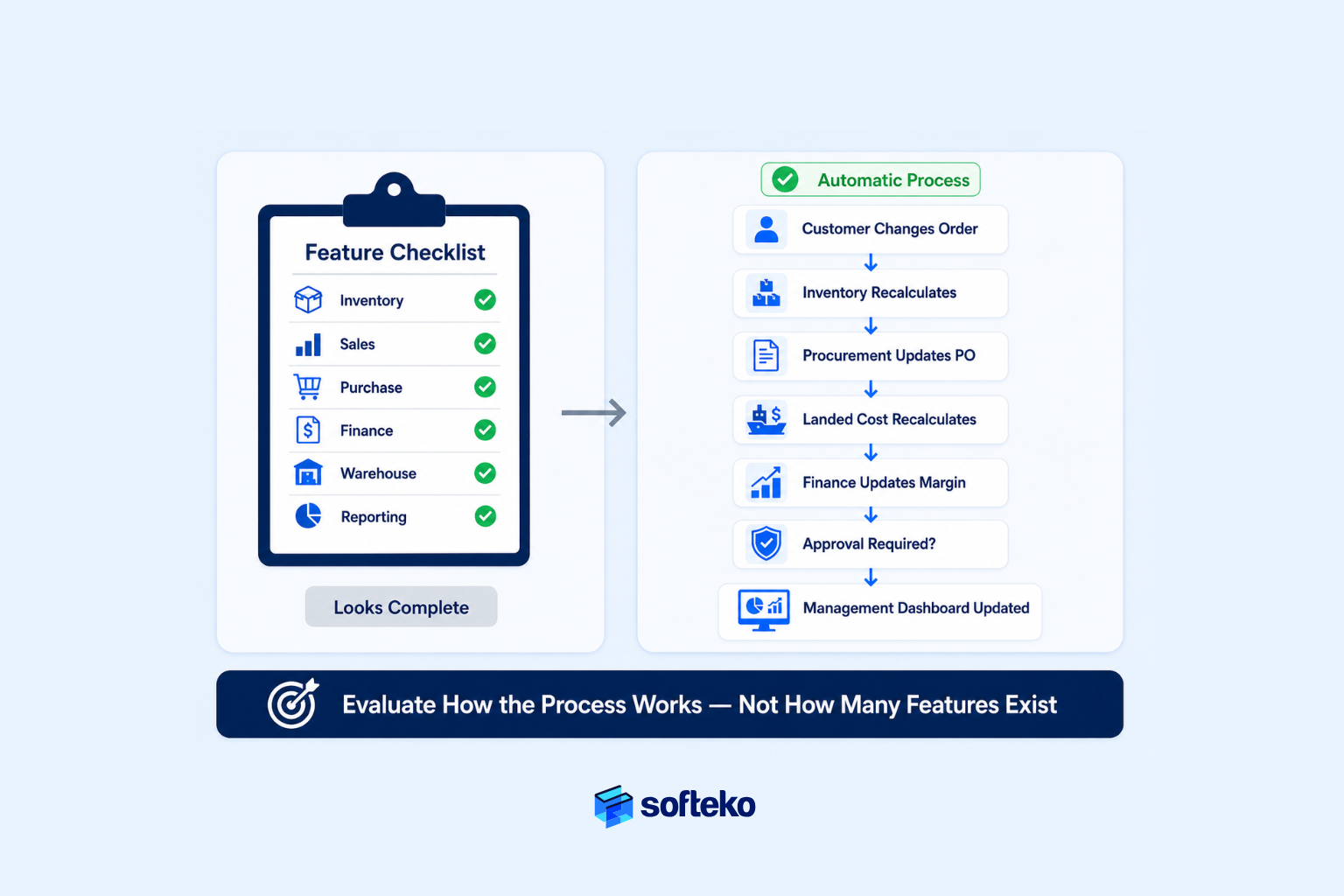
Step 1: Document How Your Business Actually Operates
Before comparing vendors, document your current operating model. You may skip this step because you believe you already understand your own processes. Usually, you understand departments. However, you do not fully understand the connections between departments.
Start by mapping your major business workflows:
- Customer Inquiry → Quotation
- Quotation → Customer Purchase Order
- Customer Order → Procurement
- Procurement → Shipment
- Shipment → Warehouse
- Warehouse → Customer Delivery
- Delivery → Invoice
- Invoice → Collection
Then identify where information changes hands. Ask questions such as:
- Who owns each stage?
- What approvals are required?
- Which documents are created?
- Which departments participate?
- Where do delays usually occur?
- Which activities still depend on spreadsheets?
This process map becomes your evaluation document. Instead of asking vendors generic questions, you can ask them to demonstrate your actual workflows.
Step 2: Identify the Operational Controls Your Business Cannot Operate Without
Every trading business has non-negotiable controls. These controls vary by industry but typically include:
| Operational area | Critical business control |
|---|---|
| Sales | Customer credit validation before order confirmation |
| Procurement | Supplier approval before purchase |
| Inventory | Real-time stock visibility |
| Warehouse | Controlled inventory movements |
| Logistics | Shipment and document tracking |
| Finance | Accurate landed cost and profitability |
| Management | Real-time operational dashboards |
Notice that none of these describe software features. Rather, they describe business rules. Your ERP should enforce these rules consistently regardless of which employee performs the work. That consistency is what creates operational discipline.
Step 3: Evaluate Complete Business Scenarios Instead of Individual Features
One of the most effective evaluation methods is scenario-based testing. Instead of asking “Does your ERP support purchasing?”, ask the vendor to demonstrate an actual trading workflow.
For example: a customer requests 500 MT of product under CIF terms. Sales prepares a quotation. Procurement receives updated supplier pricing. Finance checks customer credit. The customer confirms the order. Procurement issues a supplier PO. Freight costs increase before shipment. The shipment arrives late. Landed cost changes. Finance needs updated margin. Management wants to know whether profitability is still acceptable.
Now observe the system. Does information flow automatically? Do approvals trigger correctly? Can every department see the same transaction? How many manual updates are required? This exercise reveals far more about operational capability than a feature checklist ever will.
Step 4: Evaluate Scalability, Not Just Current Requirements
Many ERP decisions fail because businesses buy software that matches today’s operation rather than tomorrow’s. Ask yourself:
- Will we open additional warehouses?
- Will we expand into new countries?
- Will product volume increase?
- Will supplier relationships become more complex?
- Will we operate multiple legal entities?
- Will reporting requirements become more demanding?
If the answer is yes, evaluate whether the ERP can support those changes without requiring another major system replacement. Growth should require configuration. It should not require rebuilding your business system.
Step 5: Evaluate Adoption Before Technology
Even the most capable ERP fails if your employees do not use it consistently. During evaluation, ask practical questions:
- Can Warehouse staff complete daily work without unnecessary clicks?
- Can Sales prepare quotations efficiently?
- Can Finance review approvals quickly?
- Can management access information without requesting reports from multiple departments?
A technically powerful ERP with poor usability often creates workarounds. Your employees return to spreadsheets. Departments create unofficial reports. Information becomes fragmented again. This matters because Prosci research shows human factors matter 6× more than technical factors in ERP success.[3] Adoption is not a small consideration — it is where ROI is realised or lost.
ERP Evaluation Scorecard
The following scorecard can help your management team compare vendors objectively.
| Evaluation category | Weight | Vendor A | Vendor B | Vendor C |
|---|---|---|---|---|
| Operational workflow support | 25% | |||
| Inventory & warehouse control | 15% | |||
| Procurement & landed cost management | 15% | |||
| Financial visibility | 15% | |||
| Reporting & management dashboards | 10% | |||
| Scalability | 10% | |||
| Ease of adoption | 5% | |||
| Implementation partner capability | 5% |
This scorecard encourages objective discussion. Instead of saying “I like this ERP more,” your team begins asking “Which ERP supports our operational requirements more effectively?” That is a much stronger basis for an investment decision.
Business Example: One Workflow Exposed the Right ERP
A regional importer invited three ERP vendors for demonstrations. Each vendor prepared polished presentations. Each claimed to support procurement, inventory, finance, and reporting.
Rather than evaluating the presentations, the management team prepared one operational scenario. A shipment arrived with higher freight charges than originally estimated. Management wanted to know:
- Would landed cost update automatically?
- Would product profitability change immediately?
- Would Finance see the revised margin?
- Would future quotations reflect the updated cost?
- Would management receive an exception if profitability dropped below policy?
The first vendor required several manual adjustments. The second required custom development. The third completed the entire process through the standard workflow. That demonstration answered the business question the feature comparison never could. The winning ERP was not selected because it looked better. It was selected because it controlled a real business process more effectively.
How Should You Compare Different Types of ERP Systems?
There is no single ERP that is right for every trading business. The best choice depends on how well the system supports your operational model, growth plans, and management requirements.
This is where many ERP evaluations become confusing. One vendor promotes industry specialisation. Another emphasises customisation. A third focuses on cloud deployment. A fourth competes primarily on price. Comparing these systems without a consistent framework often leads to decisions based on marketing rather than business needs.
Compare ERP systems based on operational fit, flexibility, implementation approach, and long-term business value — not vendor popularity or feature count.
Understand the Main ERP Categories Before Comparing Vendors
Most ERP systems fall into one of four broad categories. Each has strengths and limitations.
| ERP category | Best suited for | Typical limitation |
|---|---|---|
| Industry-specific ERP | Businesses with highly specialised processes | Less flexibility outside the target industry |
| Traditional enterprise ERP | Very large organisations with complex governance | Higher implementation cost and longer projects |
| Modern modular ERP | Growing companies needing flexibility and phased implementation | May require configuration to match industry workflows |
| Custom-built business systems | Companies with unique operational requirements | Higher maintenance cost and dependence on developers |
No category is automatically better. The question is whether the system aligns with your business model. A wholesale distributor with three warehouses has different requirements from a multinational commodity trader operating across several legal entities. Understanding those differences prevents you from paying for unnecessary complexity — or purchasing a system you quickly outgrow.
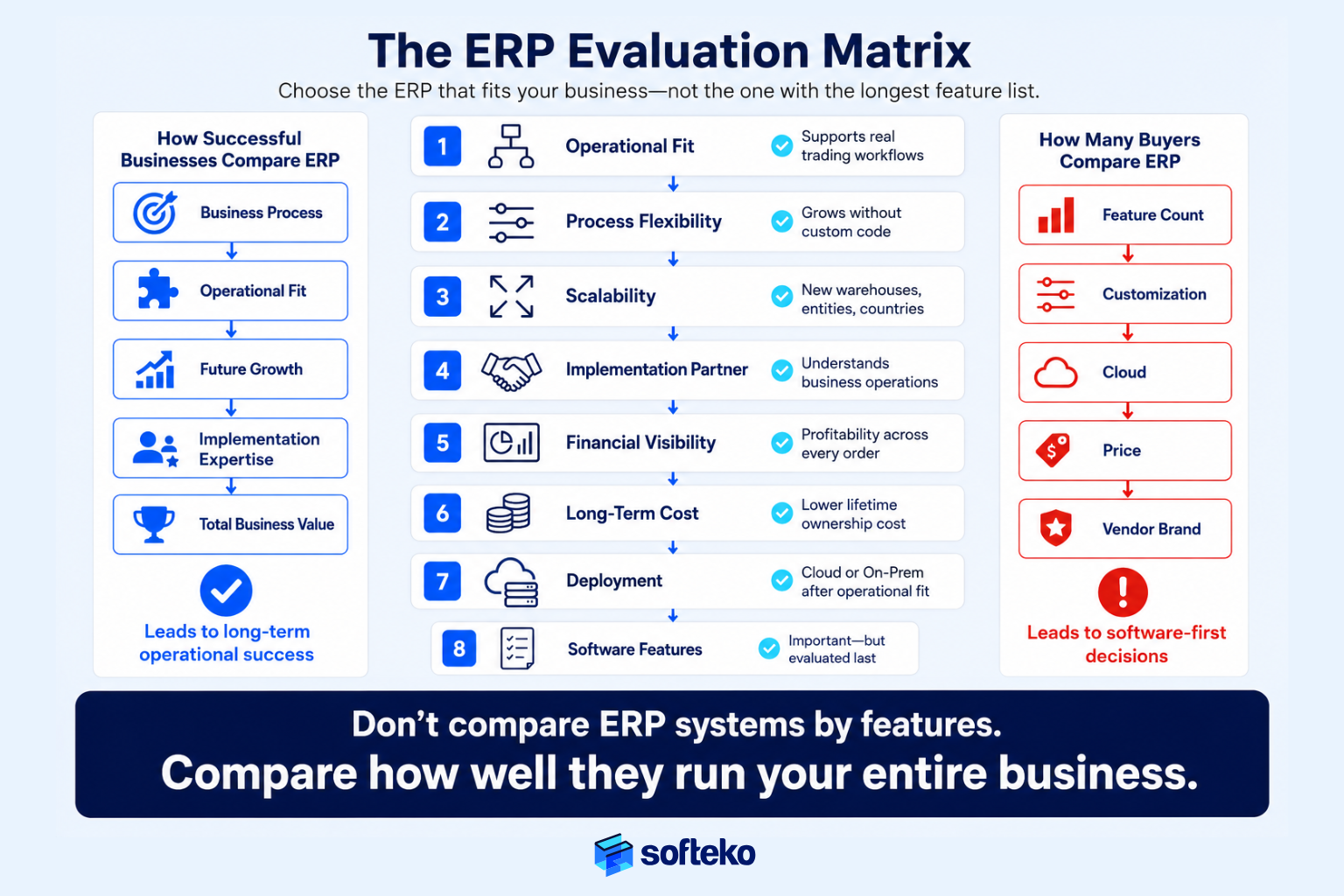
Compare Operational Flexibility Instead of Customization
One of the first questions many buyers ask is: “Can this ERP be customised?” Almost every ERP can. The more important question is: “How much customisation will we actually need?”
Heavy customisation often creates long-term challenges. Future upgrades become more difficult. Implementation takes longer. Support costs increase. Business processes become dependent on custom code rather than standard workflows. In fact, academic research shows projects with more than 20% customisation are 64% more likely to experience significant delays, with total cost increases of 200–400% for extensive changes.[8]
Instead, evaluate how much flexibility exists through standard configuration. Ask questions such as:
- Can approval workflows be configured without programming?
- Can new warehouses be added through system configuration?
- Can reporting dashboards be modified by business users?
- Can user roles change as the organisation grows?
- Can new product categories and pricing policies be introduced without redevelopment?
The more operational flexibility available through configuration, the easier the ERP will be to maintain over time.
Choose the Right Deployment After You Choose the Right ERP
Many ERP discussions begin with deployment. Cloud or on-premises? While deployment is important, it should not be your primary selection criterion. A poorly designed operational workflow remains inefficient regardless of where the software is hosted.
Instead, evaluate deployment after confirming that the ERP supports your business processes. Once operational fit has been established, consider factors such as:
- IT infrastructure requirements
- Security policies
- Regulatory obligations
- Remote accessibility
- Disaster recovery expectations
- Internal technical resources
For many growing trading businesses, cloud deployment reduces infrastructure management and simplifies access across multiple offices and warehouses. However, deployment should support your operational strategy — not replace it.
Choose the Right Implementation Partner
Two companies can implement the same ERP and achieve completely different results. The difference often lies with the implementation partner.
An experienced implementation partner spends time understanding your business before configuring the system. They ask questions such as:
- How does your quotation process work?
- Which approvals are mandatory?
- Where do delays occur?
- Which reports drive management decisions?
- What operational controls already exist?
- Which processes should be standardised?
A less experienced partner may begin configuring modules immediately. The software may still function. However, the business processes may not. For your trading business, implementation experience within procurement, inventory, logistics, finance, and multi-department operations is often more valuable than technical knowledge alone.
Evaluate the Total Cost of Ownership—Not Just the Purchase Price
The software license is only one part of your investment. Your management team should also evaluate:
- Implementation services
- Process redesign
- Data migration
- Employee training
- Change management
- Future support
- System upgrades
- Additional users
- Custom development
- Ongoing maintenance
A lower purchase price can become more expensive if implementation takes longer or requires extensive customisation. Likewise, a higher initial investment may produce lower long-term operating costs if the ERP reduces manual work, improves inventory utilisation, and shortens business cycles. This is why between 55–75% of ERP implementations fail to meet objectives and 68% overrun timelines — the cost of the wrong selection dwarfs the cost of the right one.[1] The objective is to understand total business value rather than comparing software prices alone.
Comparison Framework for ERP Buyers
The following matrix provides a more balanced way to compare ERP options.
| Evaluation area | Questions to ask |
|---|---|
| Operational Fit | Does it support our actual trading workflows? |
| Process Flexibility | Can workflows change as the business grows? |
| Multi-Warehouse Support | Can inventory be managed consistently across locations? |
| Financial Visibility | Can management monitor profitability during operations? |
| Reporting | Are dashboards operational rather than purely financial? |
| Scalability | Will the ERP support expansion into new markets and entities? |
| Implementation Partner | Do they understand trading operations, not just software? |
| Long-Term Cost | What will the business spend over five to ten years? |
Notice that only one row refers directly to software. The remaining questions evaluate your business’s ability to operate successfully over time.
Business Example: The Lowest-Cost ERP Was Not the Lowest-Cost Decision
A growing importer compared three ERP solutions. The first vendor offered the lowest software price. The second offered the fastest implementation. The third focused almost entirely on operational workshops before discussing configuration.
Initially, management viewed the workshops as unnecessary. However, during those sessions, several operational risks became visible. Procurement approvals differed between countries. Warehouse receiving procedures were inconsistent. Finance calculated landed cost differently depending on shipment type. Sales maintained multiple quotation templates for the same products.
Had these issues been ignored, the implementation would have automated inconsistent processes rather than improving them. The business ultimately selected the third option — not because it was the least expensive, but because it demonstrated the strongest understanding of how the company actually operated. That investment reduced implementation risk far more than negotiating a lower software price would have.
What Questions Should You Ask ERP Vendors Before Making a Decision?
An ERP demonstration shows what the software can do. The questions you ask reveal whether it can support your business. Many buying teams spend hours watching product demonstrations but only a few minutes asking operational questions. As a result, they evaluate what the vendor wants to show instead of what the business actually needs to know.
Experienced trading businesses reverse that approach. You prepare business scenarios, define operational requirements, and ask vendors to demonstrate how those requirements are handled in the ERP.
Ask vendors to demonstrate how the ERP supports your real trading workflows, approval rules, and operational controls — not just individual features.
Ask Vendors to Demonstrate Your Business Process
Every ERP vendor has a polished demonstration. The same sample customer, the same quotation, the same purchase order, and the same invoice. Those demonstrations prove the software works. They do not prove it works for your business.
Instead, provide the vendor with one of your typical operational scenarios several days before the demonstration. For example:
A customer requests a revised quotation after the supplier increases prices. The customer confirms the order. Finance identifies that the customer’s credit exposure now exceeds the approved limit. Part of the inventory is available in Warehouse A. The remaining quantity must be purchased from two suppliers. Freight costs increase before shipment. Management wants to know the revised gross margin before approving procurement.
Ask the vendor to demonstrate that complete workflow. Do not interrupt. Observe how information moves through the system. If multiple manual workarounds appear during a single business process, those same workarounds will likely exist after implementation.
Focus on Operational Controls Rather Than Screens
During demonstrations, it is easy to become distracted by dashboards, charts, and user interfaces. Those are important. However, they are rarely the reason ERP projects succeed. Instead, evaluate whether the ERP enforces your business rules. For example:
- Can quotations require approval above a defined discount?
- Can purchase orders follow approval thresholds based on value or expected margin?
- Can customer orders be blocked automatically when credit limits are exceeded?
- Can inventory reservations prevent double allocation?
- Can shipment documents be linked to each order throughout execution?
- Can every approval be audited later?
These questions evaluate operational governance. That is significantly more valuable than asking whether a dashboard can change colours.
Test How the ERP Handles Business Exceptions
Standard workflows are rarely the problem. Exceptions are. Consider the situations your business experiences every month:
- A supplier delivers only part of the order
- A shipment arrives later than expected
- Freight costs increase unexpectedly
- The customer changes quantities after confirming the purchase order
- Multiple warehouses can fulfil the same order
- Management approves an exception to standard pricing
Ask the vendor to demonstrate these situations. If the ERP manages exceptions effectively, routine transactions are usually handled without difficulty.
Check Whether Reports Improve Decisions
Most ERP systems can generate reports. The better question is whether those reports improve your business decisions. Ask vendors:
- Can management identify delayed shipments without manually reviewing orders?
- Can Finance monitor projected cash requirements for confirmed purchase orders?
- Can Procurement identify suppliers whose delivery performance is declining?
- Can Warehouse managers detect inventory approaching expiry?
- Can Sales identify quotations awaiting approval?
Reports should help your managers act earlier. If reports simply explain what happened after the event, they provide historical information rather than operational control.
Review the Vendor’s Implementation Method
Software capability is only one part of a successful ERP project. Implementation methodology often determines whether your employees adopt the system successfully. Ask implementation partners:
- How do you document existing business processes?
- How do you identify operational bottlenecks?
- How much process redesign occurs before system configuration?
- How are department workshops conducted?
- How do you manage user training?
- How do you handle change management?
- How do you measure implementation success after go-live?
Strong implementation partners discuss business processes as comfortably as they discuss software configuration. That is usually a positive indicator.
ERP Vendor Evaluation Checklist
The following checklist can be used during every vendor demonstration.
| Evaluation area | Questions to ask | Why it matters |
|---|---|---|
| Business Process Understanding | Did the vendor understand our workflows before demonstrating the ERP? | Prevents generic demonstrations |
| Workflow Support | Did they demonstrate our actual trading scenario? | Confirms operational fit |
| Operational Controls | Can approvals, credit policies, and purchasing rules be enforced? | Protects governance |
| Exception Handling | How does the ERP manage delays, revisions, and cost changes? | Reflects real operations |
| Reporting | Do dashboards support faster decisions? | Improves management visibility |
| Implementation | Is implementation based on process analysis or module configuration? | Reduces project risk |
| Industry Experience | Does the partner understand trading operations? | Improves implementation quality |
Notice that the checklist never asks: “Which ERP has the most features?” Instead, every question asks: “Which ERP best supports our business?” That shift in thinking usually leads to better long-term decisions.
Business Example: A Better Demo Led to a Better Decision
A wholesale distributor shortlisted two ERP vendors. The first delivered an impressive product demonstration with advanced dashboards, customisable reports, and extensive analytics.
The second requested copies of the company’s quotation, purchase approval process, and shipment workflow before the demonstration. During the meeting, the second vendor recreated the company’s actual business process. When a purchase order exceeded the approved margin threshold, the ERP automatically routed it to the appropriate manager, and when freight costs changed, expected profitability updated immediately. When customer credit exceeded policy limits, order confirmation stopped until Finance approved the exception.
The demonstration was less polished. It was far more relevant. Management realised they were not buying software. They were buying an operational control system that reflected how their business actually worked. That insight changed the final purchasing decision.
Avoid These Common ERP Selection Mistakes
Most unsuccessful ERP projects do not fail because the software lacks capability. Rather, they fail because your business selected the wrong solution, underestimated the implementation effort, or tried to automate inefficient processes. By the time these mistakes become visible, contracts have been signed, budgets have been committed, and employees have already begun working with the new system. Avoiding these mistakes is usually much less expensive than correcting them later.
The biggest ERP selection mistakes occur when you choose software before understanding your own processes, underestimate implementation, or evaluate vendors using the wrong criteria.
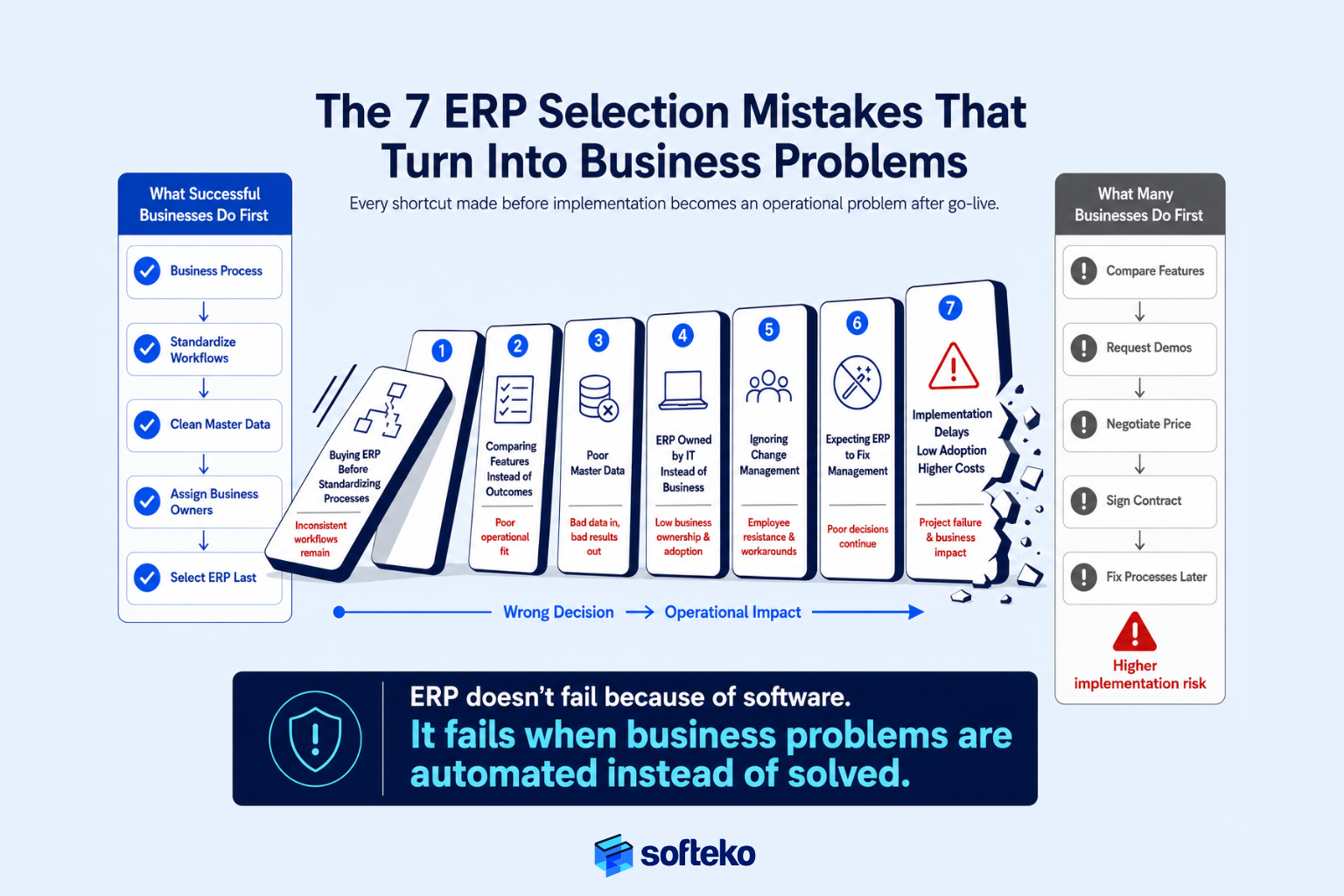
Mistake 1: Buying ERP Before Standardizing Processes
This is the most common mistake. You assume the ERP will automatically fix inconsistent operations. It will not. An ERP enforces processes. If your underlying process is inconsistent, the ERP simply makes that inconsistency more structured.
Consider a quotation process. One Sales Executive follows formal approval rules. Another negotiates directly with customers. A third maintains pricing in personal spreadsheets. If these differences are never resolved, the ERP implementation team has no single process to configure. The result is usually one of two outcomes: either the ERP becomes heavily customised to support different ways of working, or your employees continue using manual workarounds outside the system. Good implementations begin with process standardisation. Technology comes afterward.
Mistake 2: Comparing Features Instead of Business Results
Feature comparisons are attractive because they appear objective. One system offers more reports. Another includes more dashboards. A third advertises artificial intelligence or advanced analytics. Those capabilities may be useful. However, they do not answer the most important question: Will this ERP improve the way our business operates?
Your trading business should evaluate outcomes such as:
- Shorter quotation cycle times
- Better inventory accuracy
- Stronger procurement controls
- Faster order processing
- More reliable profitability reporting
- Better executive visibility
Those outcomes matter far more than the number of available features.
Mistake 3: Underestimating Data Quality
Many businesses focus on software configuration while assuming existing data can simply be imported. Unfortunately, ERP implementations often expose years of inconsistent business data:
- Duplicate customer records
- Different product names for the same item
- Inconsistent supplier information
- Missing unit-of-measure definitions
- Incorrect inventory balances
- Outdated pricing records
Migrating poor-quality data into a new ERP does not improve operations. Rather, it transfers your existing problems into a new system. This is exactly why 62% of organisations cite data migration as their biggest ERP challenge.[1] Successful projects spend significant time preparing master data before migration begins — customer records, suppliers, products, pricing, warehouses, and inventory balances.
Mistake 4: Treating ERP as an IT Project Instead of a Business Project
ERP affects almost every department. Sales. Procurement. Warehouse. Finance. Operations. Management. Yet some organisations assign the entire project to the IT department.
Technical teams are essential. However, ERP success depends far more on business ownership than technical ownership. Your department managers should define workflows. Finance should establish financial controls. Warehouse teams should validate operational procedures. Sales should review commercial processes. IT supports the implementation. Your business owns it.
Mistake 5: Ignoring Change Management
Your employees naturally become comfortable with familiar processes. Even inefficient processes feel safe because everyone understands them. ERP changes daily routines. Approvals move differently. Information becomes more transparent. Manual shortcuts disappear.
Some employees welcome these improvements. Others resist them. That resistance should not be treated as a technical problem. Rather, it is an organisational change process. Prosci research shows human factors matter 6× more than technical factors in ERP success,[3] and 62% of leaders identify top management support as the single most critical success factor.[4] Successful implementations prepare employees long before the system goes live. Training focuses not only on how to use the ERP but also why the new workflow benefits the business.
Mistake 6: Expecting ERP to Solve Every Business Problem
ERP improves operational control. It does not replace management. Your business may sometimes expect ERP to solve problems such as:
- Poor supplier relationships
- Weak pricing strategy
- Lack of accountability
- Undefined approval authority
- Inconsistent management decisions
Those are leadership challenges. ERP provides better visibility and stronger process enforcement. However, your management must still make good business decisions. The most successful organisations understand this distinction.
Mistake 7: Selecting an Implementation Partner Based Only on Price
ERP software and ERP implementation should never be evaluated independently. A capable ERP implemented poorly often delivers disappointing results. An experienced implementation partner usually contributes by:
- Mapping existing workflows
- Identifying unnecessary process variation
- Recommending operational improvements
- Configuring business controls
- Preparing users for adoption
- Supporting continuous improvement after go-live
These activities have a direct influence on implementation success. Choosing an implementation partner solely because they offer the lowest proposal often increases project risk rather than reducing project cost.
Compare Common ERP Selection Mistakes
| Mistake | Business consequence | Better approach |
|---|---|---|
| Buying ERP before standardising processes | Inconsistent workflows remain | Standardise operations first |
| Comparing features instead of workflows | Poor operational fit | Evaluate real business scenarios |
| Ignoring data quality | Reporting and inventory issues continue | Clean master data before migration |
| Treating ERP as an IT project | Low business adoption | Make department leaders responsible |
| Overlooking change management | Employee resistance | Train users before implementation |
| Expecting ERP to fix management problems | Poor business decisions continue | Strengthen governance alongside ERP |
| Selecting the cheapest implementation partner | Higher implementation risk | Evaluate industry and operational expertise |
Business Example: The Process Was the Real Problem
A trading company planned to replace its legacy business software after several years of rapid growth. Management believed the ERP would eliminate quotation delays and inventory discrepancies.
During implementation workshops, however, a different issue became clear. Each regional office followed a different quotation approval process. Supplier records existed in multiple formats. Inventory units differed between warehouses. Finance calculated landed costs differently depending on who prepared the shipment.
None of these inconsistencies originated from the software. They originated from business processes that had evolved independently over many years. Before configuring the ERP, the implementation team worked with department managers to establish one standardised operating model. Only then was the system configured.
The implementation took slightly longer than originally planned. However, user adoption was significantly higher because every department was working toward the same process rather than protecting its own version of it. The project succeeded because operational alignment came before technology. The Hershey ($150 million in lost sales)[9] and Lidl (€500 million written off after seven years)[10] failures show what happens at scale when this lesson is ignored.
How Odoo Supports Trading Business Operations
Throughout this guide, the focus has been on evaluating business operations — not evaluating software. That approach should remain unchanged when you consider Odoo.
The right question is not: “Is Odoo the best ERP?” The better question is: “Does Odoo support the operational controls our trading business requires?” That distinction keeps your evaluation objective. Every ERP should be measured against the same business criteria. If those criteria have been clearly defined, it becomes much easier to determine whether Odoo is an appropriate fit.
Odoo supports many of the operational capabilities growing trading businesses need, particularly when you require connected workflows across sales, procurement, inventory, warehouse operations, logistics, and finance.
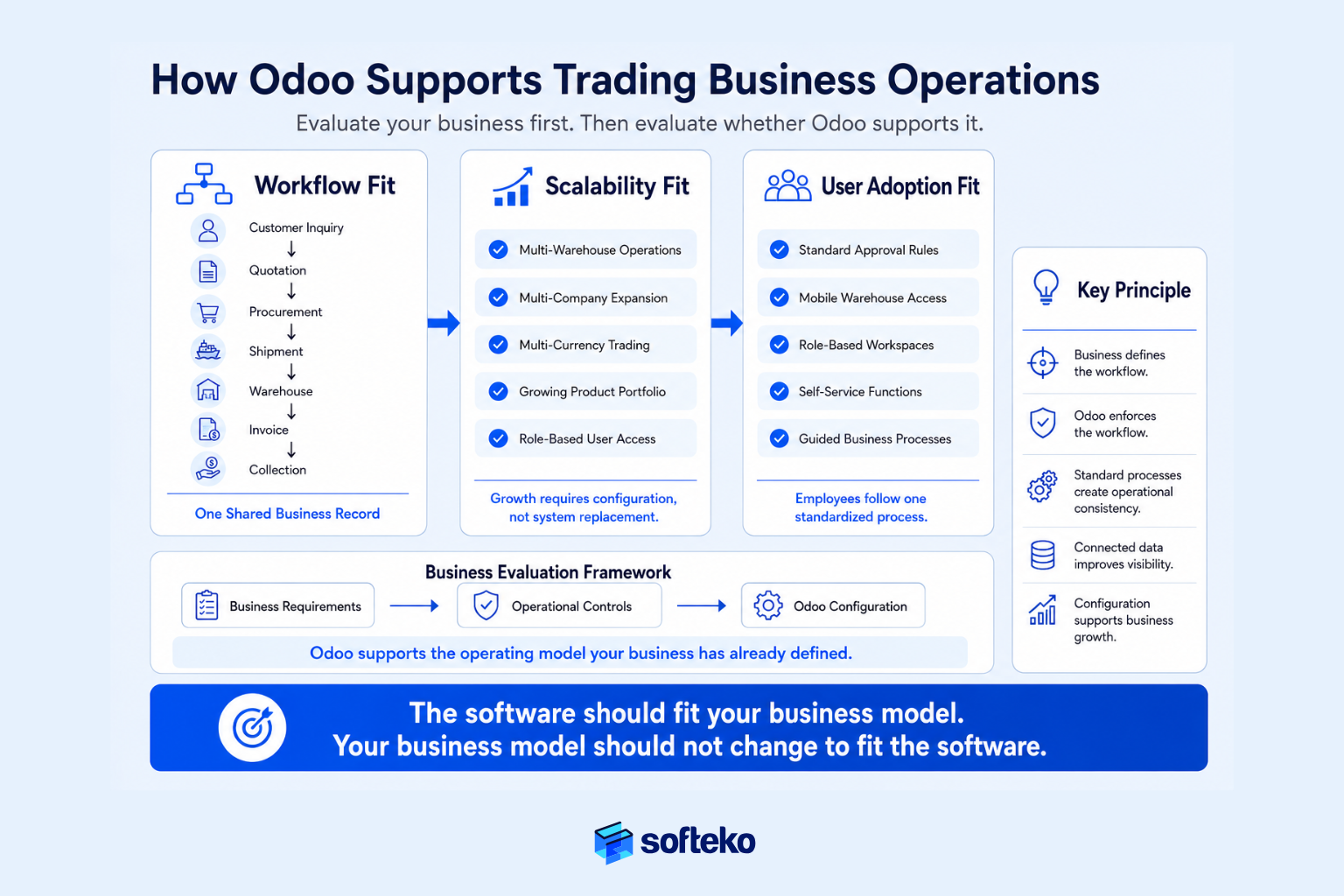
Below, Odoo’s fit is grouped into three layers: the workflow layer (how your trading processes run), the scalability layer (how the ERP grows with your business), and the adoption layer (whether your employees will actually use it).
Odoo Connects Your Trading Workflows
First, the workflow layer converts scattered departmental activity into one shared record. Instead of Sales quoting in a spreadsheet while Procurement chases prices by email, your entire RFQ-to-collection cycle runs on the same data.
| Trading stage | Odoo capability |
|---|---|
| Customer inquiry / RFQ | CRM captures the enquiry with mandatory fields, links to the customer master, and routes to Procurement and Finance for stock, price, and credit validation |
| Quotation / PFI | Standardised templates with margin calculation, discount approval thresholds, and version control |
| Customer PO verification | Hard block on Product / Packaging / Incoterm mismatch; soft block with mandatory comment on price/quantity variance |
| Supplier PO and shipment | Purchase module with payment-readiness gate before PO issuance; landed cost captured as freight and duty are recorded |
| Documentation and customs | Central document repository (BL, COO, COA, CI, PL) linked to the sales order |
| Warehouse and delivery | Multi-warehouse inventory, barcode/scanner support, weighbridge upload, GDC sign-off |
| Invoice and collection | Automated 25-day and credit-period reminders, commission reconciliation on collection |
As a result, your Sales Executive, Procurement Officer, Import Coordinator, Warehouse Supervisor, and Finance Officer all work from the same record — not from six spreadsheets. This is the operational principle used throughout large trading implementations, where customer inquiry, PFI, procurement, shipment execution, documentation, warehouse operations, invoicing, and payment are treated as one continuous operational process rather than isolated departmental activities.
Odoo Grows with Your Business
Next, the scalability layer determines whether the ERP will survive the next stage of your growth. Trading businesses grow in predictable directions — more warehouses, more country entities, more suppliers, more product lines. Odoo supports these through configurable applications rather than another system replacement.
| Growth vector | Odoo response |
|---|---|
| Additional warehouses | Multi-warehouse configuration with location-level stock and transfer rules |
| Additional country entities | Multi-company setup with intercompany transactions and consolidated reporting |
| Multi-currency purchasing and sales | Native currency handling with automatic revaluation |
| More suppliers and Incoterms | Supplier master with approved-vendor lists, product-supplier pricing, Incoterm defaults |
| More SKUs and product categories | Product master with variants, attributes, and category-based costing |
| More users and roles | Role-based access rights configured without programming |
Consequently, growth in your business requires configuration, not rebuilding your business system.
Odoo Helps Employees Follow Standard Processes
Finally, the adoption layer determines whether your Warehouse Supervisors, Delivery Drivers, and Sales Executives will use the ERP or work around it. This is where the 6× human-factors research becomes practical.[3] Odoo’s usability, self-service portals, mobile access for warehouse and field staff, and role-based dashboards reduce the friction that pushes users back to WhatsApp and spreadsheets.
Importantly, Odoo does not create governance on its own. If quotation approvals are inconsistent today, you must standardise them before configuration and If supplier data is duplicated across three spreadsheets, you must clean it before migration. If Warehouse procedures differ between UAE and KSA, you must align them first. The ERP enforces controls — your leadership defines them. This is one reason experienced implementation teams spend significant time documenting workflows before configuring the ERP.
Business Example: Odoo Matched the Business Requirements
A regional distributor evaluated several ERP systems. Rather than asking which software had the longest feature list, management compared each solution against the operational framework developed earlier in this article. The evaluation focused on questions such as:
- Can quotations follow defined approval policies?
- Can inventory be viewed across multiple warehouses?
- Can procurement follow standardised approval rules?
- Can landed costs be reflected in product profitability?
- Can Finance monitor customer credit before shipment?
- Can management trace every transaction from inquiry to payment?
Because these requirements had already been documented, the software evaluation became much simpler. Odoo was not selected because it contained a particular module. Rather, it was selected because its standard workflows closely aligned with the company’s desired operating model while leaving room for future growth. That is exactly how ERP should be evaluated. The software supported the business. The business did not redesign itself to fit the software.
ERP Evaluation Checklist for Trading Businesses
Selecting an ERP should never depend on one impressive demonstration or one attractive proposal. Instead, the evaluation should follow a structured review of your business requirements. If your leadership team can answer the following questions with confidence, you are far more likely to choose an ERP that supports your business over the next five to ten years.
Business Process Assessment
Before evaluating any ERP vendor, confirm that your business understands its own operations.
- ☐ Our quotation process is documented
- ☐ We have defined approval rules for pricing, purchasing, and customer credit
- ☐ Every department understands where its responsibilities begin and end
- ☐ Our major operational workflows have been mapped
- ☐ We know where delays and manual handoffs occur
- ☐ We have identified the reports management actually needs for decision-making
Operational Control Assessment
The ERP should strengthen operational discipline — not simply record transactions.
- ☐ Customer orders follow defined approval rules
- ☐ Inventory can be viewed accurately across all warehouses
- ☐ Procurement follows approved supplier and purchasing policies
- ☐ Landed costs can be tracked accurately
- ☐ Customer credit exposure is controlled before order confirmation
- ☐ Shipment status and supporting documents remain traceable throughout execution
- ☐ Management receives alerts when operational exceptions occur
Data Readiness Assessment
Poor data will reduce the value of even the best ERP. Confirm that your organisation is preparing accurate master data.
- ☐ Customer records have been reviewed
- ☐ Supplier information is complete and current
- ☐ Product master data has been standardised
- ☐ Units of measure are consistent
- ☐ Warehouse locations are clearly defined
- ☐ Historical pricing has been reviewed
- ☐ Duplicate records have been removed
Organization Readiness Assessment
ERP implementation changes the way people work. Your organisation should be prepared for that change.
- ☐ Department managers support standardised processes
- ☐ Executive leadership is actively involved
- ☐ Employees understand why the ERP project is being undertaken
- ☐ Process owners have been assigned
- ☐ Time has been allocated for user training
- ☐ Internal project leaders have been identified
Vendor Evaluation Assessment
Every shortlisted vendor should be evaluated using the same criteria.
- ☐ The vendor demonstrated our actual trading workflow
- ☐ The ERP supported our operational controls
- ☐ The implementation methodology was clearly explained
- ☐ The implementation partner understands trading operations
- ☐ Long-term support arrangements are clearly defined
- ☐ Future scalability was discussed
- ☐ Total cost of ownership was explained — not just software licensing
Final ERP Decision Checklist
Before signing an ERP contract, every executive team should be able to answer “Yes” to these questions.
| Executive question | Yes / No |
|---|---|
| Have we standardised our major business processes? | ☐ |
| Do we understand where operational bottlenecks exist today? | ☐ |
| Have we evaluated ERP using real business scenarios? | ☐ |
| Have we compared vendors using the same evaluation criteria? | ☐ |
| Do we understand the total implementation effort? | ☐ |
| Is executive leadership committed to organisational change? | ☐ |
| Have we selected the ERP because it fits our business — not because of its marketing? | ☐ |
A “No” answer does not necessarily mean the project should stop. However, it does indicate that additional preparation is needed before making a significant investment.
Conclusion
Every growing trading business reaches a point where operational complexity begins to outpace manual coordination.
At first, the symptoms seem manageable. A delayed quotation. An inventory discrepancy. A procurement approval that takes longer than expected. A report that requires several spreadsheets to prepare. Over time, those isolated issues become connected operational risks.
Evaluate Your Business Before You Evaluate ERP
The question is no longer whether your business needs better systems. The question is whether you understand what those systems should actually accomplish.
The strongest ERP decisions begin long before vendor demonstrations. They begin by understanding how work flows through your organisation, identifying where operational control is lost, and defining the business processes that must be protected as the company grows. Once those requirements are clear, evaluating ERP software becomes far more objective. Instead of comparing brands, you compare operational capability.
Choose an ERP That Fits Your Business
For many growing wholesalers, distributors, importers, and exporters, Odoo aligns well with this evaluation framework because it supports connected workflows across sales, procurement, inventory, warehouse operations, logistics, and finance while remaining flexible enough to adapt as operational requirements evolve. Like any ERP, however, its success depends on clearly defined business processes, clean data, committed leadership, and a disciplined implementation approach.
If your organisation is preparing for ERP evaluation, resist the temptation to begin with software. Start with your business. Document your workflows. Identify your operational controls. Define how success will be measured. Only then begin comparing ERP solutions.
That approach will not only help you choose the right ERP software for trading businesses — it will significantly reduce the risk of making an expensive decision that your business must live with for years to come.
At Softeko, we help trading businesses design a process-first ERP evaluation and implement Odoo ERP as a connected operating system across sales, procurement, inventory, warehouse, logistics, and finance.
Frequently Asked Questions (FAQ)
How do I choose the right ERP software for a trading business?
Start by documenting how your business operates before comparing software. Map your quotation, procurement, inventory, warehouse, logistics, finance, and reporting workflows. Then evaluate ERP systems based on how well they support those processes, not on the number of available features or the quality of the product demonstration.
What features are most important in ERP software for trading businesses?
The most valuable capabilities are those that improve operational control. These include connected sales and procurement workflows, real-time inventory visibility, landed cost management, credit control, warehouse management, financial visibility, document traceability, and management dashboards. The business outcome is more important than the feature itself.
When should a growing trading business invest in ERP?
The right time is when operational complexity begins slowing your business. Common signs include multiple warehouses, disconnected departments, manual reporting, inventory visibility problems, increasing approval delays, and growing dependence on spreadsheets. Waiting until operations become unmanageable usually makes implementation more difficult.
Should I compare ERP systems using feature lists?
Feature lists provide only a partial comparison. A better approach is to evaluate how each ERP handles real business scenarios such as customer order revisions, procurement approvals, shipment delays, landed cost updates, and inventory allocation across warehouses. This shows how the system performs under real operating conditions.
Is Odoo suitable for trading businesses?
Odoo can be a strong option for many trading businesses because it supports connected workflows across sales, procurement, inventory, warehouse operations, logistics, and finance. However, it should be evaluated using the same operational framework applied to every ERP. The decision should be based on business fit rather than software popularity.
How long does ERP selection usually take?
The evaluation period depends on your business size and operational complexity. Many growing trading businesses spend several weeks documenting workflows, assessing operational requirements, evaluating vendors, and conducting demonstrations before making a final decision. Investing more time in evaluation often reduces implementation risk later.
What is the biggest mistake businesses make when selecting ERP?
The most common mistake is selecting software before standardising business processes. An ERP can enforce a workflow, but it cannot decide what the workflow should be. Businesses that improve their processes before implementation usually experience stronger user adoption and better long-term results.
Should price be the main factor when selecting ERP?
No. Software licensing is only one part of the investment. Your business should evaluate implementation services, training, data migration, future support, scalability, and ongoing maintenance. The lowest purchase price is not always the lowest total cost of ownership — especially once 64% of projects run over budget and 68% overrun their timeline.[1]
Related reading in this series
- Why Trading Companies Lose Money Without Sales, Inventory, Procurement, and Finance in One System — the pillar post
- Connected Business Operations: How Growing Trading Businesses Stay in Sync — cross-departmental visibility
- How Trading Businesses Achieve 99% Inventory Accuracy — operational-discipline companion
- Landed Cost and Profit Margin in Trading Businesses — margin-protection companion
- Credit Control for Trading Businesses — customer financial risk control
- Cash Flow Visibility for Trading Businesses with ERP — working-capital companion
References
- NetSuite — 60 Critical ERP Statistics (Gartner-sourced) — https://www.netsuite.com/portal/resource/articles/erp/erp-statistics.shtml
- McKinsey & Company — Perspectives on Transformation — https://www.mckinsey.com/capabilities/transformation/our-insights/perspectives-on-transformation
- Prosci — ERP Change Management Research — https://www.prosci.com/erp-change-management
- Mint Jutras via Rootstock — ERP Implementation Success Factors — https://www.rootstock.com/cloud-erp-blog/erp-implementations-are-more-successful-than-you-thought/
- Cyferd — Why Disconnected Systems Drain Your Business Efficiency (Harvard Business Review + McKinsey syntheses) — https://cyferd.com/why-disconnected-systems-drain-your-business-efficiency/
- APQC — Process Classification Framework (PCF) v7.4 — https://www.apqc.org/resource-library/resource-listing/apqc-process-classification-framework-pcf-cross-industry-excel-12
- CAPS Research via NetSuite — Inventory Accuracy Benchmarks — https://www.netsuite.com/portal/resource/articles/inventory-management/inventory-accuracy.shtml
- IJCA / Mhaskey — Identifying and Mitigating Risks in ERP Customizations — https://ijcaonline.org/archives/volume187/number22/mhaskey-2025-ijca-925366.pdf
- Kopis USA — ERP Implementation Failure at Hershey Foods Corporation — https://kopisusa.com/wp-content/uploads/ERP_Implementation_Failure_Hershey_Foods.pdf
- Panorama Consulting — The Lidl SAP ERP System Project Failure Case Study — https://www.panorama-consulting.com/lidl-erp-failure/