


Key takeaways
- Give every distinct film specification its own item code: material, micron, width and unit. Two widths of the same foil are two items.
- Track each delivery as a lot under that code, so you know the supplier and age of every roll while still seeing one total.
- Inspect goods against the delivery note before the goods receipt is created, and do not let the person who raises a receipt approve it.
- Issue material to production against a requirement form, and book unused material back. The difference is what was consumed.
- Lot tracking, FIFO removal, three-step receipts with a quality area, and quality checks on receipts are all standard in Odoo 19.
Overview
In a flexible packaging plant, raw material is most of the job cost: films, foil, inks, adhesives, solvents, zippers and valves. If stock records are wrong, quotes, planning and margins are wrong too. For other areas, see what Odoo covers as standard.
This article describes the raw material and warehouse design we documented for Sahl Pack (Modern Sahl Industries), a Saudi flexible packaging manufacturer, and how it maps to Odoo 19. Inventory was being configured when this was written, so it describes the agreed design, not results.
Item codes: one code per specification
Raw materials are grouped by category: film, accessories, ink, solvent, varnish, adhesive, zipper, valve, core and plug. Categories can be extended later. Costing then uses the next wider film width when the exact width is not in stock.
Within a category, every distinct specification gets its own code, built from its attributes:
| Pattern | Example |
|---|---|
| Micron – Material – Width – Unit – Serial | 7-Alu-500mm-KG-001 |
| Same foil, different width | 7-Alu-600mm-KG-002 |
| Other films | 12-PET-…-KG, 38-BOPP-…-KG, 120-PE-…-KG, 12-MPET-…-KG |
Each code records how it is issued. Some categories are issued against a requisition. Others can be back-flushed, which means consumption is booked automatically when production is recorded.
One administration page shows every code scheme together (raw materials, jobs, designs and plates), so formats do not overlap.
Why this matters: a press loaded for 500 mm foil cannot run 600 mm foil. If both widths share one code, the system shows stock that the job cannot use, and the planner finds out at the machine.
Lots: one total, full history
Each delivery is a lot under the item code. For example:
- Lot 1: 7-micron aluminium foil, 500 mm, 250 kg from supplier 1
- Lot 2: the same item, 255 kg from supplier 2
- On hand: 505 kg, with each lot’s supplier and receipt date kept
Lot tracking is mandatory for raw materials, so material can be issued first-in, first-out. In Odoo, FIFO is the default removal strategy, and it relies on lot or serial number tracking [1]. A trader we designed for uses the same lot logic across countries; see stock across UAE and KSA.
Issue order and valuation are separate decisions
Sahl Pack issues film FIFO but values inventory at weighted average cost, in line with IFRS. These do not conflict. In Odoo, the removal strategy decides which lot is picked [1]. The costing method on the product category decides how stock is valued, and Odoo supports FIFO and average cost (AVCO) [2]. We recorded this in the requirements so finance and the warehouse agree on it before go-live.
From purchase request to stock
The agreed flow:
- The planner raises a purchase request from the demand forecast, for raw materials, plates or consumables.
- Purchasing turns it into a purchase order, adding supplier and price. Each line carries its own expected arrival date, because different materials have different lead times.
- The goods arrive and are unloaded.
- Quality control inspects them against the delivery note.
- Only after QC approval can the store raise a goods receipt note (GRN).
- The store manager approves the GRN. The person who raised it cannot approve it.
- Only approved GRNs add quantity to stock.
In Odoo, a warehouse can receive in three steps: input, quality control, then stock. Goods in the quality area are not available until they move to stock [3]. Quality control points can create checks on receipts, including measurements that must fall within a tolerance [4], and failed products can be sent to a failure location [5].
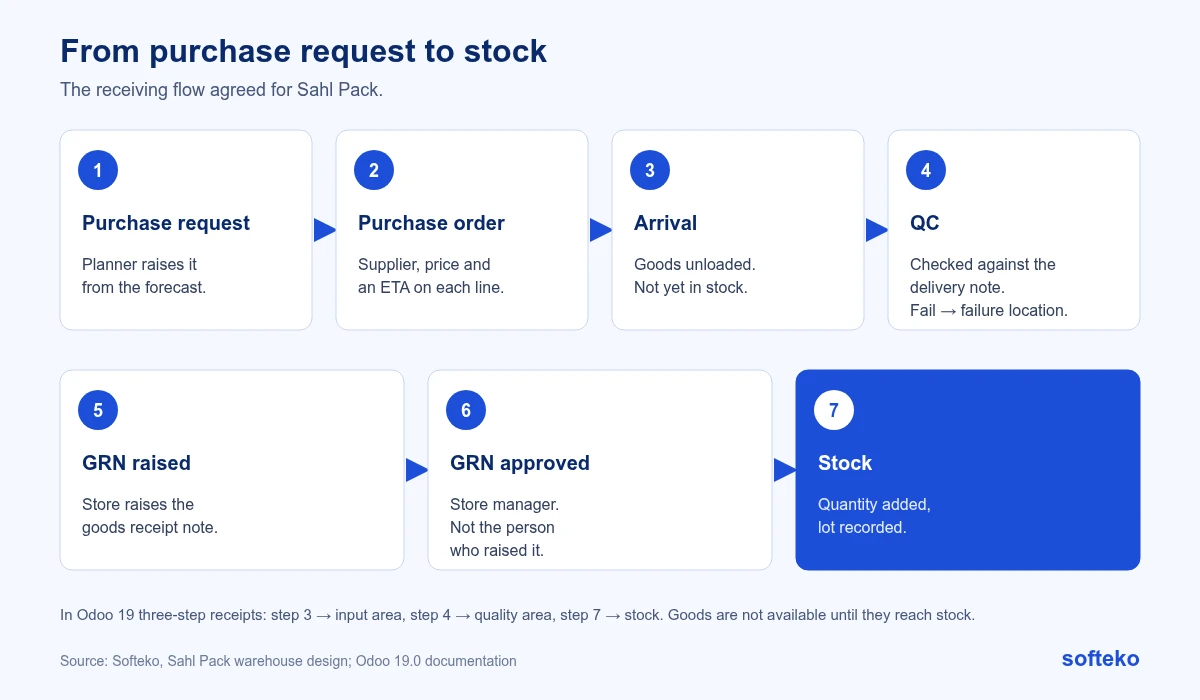
Standard Odoo receipts have one Validate step. The rule that the person who raises a GRN cannot approve it is an addition on top, built during configuration.
Issue and return
Production asks for material with a material requirement form. The store issues it, physically and in the system, from the store to the right production location.
Illustration from the requirements workshop: production needs 250 kg, the store issues 300 kg, and 50 kg comes back. The full 300 kg leaves store stock at issue. The returned 50 kg is booked back in. Consumption is 250 kg. Each requirement form keeps its issued and returned quantities, so the numbers can be traced.
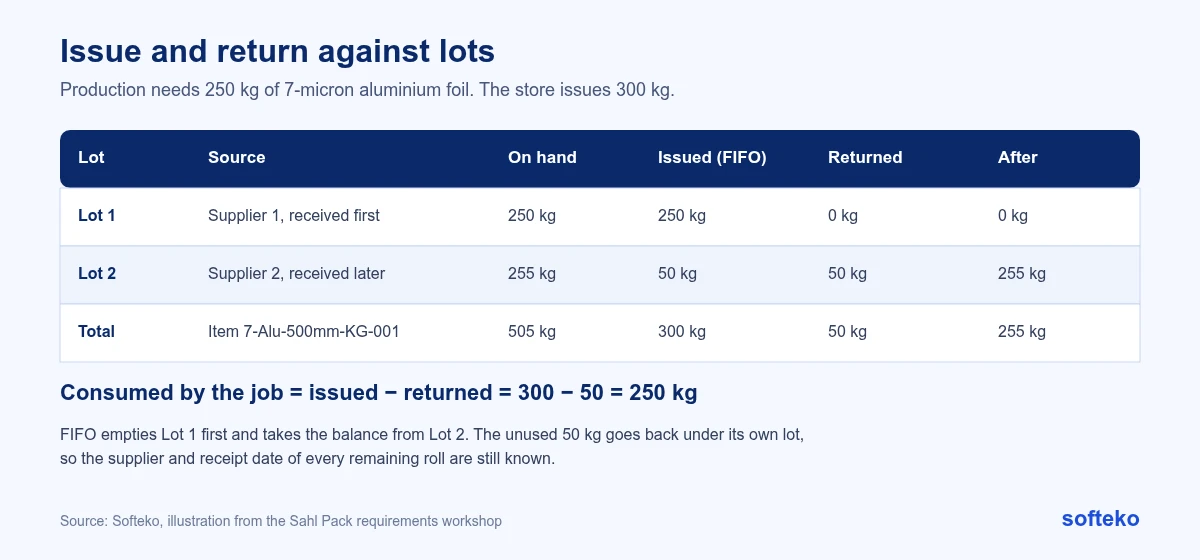
With lots, the example has one more layer. Say the 500 mm foil has two lots on hand: Lot 1 with 250 kg, received first, and Lot 2 with 255 kg. FIFO issues all of Lot 1 and 50 kg of Lot 2. The 50 kg that comes back is booked back into Lot 2. After the job, Lot 1 is empty and Lot 2 still holds 255 kg, with its supplier and receipt date intact.
In Odoo, the issue is an internal transfer from the RM Store to the production location, and the return is a transfer in the opposite direction. Linking both to the requirement form keeps the issued and returned quantities for each job in one place.
How to set up raw material control in Odoo 19
These steps cover the standard part of the design. Do them before any stock is imported.
Step 1: Turn on lots and multi-step routes
Go to Inventory › Configuration › Settings. In the Traceability section, enable Lots & Serial Numbers [6]. In the Warehouse section, enable Multi-Step Routes, which also turns on Storage Locations [3].
Step 2: Track each raw material by lots
Open each raw material product. On the General Information tab, tick Track Inventory and choose By Lots [6].
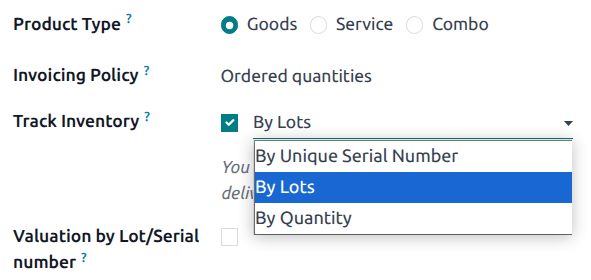
If the product already has stock when you switch on lot tracking, Odoo shows a warning. Use an inventory adjustment to assign lot numbers to the existing stock [6].
Step 3: Set the removal strategy and the costing method
FIFO is Odoo’s default removal strategy. If no strategy is set on the location or the product category, FIFO is used [1]. You can still set it explicitly on the product category, in the Force Removal Strategy field, so nobody changes it by accident [1].
On the same product category, set the costing method to average cost (AVCO) if that is what finance has agreed [2]. These are two separate fields, which is why issue order and valuation can differ.
Step 4: Receive in three steps
Go to Inventory › Configuration › Warehouses, open the warehouse, and set Incoming Shipments to Receive goods in input, then quality and then stock (3 steps) [3].
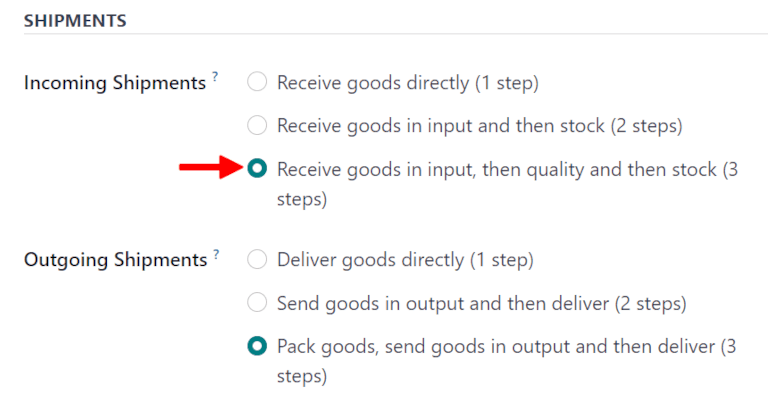
Odoo creates two new locations, WH/Input and WH/Quality Control. You can rename them to match the names your store team uses [3].
Step 5: Add a quality check on receipts
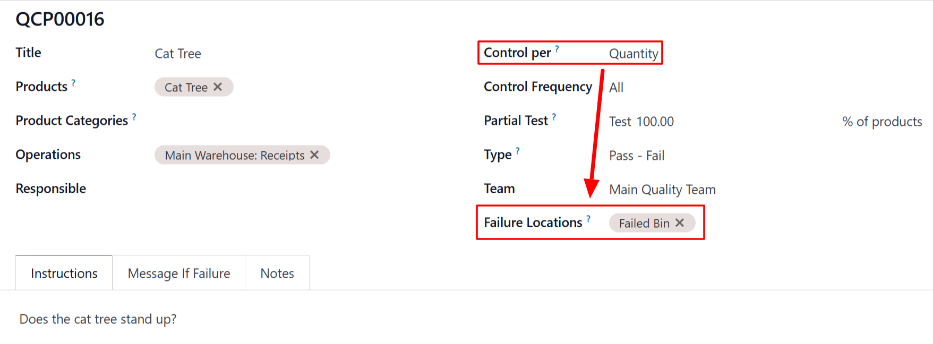
In the Quality app, create a quality control point for the receipt operation, with the products or categories it covers. For film, a measurement check can record the micron or width against a tolerance [4]. If you set a Failure Location, products that fail the check are moved there instead of into stock [5].
Step 6: Trace a lot
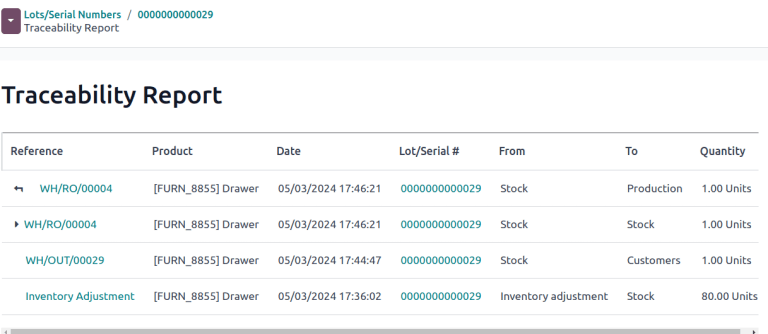
To see every movement of a lot, open Lots/Serial Numbers, select the lot, and click the Traceability smart button [6]. The report lists each receipt, transfer and delivery for that lot.
Warehouses that follow the process
Material moves through locations that match the production process:
| Location | Holds |
|---|---|
| RM Store | Raw materials |
| Printing | Film and ink issued for printing |
| Lamination 1 and 2 | Printed film, adhesive, second substrate |
| Slitting | Laminated rolls |
| Pouching | Slit rolls, zippers, valves |
| FG Store | Finished goods |
The exact number of locations was still being confirmed when the requirements were written.
Finished goods and dispatch
Completed production moves to finished goods in one, two or three steps, with an optional QC check before it counts as finished. A production receipt records the quantity transferred, and only then can it be delivered and invoiced.
Fifteen days after delivery, the system creates a task for the salesperson to check with the customer for quality or damage problems.
Avoiding overstock and stockouts
Two parts of the design address this directly:
- Aging. Raw materials, semi-finished and finished goods all show days in stock since receipt. Slow stock is visible before it becomes a write-off.
- Release check. Before production starts, the planner sees available finished goods stock and releases only what actually needs producing. Our article on planning multi-process production covers this.

Inventory reports
The client listed eight reports: on hand, on hold, issued by warehouse, consumption, issue from store to production, QC rejections, work in progress and semi-finished stock, and finished goods by location, customer, age, sales order and job code. We discuss why these eight inventory reports matter in our MIS vs ERP guide.
Checklist
- Decide your item code pattern before importing any stock.
- Make lot tracking mandatory for film and foil.
- Agree the removal strategy and the costing method separately, with finance in the room.
- Decide who inspects incoming goods, and who approves receipts.
- Set up a requirement form for issue, and a way to return unused material.
- Agree your warehouse locations with the production team.
- Assign lots to existing stock before go-live, not after.
FAQ
Should each film width have its own item code?
Yes. Different widths are not interchangeable on the press, and costing depends on the width you actually use.
Can I issue FIFO and value at average cost in Odoo?
Yes. The removal strategy controls which lot is picked [1]. The costing method controls valuation [2].
Where should quality inspection happen?
Before goods become available stock. Odoo’s three-step receipt puts a quality area between input and stock [3].
What if I already have stock without lot numbers?
Assign lot numbers to existing stock with an inventory adjustment after you turn on lot tracking [6].
How do I measure material consumption accurately?
Record what was issued and what was returned for each job. The difference is consumption.
Start with your item list
Export your current raw material list and check whether every width, micron and grade has its own code. Most stock problems start there. Read more about our Odoo implementation service.
References
[1] Odoo, Removal strategies, Odoo 19.0 documentation. https://www.odoo.com/documentation/19.0/applications/inventory_and_mrp/inventory/shipping_receiving/removal_strategies.html
[2] Odoo, Valuation by lots/serial numbers, Odoo 19.0 documentation. https://www.odoo.com/documentation/19.0/applications/inventory_and_mrp/inventory/inventory_valuation/valuation_by_lots.html
[3] Odoo, Three-step receipt, Odoo 19.0 documentation. https://www.odoo.com/documentation/19.0/applications/inventory_and_mrp/inventory/shipping_receiving/daily_operations/receipts_three_steps.html
[4] Odoo, Quality control points, Odoo 19.0 documentation. https://www.odoo.com/documentation/19.0/applications/inventory_and_mrp/quality/quality_management/quality_control_points.html
[5] Odoo, Failure locations, Odoo 19.0 documentation. https://www.odoo.com/documentation/19.0/applications/inventory_and_mrp/quality/quality_management/failure_locations.html
[6] Odoo, Lot numbers, Odoo 19.0 documentation. https://www.odoo.com/documentation/19.0/applications/inventory_and_mrp/inventory/product_management/product_tracking/lots.html
[7] Screenshots: Odoo S.A., Odoo 19.0 documentation (Lot numbers, Three-step receipt, Failure locations), licensed under CC BY-SA 4.0 (https://creativecommons.org/licenses/by-sa/4.0/). https://www.odoo.com/documentation/19.0/