


Key takeaways
- A print MIS is built around estimating, job tickets and press scheduling. An ERP runs the whole business: sales, purchasing, inventory, production, quality and accounting.
- Spreadsheets and tools like AirTable work until several people need the same data at once, or until costs must be hidden from some users.
- The deciding question is not features. It is how many systems your team must re-key data between, and who owns each number.
- Sahl Pack, a Saudi flexible packaging manufacturer, chose a single Odoo system with a packaging costing calculator built in, because it also needed ZATCA e-invoicing, manufacturing and inventory in one place.
Overview
Most print and packaging businesses go through three stages: spreadsheets, a specialist tool for estimating or job tracking, and then a decision about an ERP.
This article explains the difference between a print MIS and an ERP, where spreadsheets stop working, and how to decide. It uses the requirements we documented for Sahl Pack (Modern Sahl Industries), which ran its business on AirTable and Excel before starting an Odoo project with us in May 2026. It describes the agreed design, not results from a live system.
Definitions in plain terms
| Print MIS | ERP | |
|---|---|---|
| Built for | Print and packaging work | Any business, configured for yours |
| Strong at | Estimating, job tickets, press scheduling, prepress tracking | Sales, purchasing, inventory, manufacturing, quality, maintenance, accounting, HR |
| Usually weaker at | Full accounting, multi-warehouse inventory, local tax rules | Industry-specific estimating, unless configured or developed |
| Typical setup | Often runs next to a separate accounting system | One database for the whole company |
Neither is better in general. The right choice depends on where your data is re-keyed today.

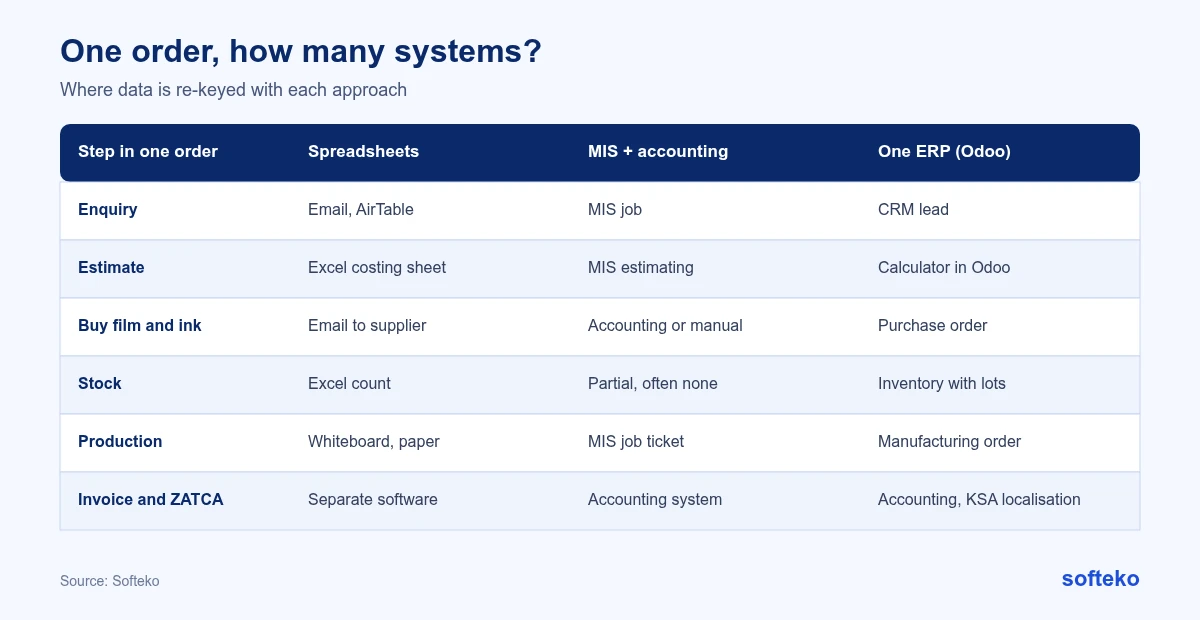
Count the systems one order passes through in your business today. Each handover between systems is a place where a quantity, a price or a specification can be copied wrong.
Where spreadsheets and AirTable stop working
These were the problems behind Sahl Pack’s requirements. They are common in growing packaging companies:
- Leads get lost. Website enquiries arrived only as email notifications, so any that were missed never reached the pipeline.
- Costs cannot be hidden. A costing spreadsheet shows machine rates and margins to everyone who opens it. Sahl Pack needed sales to see only a price range.
- Codes multiply. Raw material codes, design numbers, job codes and plate codes were kept in different places, with formats that could overlap.
- Stock is a guess. Without lots and locations, nobody can say which supplier’s film is on which rack, or how long it has been there.
- Compliance needs a system. Saudi e-invoicing (ZATCA) requires invoices to be generated and reported from compliant software.
Traders hit the same limits; see from WhatsApp and email to one deal record.
How to decide: MIS, ERP or both
| Your situation | Likely fit |
|---|---|
| Mostly short-run commercial print, accounting already works well, the main pain is estimating | Print MIS, connected to your accounting |
| Manufacturing with several processes, raw material stock, purchasing and quality checks | ERP |
| A strong MIS you want to keep, but inventory and accounting are a mess | ERP for the business, connected to the MIS. Budget for the integration and its upkeep |
| Moving from trading to manufacturing, or entering a market with strict e-invoicing rules | ERP, so the new processes are built on one record from the start |
If you are leaning towards ERP, start with what Odoo covers as standard.
When a print MIS is the better choice
A dedicated MIS can be the right answer. If you run a commercial print shop with short runs, few raw materials to track and an accounting system that already works, a good MIS may cover what you need faster. The case for an ERP grows with the number of processes, the amount of stock, the number of entities and the weight of local tax rules.
When you keep both
Some businesses keep an MIS they like and add an ERP for inventory and accounting. That works if the integration is clear about which system owns each record: customers, products, jobs, costs and invoices. Without that rule, the two systems drift apart and someone ends up reconciling them by hand.
Three questions usually settle it:
- How many systems does one order pass through, and where is it re-keyed?
- Who needs to see costs and margins, and who must not?
- Which reports does management ask for that take more than an hour to build?
What Sahl Pack chose, and why
Sahl Pack chose one Odoo system. The reasons came from its own situation:
- It is moving from trading packaging to manufacturing it in-house, so manufacturing, inventory and purchasing had to be built anyway.
- It sells in Saudi Arabia, so ZATCA-compliant invoicing in the accounting system was a requirement [1].
- It plans to expand to the US, Europe and Australia, so it needed multiple currencies on one ledger, with Saudi riyal as the base.
The packaging-specific parts that an MIS would normally provide, such as the technical requirement form, the feasibility check and the costing calculator, are being built inside Odoo instead. That avoids a second system and an integration to maintain. The costing calculator and ZATCA-compliant invoicing each have their own guide.

If you are deciding between an MIS and an ERP, we can walk through your current tools and show where each order is re-keyed.
The reports that replace spreadsheet tracking
Whatever you choose, agree the reports before the system is built. Sahl Pack listed eight inventory reports:
- Inventory on hand (raw materials, semi-finished and finished goods)
- Inventory on hold, by warehouse
- Inventory issued, by warehouse
- Material consumption
- Material issued from store to production
- Material rejected at quality control
- Work in progress and semi-finished goods
- Finished goods by location, customer, age, sales order and job code
In Odoo, the stock report shows quantities by product, location and lot, and can be grouped and filtered for most of these views [3]. The stock structure behind these eight inventory reports is covered in our raw material guide.
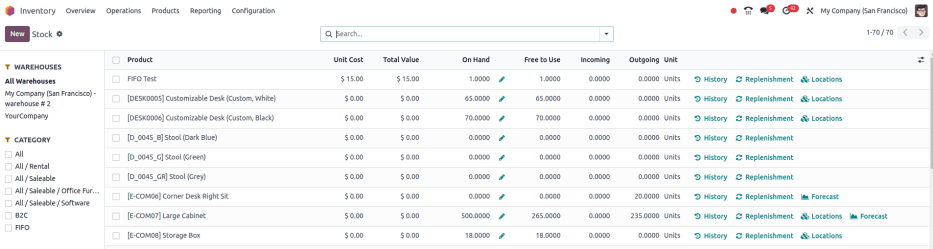
Every category also shows aging: days in stock since the goods were received. Aging was marked as critical for planning, because film that sits too long ties up cash and may no longer meet specification.
Metrics worth tracking once the data is in one place
These come from the Sahl Pack design. They only work when quotes, materials and production share one record:
- Quoted cost against actual cost for each job. Odoo shows both the expected cost and the real cost of a manufacturing order [2].
- Wastage for each job against the allowance set by the planner.
- Plate impressions used against the plate’s rated life.
- Leads with no activity after 72 hours, and quotations with no response after a week.
- Age of raw material, semi-finished and finished goods stock.
FAQ
Is a print MIS the same as an ERP?
No. A print MIS focuses on estimating, job tracking and scheduling for print. An ERP covers the whole business, including accounting and purchasing. Some products overlap.
Can Odoo replace a print MIS?
Odoo covers manufacturing, inventory, quality and accounting as standard. Packaging estimating and feasibility checks usually need configuration or development, as in the Sahl Pack design.
When should we move off spreadsheets?
When several people need the same data at the same time, when some numbers must be hidden from some users, or when a compliance rule requires system-generated documents.
Can we keep our MIS and add an ERP?
Yes, if the MIS works well. Plan who owns each piece of data, and budget for building and maintaining the integration.
Map your current tools first
List every tool an order passes through and where data is typed twice. That list usually shows whether you need an MIS, an ERP or both. We can review it with you. Read more about our Odoo implementation service.
References
[1] Odoo, Saudi Arabia fiscal localization, Odoo 19.0 documentation. https://www.odoo.com/documentation/19.0/applications/finance/fiscal_localizations/saudi_arabia.html
[2] Odoo, Manufacturing order costs, Odoo 19.0 documentation. https://www.odoo.com/documentation/19.0/applications/inventory_and_mrp/manufacturing/basic_setup/mo_costs.html
[3] Odoo, Stock report, Odoo 19.0 documentation. https://www.odoo.com/documentation/19.0/applications/inventory_and_mrp/inventory/warehouses_storage/reporting/stock.html
[4] Screenshot: Odoo S.A., Odoo 19.0 documentation, Stock report, licensed under CC BY-SA 4.0 (https://creativecommons.org/licenses/by-sa/4.0/). https://www.odoo.com/documentation/19.0/applications/inventory_and_mrp/inventory/warehouses_storage/reporting/stock.html