

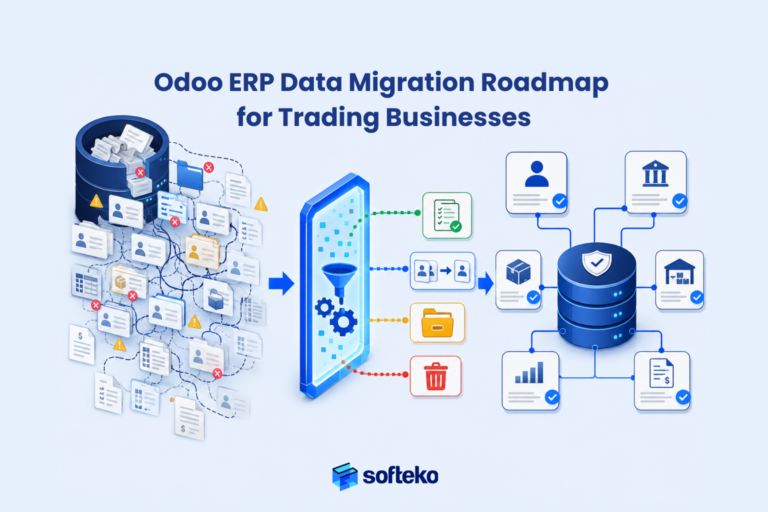
Overview
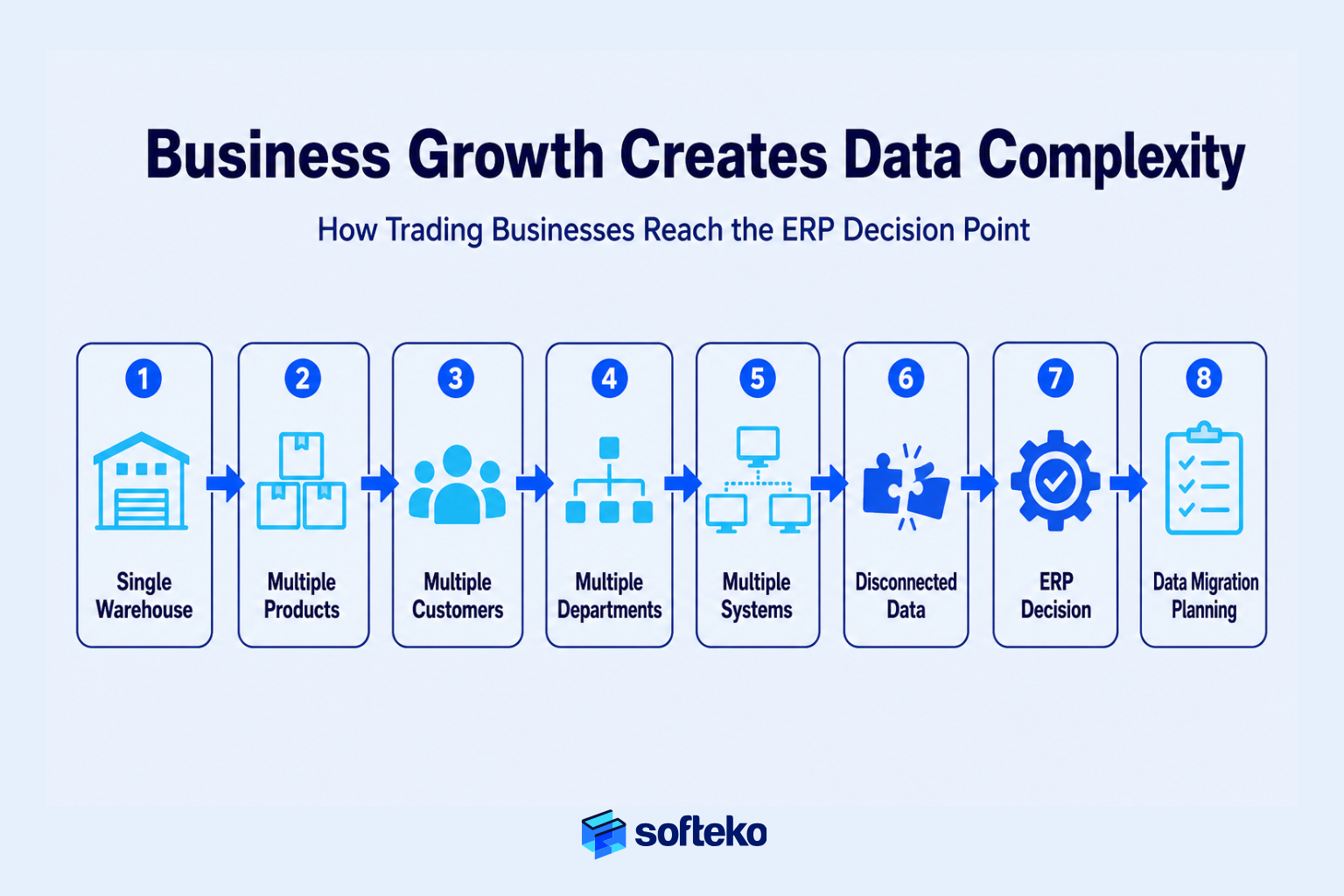
Notably, your trading business did not become complex overnight. It grew one customer, one warehouse, one supplier, and one product line at a time.
What started as a simple operation managed through spreadsheets and accounting software gradually expanded into a network of sales teams, procurement staff, warehouses, finance departments, logistics partners, and thousands of daily transactions. Each department adopted its own way of recording information. Customer details lived in spreadsheets. Inventory quantities differed between warehouses. Purchase records sat in accounting software, while quotations, emails, and shipping documents remained scattered across multiple systems.
In fact, this is a common stage in business growth — not a sign that the business has failed.
Eventually, however, operational complexity reaches a point where disconnected data becomes more expensive than disconnected systems. Sales cannot confidently promise delivery dates because inventory records are inconsistent. Finance spends days reconciling reports from different applications. Procurement works with duplicate supplier records. Management questions whether the numbers in today’s dashboard actually represent today’s business.
In practice, that is often the point when a trading business decides to implement a modern ERP such as Odoo.
Why the Real Concern Is Migration, Not Implementation
For many executives, the implementation decision itself is not the biggest concern. The real concern is what comes next. Years of customer information, supplier agreements, product catalogs, inventory balances, financial transactions, pricing history, and operational records have accumulated across multiple systems. Some of that information remains essential for daily operations. Some exists only because no one has ever deleted it. Much of it contains duplicates, inconsistencies, or outdated records.
Understandably, moving all of that information into a new business operating system feels risky.
For example, business owners worry about inventory discrepancies after go-live. Finance teams worry about opening balances. Sales teams worry about losing customer history. Warehouse managers worry about product codes changing. Executives worry that one migration mistake could interrupt order fulfillment, delay purchasing, or affect customer service for weeks.
Those concerns are justified. Independent research shows that between 55% and 75% of ERP projects fail to meet their original objectives,[1] and roughly 83% of data migration projects either fail or exceed their budgets and schedules.[3] Industry analysis of ERP data migration failures consistently traces the root causes to weak data governance, legacy system complexity, missing master data, incorrect field mapping, and data duplication.[6] Most of these problems appear after go-live, but they begin long before implementation — when organisations underestimate the business decisions involved in moving operational data from one environment to another.
As a result, successful Odoo Data Migration is not an IT exercise. It is a business governance project focused on protecting operational continuity while improving the quality, structure, and reliability of the information that the business depends on every day.
What This Guide Will Help You Do
In summary, this guide explains how experienced trading businesses plan ERP data migration, decide what should and should not be migrated, validate business-critical information before go-live, reduce implementation risk through governance and phased execution, and use Odoo’s migration capabilities to establish a reliable operational foundation for future growth.
Why this matters before implementation
Before discussing migration tools or import methods, one principle must be clear:
The objective of ERP data migration is not to move every record. The objective is to ensure your business can continue operating accurately on day one of the new ERP.
That shift in thinking changes every migration decision that follows.
Why ERP Data Migration Requires Business Ownership
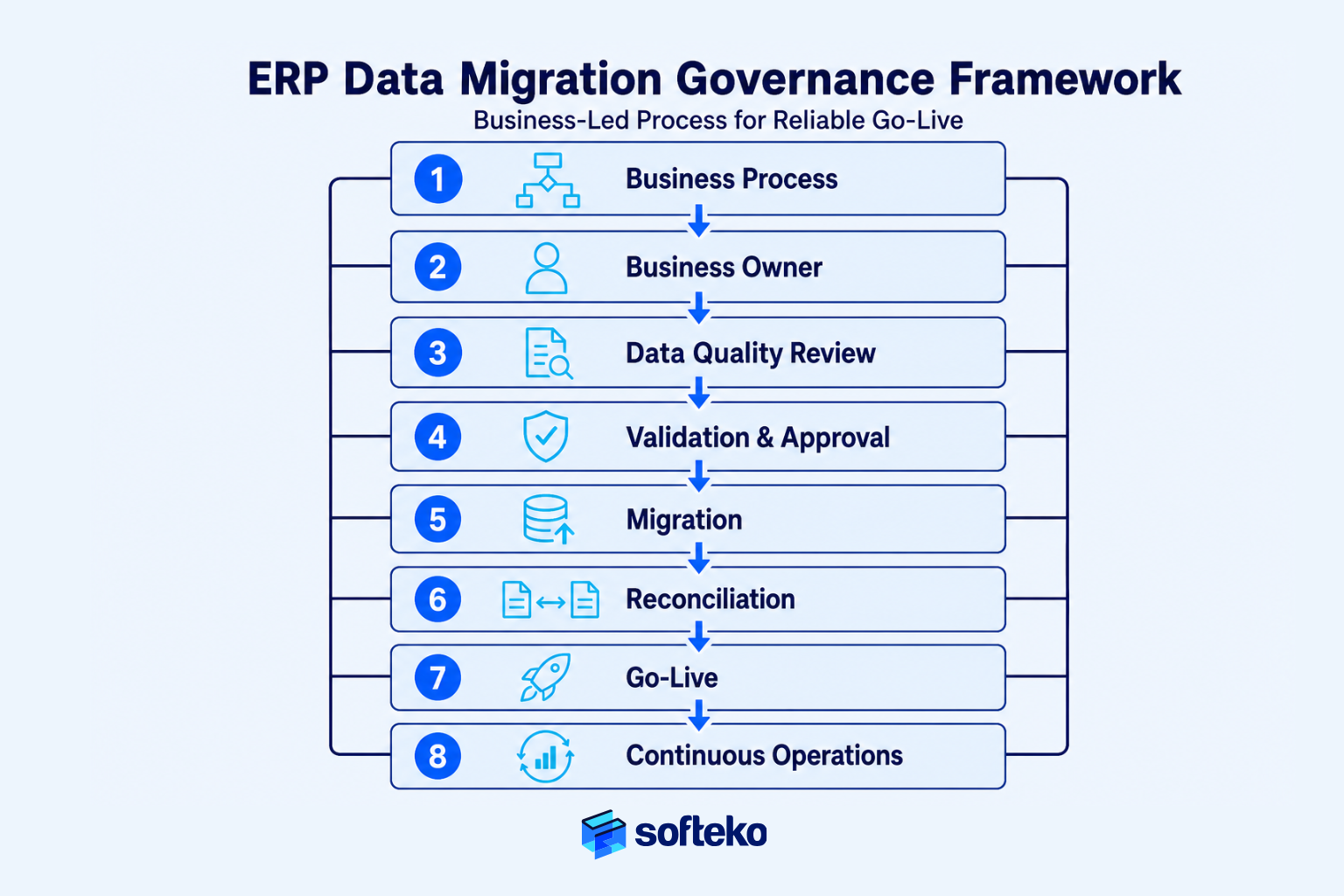
The short answer is simple: ERP data migration determines how your business will operate after go-live. Technology moves the data, but business teams decide what information is trustworthy, which processes it supports, and how it should be used in the future.
Many organisations begin migration discussions by asking technical questions.
“Which migration tool should we use?” “Can we import everything automatically?” “How long will the migration take?”
Experienced implementation teams ask different questions.
“Which data does the business actually need on day one?” “Which records can be archived?” “Who owns each dataset?” “How will we prove the migrated data is correct?”
Those questions lead to a successful implementation because they focus on operational continuity rather than data movement. A modern ERP becomes the operational control system for purchasing, inventory, sales, warehousing, logistics, and finance. If inaccurate information enters that system during migration, every department inherits the same problem on the first day of operation.
The Purpose of Data Migration Is to Preserve Business Operations
A common misconception is that data migration is about transferring information from one database to another. In reality, however, the objective is much broader.
Your business must continue accepting customer orders, purchasing inventory, shipping products, issuing invoices, collecting payments, and preparing financial reports without losing confidence in the underlying information.
Consider a distributor managing three warehouses. Before ERP implementation, each warehouse maintains its own product spreadsheet. Product descriptions differ slightly. Units of measure are inconsistent. One warehouse records “25 KG Bag,” another uses “25kg,” while a third abbreviates it as “25K.”
From a technical perspective, these are merely text differences. From an operational perspective, however, they represent three different inventory records that can create duplicate products, inaccurate stock reports, purchasing errors, and incorrect sales quotations after migration.
The migration challenge is therefore not importing three spreadsheets. Rather, the challenge is establishing one trusted product master that every department will use going forward.
This principle appears repeatedly in mature ERP implementations. Rather than allowing departments to maintain separate versions of the same information, the ERP establishes a standardised master record that becomes the single source of truth for future transactions. That same philosophy underpins structured Odoo implementations across customer, supplier, product, inventory, and operational workflows.
Every Department Owns Part of the Migration
Many organisations assume the IT department owns ERP migration because software is involved. In practice, however, IT rarely knows whether a customer credit limit is correct, a supplier is still active, or an inventory balance reflects physical stock. Those decisions belong to the business.
A successful migration assigns ownership to the people who use the information every day.
| Business area | Business owner | Migration responsibility |
|---|---|---|
| Customer Master | Sales | Remove duplicate customers, validate contacts, confirm payment terms and active accounts |
| Supplier Master | Procurement | Verify approved suppliers, banking information, purchasing terms, and inactive vendors |
| Product Master | Inventory & Procurement | Standardise SKUs, packaging, units of measure, categories, and product status |
| Inventory | Warehouse | Validate physical stock, locations, serial or batch records, and opening balances |
| Financial Data | Finance | Confirm chart of accounts, opening balances, receivables, payables, tax records, and reconciliation |
| Employees | HR | Validate active employees, departments, reporting lines, and employment status |
Notice that none of these activities begin with software. They begin with business ownership. This is why ERP implementations often create a cross-functional migration team rather than leaving the project entirely to consultants or system administrators. The APQC Process Classification Framework, a global taxonomy of over 1,000 business processes, provides the same discipline at the process level — helping trading businesses map existing workflows to standard categories before configuring the new ERP.[9]
Example: Why Business Teams Must Validate Data
An importer decides to migrate fifteen years of supplier records into a new ERP. The IT team successfully imports every supplier account. Technically, the migration succeeds.
One week after go-live, Procurement discovers that nearly one-third of those suppliers have not traded with the business in more than seven years. Several vendors have changed banking details. Others merged into different companies. A few exist multiple times under different spellings.
Nothing failed technically. Rather, the business failed to decide which suppliers still mattered.
As a result, buyers now search through outdated supplier lists, duplicate vendor records appear in purchase orders, and reporting becomes less reliable. Had Procurement reviewed the supplier master before migration, the business could have reduced thousands of records to a smaller, cleaner, and more accurate supplier database. The migration effort would have been lower, and the operational outcome would have been better.
Research Consistently Shows That Governance Drives ERP Success
Large ERP programs rarely fail because organisations cannot move data. Rather, they fail because they underestimate the governance required to prepare that data.
Research from Gartner, McKinsey, and Deloitte consistently identifies poor data quality, unclear ownership, weak governance, and inadequate validation as recurring causes of ERP implementation delays and post-go-live issues.[1] The technology platform is seldom the primary problem. Instead, the business processes surrounding data preparation usually determine the outcome. Rand Group’s ERP practice reports that 60% of its clients arrive after a failed or subpar implementation with another provider — underlining how quickly these governance gaps compound.[2]
That distinction matters for trading businesses. Unlike many service organisations, trading companies depend on thousands — or even hundreds of thousands — of operational records that directly affect purchasing, inventory valuation, customer fulfilment, landed costs, pricing, and financial reporting. A single incorrect product code or inventory balance can ripple through Procurement, warehouse operations, sales orders, and accounting.
The lesson is straightforward. Migration quality is measured by operational accuracy after go-live — not by how many records were imported.
Five Questions to Evaluate Every Data Set
Before migrating any dataset, ask five business questions.
Business Need – Is this data still actively used? Has the information been validated? Who owns its accuracy? Will it support operations on day one?
If the answer to any of these questions is no, that dataset should be reviewed, corrected, archived, or excluded before migration. This framework prevents one of the most common implementation mistakes: treating every historical record as equally valuable.
What Business Data Should You Migrate to Odoo ERP?
Notably, not every record in your existing systems deserves a place in your new ERP.
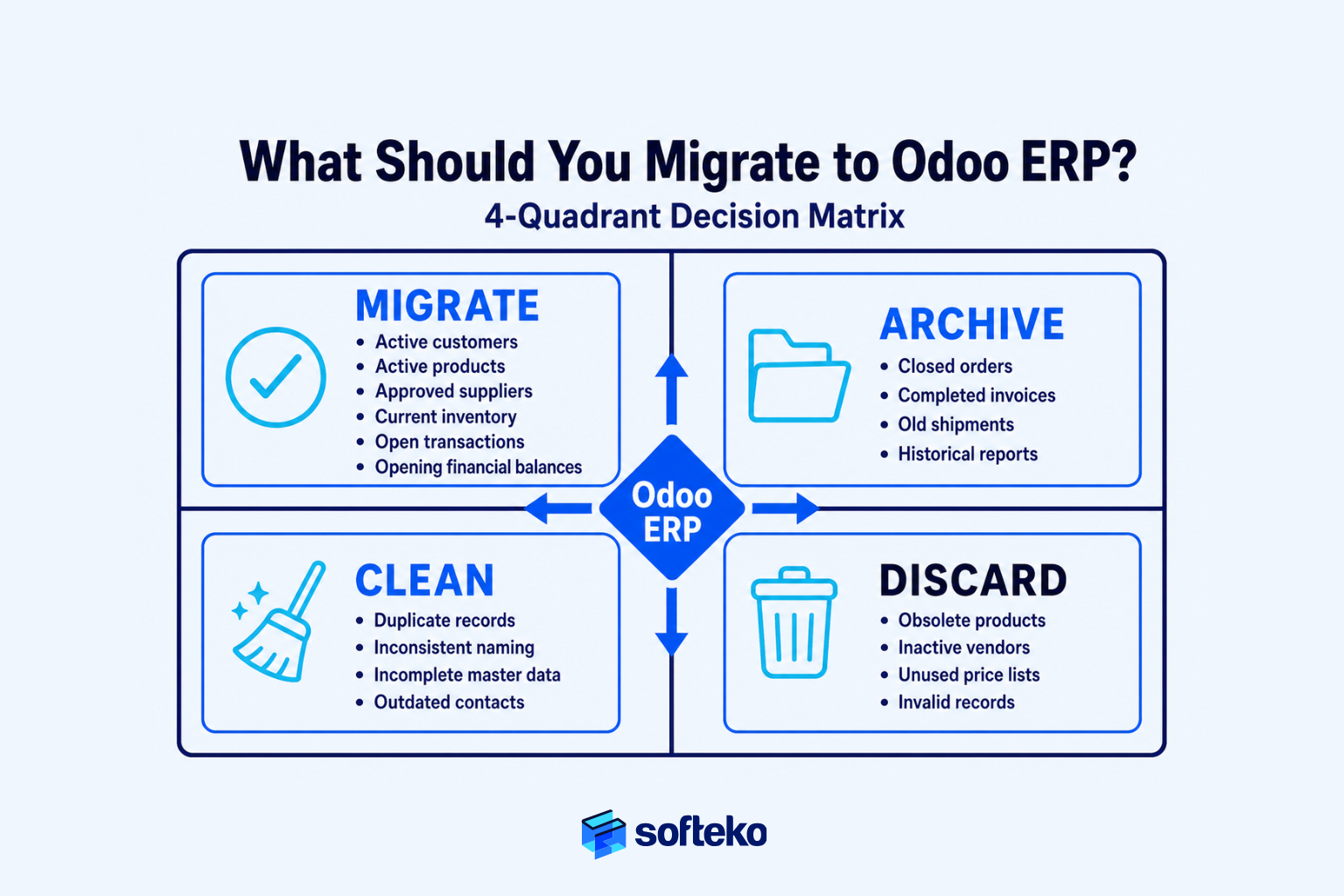
One of the most expensive migration mistakes is assuming that everything should move simply because it already exists. Over the years, trading businesses naturally accumulate obsolete customers, inactive suppliers, discontinued products, duplicate inventory records, outdated price lists, and historical transactions that no longer support day-to-day operations. Migrating all of this information increases project complexity, extends testing time, and introduces unnecessary risk without improving the business.
Successful Odoo Data Migration begins with a different question:
What information does the business need to operate accurately on the first day after go-live?
Once that question is answered, migration becomes a process of selecting and improving business data — not simply copying it.
Start with Business-Critical Data
First, every dataset should be evaluated according to its operational value. Some information supports daily decision-making and must be available immediately. Other records are useful only for audits or occasional reference. Keeping these categories separate makes migration faster, cleaner, and easier to validate.
A practical way to evaluate migration scope is to classify data into four categories.
| Data category | Recommended action | Business reason |
|---|---|---|
| Active operational data | Migrate | Required for day-to-day business after go-live |
| Historical reference data | Archive | Retain for compliance or reporting without increasing ERP complexity |
| Incorrect or duplicate data | Clean before migration | Prevent operational errors from entering the new ERP |
| Obsolete information | Discard | Reduces maintenance effort and improves data quality |
This approach changes the objective from moving more data to moving better data.
Clean Customer Data Before Migration
In practice, customer information is one of the most valuable assets in a trading business. Unfortunately, it is also one of the least consistent. Different departments often create their own customer records. Sales saves one version. Finance creates another. Logistics records a third using a slightly different company name.
After several years, one customer may exist multiple times. Examples include:
- ABC Industries
- ABC Industries LLC
- ABC Ind. Ltd.
- ABC Trading Industries
Although they represent the same customer, the ERP treats them as separate accounts unless they are consolidated before migration. The objective is not simply to migrate customer records. Rather, the objective is to establish one trusted customer master that Sales, Finance, Procurement, Logistics, and Management all reference consistently.
Many trading businesses also review information such as:
- Active customer status
- Primary contacts
- Billing and delivery addresses
- Payment terms
- Credit limits
- VAT or tax registration details
- Customer segmentation
- Territory assignments
Modern trading ERP implementations rely on a centralised customer master with structured onboarding, approval workflows, and standardised commercial information so every department works from the same record rather than maintaining independent copies.
Business Example: Cleaning Customer Records Before Migration
A wholesaler plans to migrate approximately 18,000 customer records. During the migration assessment, Sales discovers that nearly 6,000 customers have not placed an order in more than eight years. Finance identifies another 2,000 duplicate customer accounts.
Rather than migrating all 18,000 records, the project team:
- Migrates active trading customers
- Archives inactive accounts for future reference
- Merges duplicate records
- Standardises customer naming conventions
The result is a smaller, more accurate customer database that improves reporting, reduces user confusion, and simplifies customer onboarding after go-live.
Standardize Product Master Data Before Migration
Few datasets influence more business processes than the product master. Every quotation, purchase order, inventory movement, shipment, landed cost calculation, warehouse transaction, and invoice depends on accurate product information. If product data is inconsistent before migration, almost every department will experience operational issues after go-live.
Before migrating products, organisations typically validate:
- Product codes (SKUs)
- Product descriptions
- Units of measure
- Packaging configurations
- Product categories
- Warehouse assignments
- Tax classifications
- Standard costing methods
- Active versus discontinued products
This becomes especially important for importers and distributors managing the same material in multiple packaging formats.
For example:
| Incorrect structure | Standardised structure |
|---|---|
| Soda Ash | Soda Ash – Bulk |
| Soda Ash 25KG | Soda Ash – 25 kg Bag |
| SodaAsh Jumbo | Soda Ash – 1 MT Jumbo Bag |
Although the chemical remains the same, each packaging type has different inventory balances, pricing, warehouse handling requirements, and logistics costs. Treating them as separate, standardised products prevents inventory inaccuracies later.
This aligns with structured SCM implementations where packaging types, units of measure, warehouse locations, and product attributes are governed centrally because they affect procurement, inventory valuation, shipment execution, and reporting throughout the trading workflow.
Update Supplier Records Before Migration
Similarly, supplier databases often contain years of accumulated information. Some vendors no longer exist. Others have changed banking details, legal entities, or payment terms. Importing outdated supplier records creates unnecessary purchasing risk.
Before migration, Procurement teams should review:
- Approved suppliers
- Preferred vendors
- Payment terms
- Banking information
- Tax registration
- Supplier categories
- Country of origin
- Incoterms supported
- Compliance documentation
- Inactive suppliers
Many organisations also use migration as an opportunity to introduce supplier governance. Instead of allowing anyone to create supplier records, new vendors pass through an approval process before becoming available for purchasing. That operational control protects procurement long after migration has finished.
Migrate Accurate Financial Data
Finance departments often ask an understandable question: “Should we migrate every financial transaction?”
Usually, the answer is no. Most organisations only require enough historical information to continue business operations while preserving older transactions in the legacy system or an archive.
Typical financial migration includes:
- Chart of Accounts
- Opening balances
- Accounts Receivable
- Accounts Payable
- Outstanding invoices
- Fixed assets (where applicable)
- Tax configuration
- Cost centers
- Bank accounts
Older financial transactions often remain accessible through archived systems rather than increasing the size and complexity of the new ERP. This reduces migration effort while maintaining compliance requirements.
Verify Physical Inventory Before Migration
Notably, inventory is different from almost every other dataset. Customer information can be corrected later. Inventory discrepancies, however, immediately affect purchasing decisions, warehouse operations, sales promises, and financial reporting.
For that reason, experienced implementation teams rarely migrate inventory balances without first validating physical stock.
A typical inventory validation includes:
- Physical stock count
- Warehouse locations
- Batch or lot verification
- Serial numbers (if applicable)
- Damaged stock
- Goods in transit
- Reserved inventory
- Inventory valuation
Only after these figures are reconciled should opening inventory balances be established inside the new ERP. Skipping this step simply transfers existing inventory errors into a more sophisticated system.
Use One Rule for Every Migration Decision
If a dataset cannot answer “How does this help the business operate after go-live?”, it probably does not belong in the first migration.
Every additional record increases migration effort, testing effort, validation effort, user confusion, and go-live risk. The objective is not to build the largest database. Rather, the objective is to build the most reliable operational foundation.
Who Should Own ERP Data Migration?
Successful ERP data migration is not led by the IT department. It is led by the business.
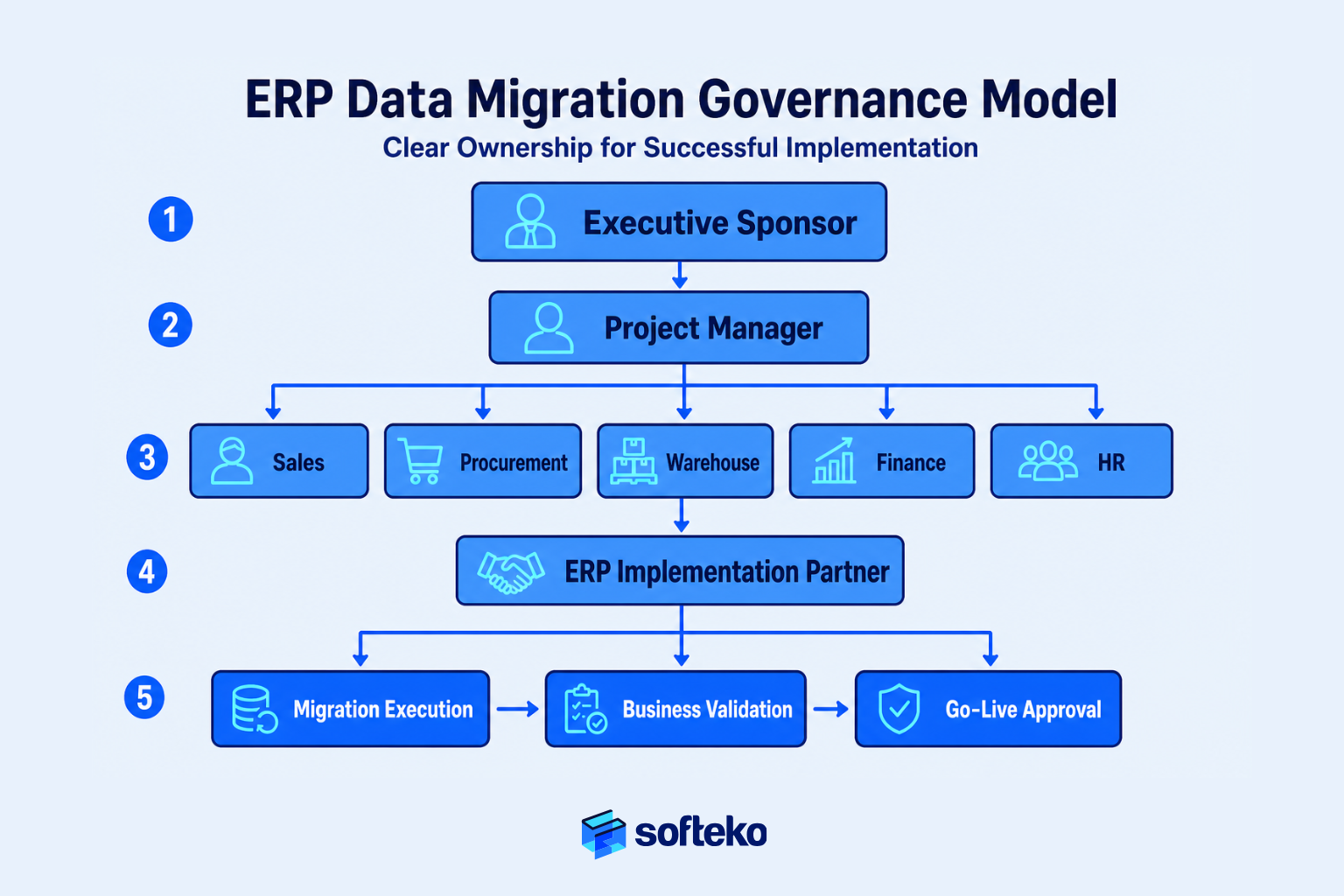
Technology specialists can configure migration tools, map fields, and transfer information between systems. However, they cannot determine whether a customer is still active, whether a supplier should remain approved, whether inventory balances match physical stock, or whether financial opening balances are accurate. Those decisions belong to the people who own the business processes.
That is why successful migration projects establish governance before they begin moving data. Without clear ownership, migration becomes everyone’s responsibility — and ultimately, no one’s responsibility.
This is not just consulting advice. Gartner predicts that 80% of data and analytics governance initiatives will fail by 2027 because organisations struggle to sustain adoption and clarify ownership.[5] The DAMA-DMBOK framework — the industry’s most widely used data-management reference — directly addresses this by defining data owners, stewards, and custodians alongside clear decision rights and accountability.[8]
Executive Sponsors Guide Migration Decisions
Every ERP implementation eventually reaches a point where business decisions must be made.
- Should inactive customers be migrated?
- Should historical transactions remain in the legacy system?
- Should discontinued products receive new SKUs?
- Should inventory be frozen before physical verification?
These are not technical questions. They affect operations, finance, customer service, and risk. For that reason, every migration project needs an executive sponsor who can:
- Align departments around common objectives
- Resolve cross-functional disagreements
- Approve migration scope changes
- Prioritise business continuity over departmental preferences
- Remove organisational roadblocks
Without executive sponsorship, migration discussions often become lengthy debates between departments protecting their own data instead of improving the business as a whole.
Every Critical Dataset Needs a Business Owner
Firstly, ownership should never be assigned to “the migration team.” Instead, every major dataset requires a designated business owner with authority to approve its accuracy. A practical governance model looks like this.
| Business data | Primary owner | Key responsibility |
|---|---|---|
| Customers | Sales Manager | Validate active customers, payment terms, contacts, territories |
| Suppliers | Procurement Manager | Approve suppliers, banking details, purchasing terms, compliance |
| Products | Inventory / SCM Manager | Standardise SKUs, packaging, categories, units of measure |
| Inventory | Warehouse Manager | Verify physical stock and opening balances |
| Finance | Finance Manager / CFO | Approve opening balances, receivables, payables, tax configuration |
| Employees | HR Manager | Confirm active employees and organisational structure |
Notice the pattern. Each owner is responsible for business accuracy, not technical migration. This separation of responsibilities prevents confusion during implementation.
Your ERP Partner Guides the Process, Not the Data
Furthermore, many businesses expect their ERP implementation partner to “clean the data.” That expectation is unrealistic.
An implementation partner understands ERP workflows. They understand field mapping. They understand migration methodology. However, they do not know:
- Which customers still trade with your business
- Which suppliers have commercial disputes
- Which products have been discontinued
- Which inventory balances reflect physical stock
- Which financial records should be archived
Only your business can answer those questions.
A strong implementation partner therefore acts as a facilitator. They help your organisation build a migration strategy, define migration templates, recommend best practices, identify data quality risks, coordinate testing, validate migration results, and plan cutover activities. Your business, meanwhile, remains responsible for approving the information that enters the ERP.
This distinction is critical because it establishes accountability long before go-live.
Example: When No One Owns the Data
A multi-warehouse distributor delegates data migration entirely to its ERP implementation partner. The consultants import supplier records exactly as provided.
After go-live, Procurement discovers dozens of suppliers with expired banking information, duplicate payment terms, and inactive contracts. Management questions why the ERP contains incorrect supplier data.
The consultants explain that the information matched the source files supplied by the business. Technically, both parties completed their assigned tasks. Operationally, however, nobody owned supplier validation. The issue was not migration quality. It was governance.
Build a Cross-Functional Migration Team
ERP migration touches almost every department. That is why experienced organisations create a cross-functional migration team rather than assigning the project to one department.
A typical governance structure includes:
| Role | Primary focus |
|---|---|
| Executive Sponsor | Business priorities, scope approval, issue resolution |
| Project Manager | Coordination, timeline, communication |
| Sales Representative | Customer master validation, pricing, open quotations |
| Procurement Representative | Supplier records, purchasing data |
| Warehouse Representative | Inventory verification, warehouse locations |
| Finance Representative | Opening balances, receivables, payables, tax validation |
| HR Representative | Employee records and user readiness |
| ERP Implementation Partner | Migration methodology, mapping, testing, cutover guidance |
This structure creates faster decision-making because every business area participates in validating its own information instead of waiting for another department to respond.
Use a RACI Matrix to Define Responsibilities
One of the simplest governance tools is a RACI matrix. Rather than assuming everyone understands their role, the project clearly defines who is:
- Responsible — Performs the work
- Accountable — Approves the final result
- Consulted — Provides input
- Informed — Receives updates
An example for customer master migration might look like this.
| Activity | Sales | Finance | IT | ERP Partner | Executive Sponsor |
|---|---|---|---|---|---|
| Remove duplicate customers | R | C | I | C | I |
| Validate credit terms | C | A | I | I | I |
| Prepare migration template | I | I | R | A | I |
| Execute migration | I | I | R | A | I |
| Approve migrated customer data | A | C | I | C | I |
This simple framework prevents a common post-go-live conversation: “I thought another department was checking that.”
Governance Matters More as Your Business Grows
Migration governance becomes even more critical when businesses operate across:
- Multiple warehouses
- Multiple legal entities
- Multiple countries
- Multiple currencies
- Multiple tax jurisdictions
- Multiple business units
A customer record may affect Sales in one country, Finance in another, and warehouse operations in a third. Similarly, one product master may support direct shipments, warehouse sales, and intercompany transfers.
Mature trading ERP implementations illustrate this complexity well. Businesses that support multiple shipment flows, legal entities, warehouses, payment methods, and document requirements can only maintain a centralised source of truth across those operations if ownership is clearly defined and master data remains standardised — rather than living in isolated departmental records.
As operational complexity grows, governance becomes the mechanism that keeps information consistent across every workflow.
Good Governance Prevents Rework
Some organisations avoid formal governance because they believe approvals will delay the project. In practice, the opposite is true.
Projects without governance usually spend more time correcting migrated data, repeating user acceptance testing, reconciling inventory, fixing financial balances, resolving ownership disputes, and supporting users after go-live. Projects with clear ownership spend more time preparing — but significantly less time recovering.
Preparation is almost always cheaper than correction.
Governance Checklist Before Migration
Before approving the migration phase, verify that:
- ✓ Every major dataset has an assigned business owner
- ✓ Executive sponsorship is established
- ✓ Department responsibilities are documented
- ✓ Data approval authority is clearly defined
- ✓ The implementation partner’s responsibilities are agreed
- ✓ Escalation procedures exist for unresolved issues
- ✓ Migration success criteria have been approved before execution
If any of these items remain unclear, governance should be strengthened before migration begins.
Why You Should Migrate ERP Data in Phases
A successful ERP migration is rarely completed in a single event. Rather, it is completed through a series of controlled, validated, and repeatable activities.
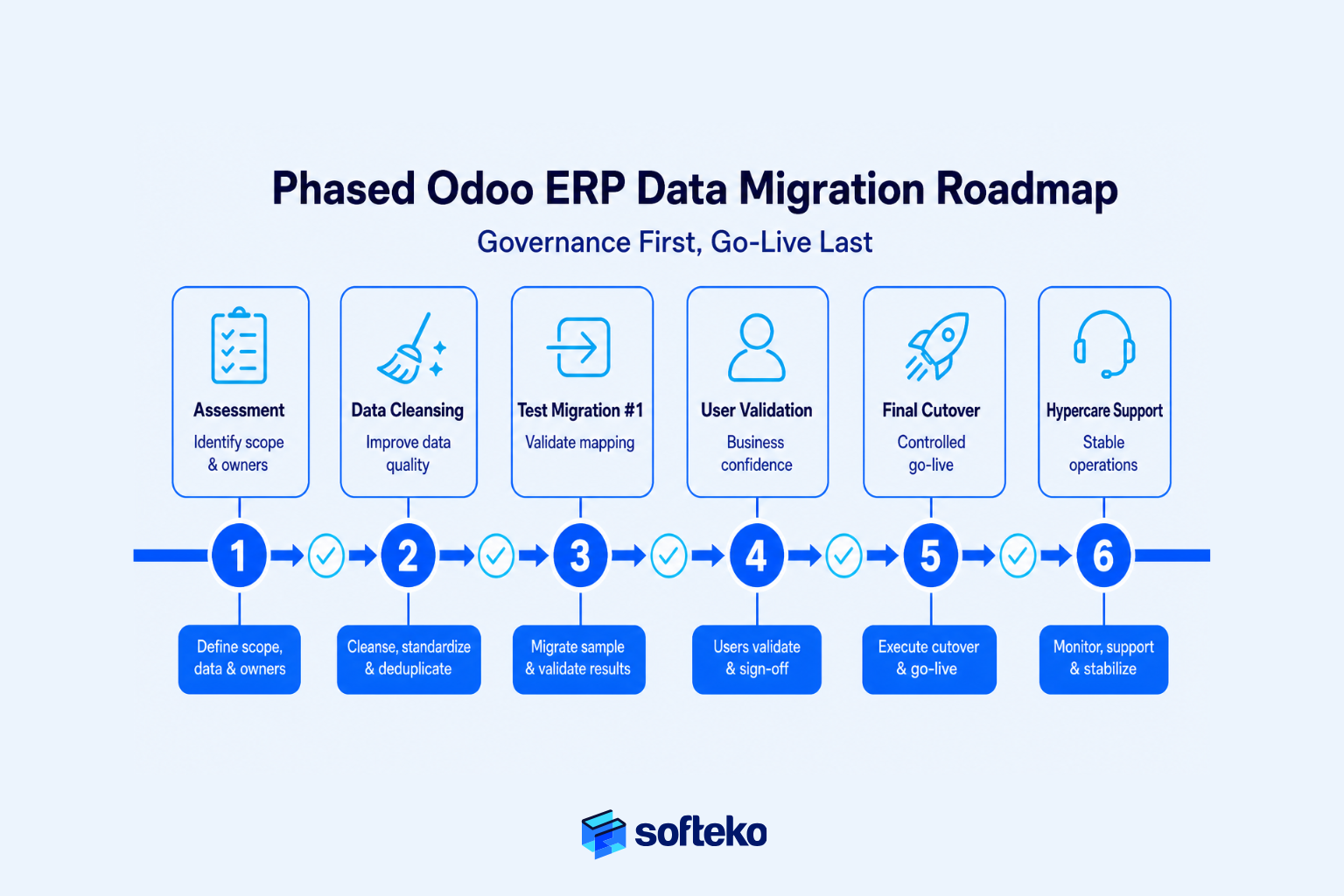
Many organisations picture migration as a weekend project. The legacy system is switched off on Friday evening. Data is imported on Saturday. Users log into the new ERP on Monday morning. Although this “big bang” approach is sometimes appropriate for smaller businesses, it introduces considerable risk for medium and large trading companies. If a critical issue appears after go-live, every department is affected simultaneously.
Experienced implementation teams reduce that risk by treating migration as a phased business transition rather than a one-time technical exercise. Each phase answers a different business question.
- Is the data ready?
- Can the business processes operate correctly?
- Do the migrated figures reconcile?
- Are employees confident using the new system?
- Is the organisation ready to switch completely?
Only after those questions have been answered should the final migration take place.
A Phased Migration Separates Preparation from Go-Live
Notably, one of the biggest misconceptions is that migration begins when data is imported. In reality, however, most migration work happens weeks — or even months — before the first production record is loaded into the ERP.
A typical migration framework looks like this.
| Phase | Primary objective | Business outcome |
|---|---|---|
| Assessment | Identify migration scope and business owners | Clear migration strategy |
| Data Cleansing | Improve data quality | Reliable master data |
| Test Migration | Validate mapping and workflows | Early issue detection |
| User Validation | Confirm operational accuracy | Business confidence |
| Final Cutover | Load approved production data | Controlled go-live |
| Post-Go-Live Review | Resolve remaining issues | Stable operations |
Notice that only one phase actually involves production migration. Everything before that exists to reduce uncertainty.
Run Test Migrations Before Go-Live
Firstly, a test migration is not intended to populate the ERP permanently. Rather, its purpose is to answer one question: “If we migrated today, what would go wrong?”
This is where implementation teams identify incorrect field mappings, missing mandatory information, duplicate master records, invalid product relationships, currency inconsistencies, inventory discrepancies, and financial reconciliation issues. Finding these problems during testing is far less disruptive than discovering them after hundreds of employees begin using the new ERP.
For this reason, experienced consultants rarely recommend performing only one test migration. Each migration cycle improves the quality of the next.
Example: Why Test Migrations Matter
An importer performs its first test migration six weeks before go-live. During validation, Finance notices that customer balances reconcile correctly. Warehouse users, however, discover that several inventory locations were mapped incorrectly. Procurement identifies supplier payment terms that were not transferred as expected.
Rather than delaying implementation, the project team updates the migration templates and performs a second test migration. The second migration confirms that the issues have been resolved.
Had these problems remained undiscovered until production go-live, customer deliveries and purchasing activities would likely have been interrupted.
Business Users Must Validate the Data
However, a migration can be technically successful and still fail operationally. Suppose every customer record imports successfully. The migration report shows zero errors. From an IT perspective, everything looks correct.
The next morning, Sales cannot locate key accounts because customer search conventions have changed. Warehouse users struggle to identify familiar product codes. Finance notices payment terms displayed differently than expected.
The technology worked. The business did not.
That is why every migration should include structured user validation involving the departments that rely on the data every day. Typical validation activities include creating quotations, processing purchase orders, receiving inventory, picking warehouse orders, issuing invoices, recording payments, and running management reports. If users cannot perform their normal work confidently, the migration is not yet complete.
Review Open Transactions Before Migration
In contrast to master data, open operational transactions are far more complex to migrate. Master data is relatively straightforward to migrate. Open operational transactions, however, are significantly more complex.
Trading businesses often have:
- Open quotations
- Active customer orders
- Purchase orders awaiting shipment
- Goods in transit
- Letters of Credit under processing
- Outstanding supplier invoices
- Customer receivables
- Backorders
- Shipment documentation awaiting completion
Each transaction represents work already in progress. The business must decide whether these records should be completed in the legacy system, recreated in the ERP, or migrated directly. The correct answer depends on operational timing rather than technical capability.
For example, moving a shipment that is already midway through customs clearance into a new ERP may introduce unnecessary operational risk. Completing that transaction in the legacy system before go-live is often the simpler and safer decision.
Use a Data Freeze Before Go-Live
Notably, one challenge during migration is that business operations continue. Sales creates new customers. Procurement issues purchase orders. Warehouse staff receive inventory. Finance posts payments.
If these activities continue while migration data is being extracted, inconsistencies quickly appear. To prevent this, organisations establish a data freeze period. During this period:
- New master data creation is restricted
- Large structural changes are avoided
- Business-critical transactions follow predefined rules
- Departments coordinate closely with the migration team
The objective is not to stop the business. Rather, the objective is to ensure that the data extracted for migration remains consistent until cutover.
Rehearsing the Cutover Reduces Go-Live Pressure
Many organisations conduct a cutover rehearsal before the actual go-live weekend. Think of it as a full operational simulation. The project team follows the same sequence planned for production:
- Stop transactions
- Extract final legacy data
- Execute migration
- Validate migrated records
- Perform reconciliation
- Obtain business approval
- Release the ERP to users
This rehearsal measures something more valuable than migration speed. It measures readiness. If a task expected to take one hour actually requires four, the implementation plan can be adjusted before production. That preparation significantly reduces pressure during the final migration.
Phased Migration Reduces Business Disruption
In reality, trading businesses cannot afford prolonged operational disruption. Customers still expect quotations. Suppliers still expect purchase orders. Containers continue arriving at ports. Invoices must still be issued.
The purpose of phased migration is therefore not to make the project longer. It is to make the business interruption shorter. Every completed phase reduces uncertainty before the next one begins.
Phased Migration Framework
Migration Assessment ↓ Data Cleansing ↓ Migration Planning ↓ Test Migration #1 ↓ Business Validation ↓ Corrections ↓ Test Migration #2 ↓ Final Approval ↓ Production Cutover ↓ Post-Go-Live Support
This progression allows issues to be identified while they remain manageable instead of becoming operational emergencies.
Implementation Lesson
Organisations rarely regret spending additional time validating migration. They often regret trying to save a few days by skipping testing, shortening validation, or reducing business involvement. A controlled migration may take longer to prepare, but it almost always reaches operational stability faster after go-live.
How Do You Validate Financial and Inventory Data Before Go-Live?
For most trading businesses, the success of an ERP migration is judged by two questions on the first day of operation.
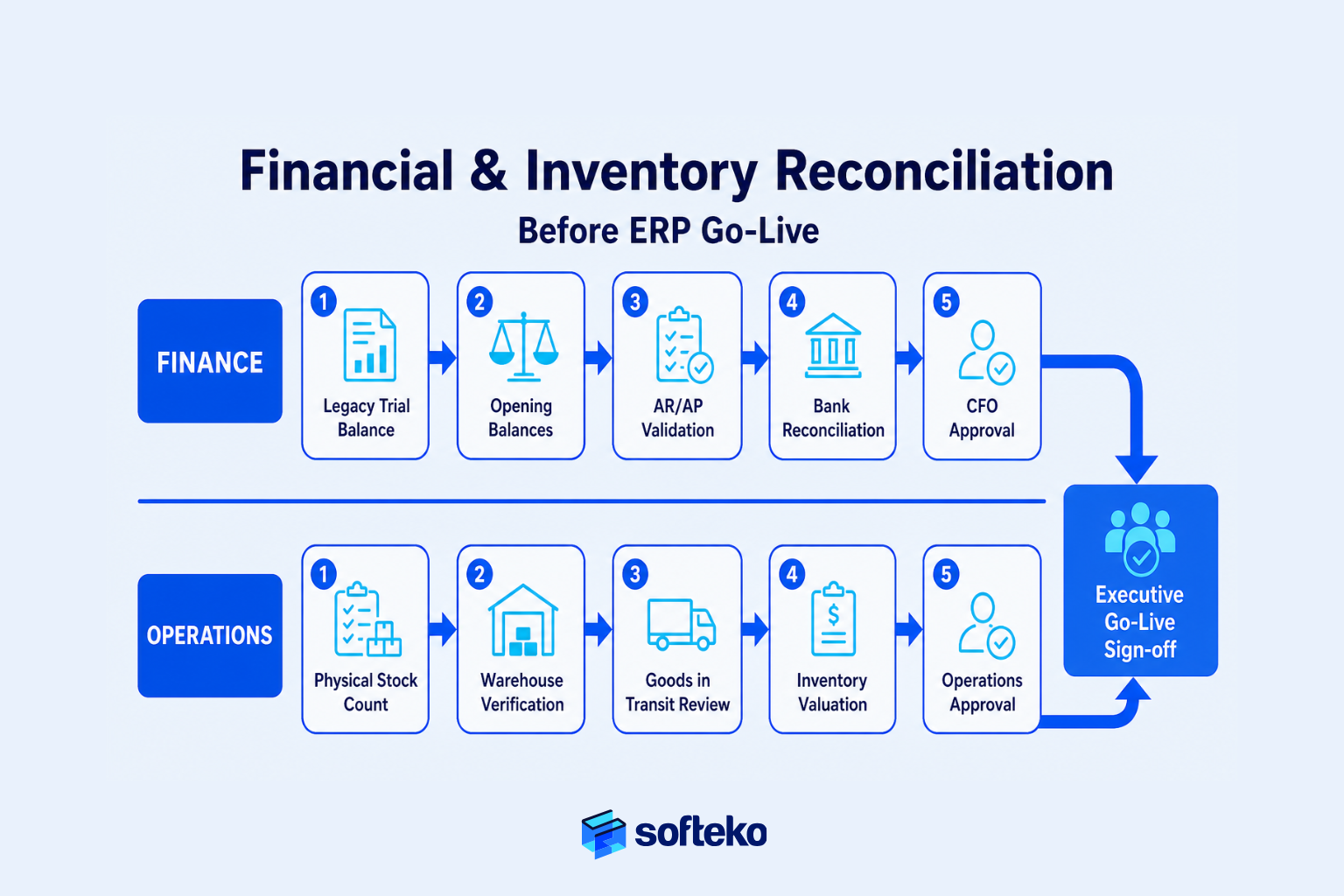
Does inventory match physical stock?
Do the financial balances match the legacy system?
If the answer to either question is no, users immediately begin questioning the reliability of every other report inside the ERP. That is why experienced implementation teams spend far more time on reconciliation than on data import.
Migration copies information. Reconciliation proves that the information is correct. Only after reconciliation should management approve the system for live operations.
Reconciliation Is a Business Control, Not an Accounting Exercise
In practice, some organisations assume reconciliation belongs exclusively to the Finance department. In reality, however, every department performs reconciliation.
Sales confirms that open quotations and customer balances are accurate. Procurement verifies supplier commitments. Warehouse teams compare physical inventory with migrated quantities. Finance validates receivables, payables, bank balances, and opening journals. Management confirms that operational reports reflect business reality.
Together, these activities answer one critical question: can the business trust the information inside the new ERP? Without reconciliation, there is no objective way to answer that question.
Financial Opening Balances Must Match the Legacy System
Firstly, every ERP implementation begins with opening balances. These figures establish the financial position of the company on the first day of operation. If opening balances are incorrect, every future financial report becomes unreliable.
Typical opening balances include cash and bank accounts, Accounts Receivable, Accounts Payable, inventory valuation, fixed assets, outstanding tax balances, equity accounts, and accruals and provisions.
The objective is not simply to recreate reports from the old system. Rather, the objective is to ensure the ERP begins with an accurate financial foundation that supports future transactions. Most organisations therefore perform multiple reconciliation rounds before approving the final opening balances.
Example: Small Balance Differences Can Cause Bigger Problems
A trading company migrates its financial data before year-end. The migration completes successfully.
During final reconciliation, Finance discovers that Accounts Receivable differs from the legacy system by only USD 4,800. Management initially considers accepting the difference because it represents less than 0.1% of total receivables.
Further investigation reveals that several customer payments were posted after the migration extract but before the opening balances were finalised. Correcting those entries takes only a few hours. Ignoring them, however, would have affected customer statements, collection activities, and cash flow reporting for months.
The lesson is straightforward. Small differences often indicate larger process issues.
Reconcile Inventory Before Go-Live
Notably, inventory reconciliation is usually the highest-risk activity for trading businesses. Unlike financial reports, inventory affects operations immediately. If stock quantities are inaccurate:
- Sales may promise products that are unavailable
- Procurement may reorder materials unnecessarily
- Warehouse teams may search for inventory that does not exist
- Finance may report incorrect inventory valuation
- Management may make purchasing decisions based on unreliable stock levels
For that reason, experienced implementation teams rarely migrate inventory balances without confirming physical stock first.
Perform a Physical Stock Verification Before Migration
Consequently, a physical inventory count creates the baseline for opening stock balances. This process typically verifies available inventory, reserved inventory, damaged goods, quarantine stock, goods awaiting inspection, goods in transit, warehouse locations, batch or lot information, and serial numbers where applicable.
Only after this verification should opening inventory balances be approved. Many organisations intentionally schedule this activity close to go-live so the difference between physical stock and system balances remains minimal.
This approach aligns with structured trading ERP implementations where warehouse operations depend on accurate Goods Receipt Notes (GRNs), FEFO allocation, warehouse locations, damaged stock recording, and inventory visibility across multiple facilities. These controls ensure that opening inventory reflects operational reality rather than historical assumptions.
Goods in Transit Require Special Reconciliation
Additionally, trading businesses frequently have inventory that is neither fully received nor fully delivered. Examples include containers at sea, shipments waiting for customs clearance, goods stored at third-party logistics providers, intercompany transfers, and supplier shipments awaiting Goods Receipt.
These transactions cannot simply be counted during a warehouse stocktake. Instead, they require operational reconciliation between Procurement, Logistics, Warehouse, and Finance.
Each shipment should answer questions such as:
- Has ownership transferred?
- Has the inventory been received?
- Has the supplier invoice been posted?
- Should the shipment appear in opening inventory?
- Should related landed costs already be recognised?
Without this review, businesses risk overstating or understating inventory immediately after go-live. For importers and distributors handling multiple shipment modes, this reconciliation is particularly important because purchase orders, shipment milestones, customs activities, Goods Receipt Notes, and landed costs often occur on different dates across the supply chain.
Validate Operational Transactions Alongside Financial Figures
However, financial reconciliation alone is not enough. Your business should also confirm that operational documents remain consistent after migration.
Typical validation includes:
| Business process | Validation question |
|---|---|
| Sales | Are all open quotations and customer orders available? |
| Procurement | Do supplier purchase orders match outstanding commitments? |
| Warehouse | Do inventory quantities match physical stock? |
| Logistics | Are active shipments visible with the correct status? |
| Finance | Do receivables, payables, and opening balances reconcile? |
| Management | Do operational dashboards reflect current business activity? |
This cross-functional review helps identify discrepancies that may not appear in financial reports alone.
Use Control Totals Before and After Migration
One of the simplest reconciliation techniques is the use of control totals. Before migration, the project team records summary figures from the legacy system.
Examples include:
- Number of active customers
- Number of active suppliers
- Number of products
- Total inventory quantity
- Total inventory value
- Accounts Receivable balance
- Accounts Payable balance
- Number of open sales orders
- Number of open purchase orders
After migration, those same totals are generated from the ERP. Differences are investigated — not ignored. This approach provides management with objective evidence that migration preserved critical business information.
Define Acceptable Reconciliation Tolerances
Not every difference represents a failure. For example, minor formatting changes may be acceptable. Updated naming conventions may intentionally reduce duplicate records. Archived historical data may reduce record counts.
However, some differences should never be accepted without investigation:
- Inventory valuation differences
- Customer balance discrepancies
- Supplier balance discrepancies
- Tax balance inconsistencies
- Missing operational transactions
- Incorrect opening stock
Before migration begins, management should define which differences are acceptable and which require correction. Clear acceptance criteria prevent unnecessary debates during go-live.
Executive Reconciliation Checklist
Before approving production go-live, verify that:
- ✓ Opening balances match the approved legacy reports
- ✓ Physical inventory has been verified
- ✓ Inventory valuation has been reconciled
- ✓ Accounts Receivable and Accounts Payable balances match
- ✓ Goods in transit have been reviewed
- ✓ Open operational transactions have been validated
- ✓ Department owners have approved their respective datasets
- ✓ Executive management has signed off on reconciliation results
Only after these controls are complete should the migration be considered operationally successful.
Implementation Lesson
Businesses often celebrate a migration because every record imported successfully. Experienced implementation teams, however, celebrate only after reconciliation confirms that the business can continue operating without questioning its own data.
Importing data creates an ERP. Reconciling data creates confidence.
How to Plan an ERP Cutover Without Disrupting Operations
Notably, for many business leaders go-live weekend feels like the most stressful part of an ERP implementation. That is understandable.
Years of business data have been prepared. Departments have completed testing. Employees have received training. Management has approved the project. Now the business must switch from one operating system to another — without interrupting customer service, warehouse operations, procurement, or financial reporting.
The pressure is high. But experienced implementation teams know something important: a successful cutover is rarely the result of good decisions made during go-live weekend. It is the result of good planning completed weeks beforehand.
The objective of a cutover plan is not simply to launch the ERP. Rather, it is to ensure the business continues operating with minimal disruption while maintaining confidence in every critical process.
Cutover Is a Business Transition, Not a Technical Event
Typically, many organisations think of cutover as the moment data is imported into the ERP. In reality, however, cutover is the controlled transition of an entire business from one operating environment to another.
Consequently, every department is affected. Sales must begin creating quotations in the new ERP. Procurement must issue purchase orders using new workflows. Warehouse teams must receive and dispatch inventory from the new system. Finance must invoice customers and record payments without interrupting daily cash flow. Management must continue monitoring operational performance without losing visibility.
The ERP is only one part of this transition. The business itself is what actually moves.
Build a Detailed Cutover Checklist Before Go-Live
Notably, one characteristic separates successful ERP implementations from stressful ones. Nothing is left to memory. Every activity is documented, every responsibility is assigned, and every dependency is understood.
A practical cutover checklist typically includes:
Before Migration
- Complete final data validation
- Obtain department approvals
- Confirm migration templates
- Notify customers and suppliers if necessary
- Complete final user training
- Prepare support teams
During Migration
- Stop approved business transactions
- Extract final production data
- Execute migration
- Validate migrated records
- Perform reconciliation
- Obtain business approval
After Go-Live
- Enable user access
- Process test transactions
- Monitor business operations
- Resolve high-priority issues
- Begin hypercare support
A documented checklist removes uncertainty because every participant understands what happens next.
Example: Two Different Go-Live Approaches
Two distributors implement ERP during the same month.
The first company relies on verbal coordination. Department managers assume everyone understands the migration schedule. Warehouse staff continue receiving inventory after the migration extract. Finance posts several customer payments during reconciliation. Sales creates new customer accounts minutes before cutover. By Monday morning, multiple departments are working with different versions of the data.
The second company follows a documented cutover checklist. Each department understands exactly when transactions stop. Management communicates responsibilities in advance. Business owners approve reconciliation before users receive system access.
Both companies migrate the same amount of data. Only one begins Monday with operational confidence.
Define a Clear Data Freeze Period
One of the most effective ways to protect migration accuracy is introducing a controlled data freeze period. A freeze period does not mean the business completely stops operating. Instead, it limits changes that would make migration inconsistent.
Typical restrictions include:
- Creating new customer master records
- Adding new suppliers
- Changing product structures
- Updating warehouse configurations
- Modifying pricing rules
- Performing large inventory adjustments
Normal operational activities continue where possible, but structural changes are carefully controlled. The duration varies depending on business complexity. For some organisations, the freeze lasts several hours. For larger multi-country trading businesses, it may extend across an entire weekend.
The important principle is consistency. The data migrated into the ERP should remain stable from extraction through final validation.
Communicate the Cutover Plan Across the Business
In practice, poor communication creates as many implementation problems as poor data. Your employees should never discover system changes after they occur.
Every department needs advance notice covering migration schedule, system downtime, temporary business procedures, department responsibilities, support contacts, escalation process, and expected go-live timeline.
This communication should be practical rather than technical. Warehouse teams need to know when inventory movements resume. Sales needs to know when quotations can be created. Finance needs to know when invoicing restarts. Executives need to know when operational reporting becomes available.
Good communication reduces uncertainty before users even log into the ERP. This is where change management fundamentals become critical. The Project Management Institute (PMI) emphasises that formal change management — identifying, documenting, reviewing, approving, and closing every change — is essential to keep projects on schedule and within budget.[10]
Prepare a Rollback Plan
Additionally, experienced implementation teams always prepare for unlikely scenarios. That does not mean they expect failure. Rather, it means they prepare for controlled recovery if something unexpected occurs.
A rollback strategy should answer questions such as:
- What happens if migration validation fails?
- Can the legacy system remain available temporarily?
- Who has authority to delay go-live?
- How will departments be informed?
- Which transactions must be protected first?
Most organisations never activate their rollback plan. However, its value lies in reducing decision-making under pressure. When responsibilities have already been defined, unexpected issues become easier to manage.
Hypercare Begins When Go-Live Ends
Notably, many organisations assume the project finishes once the ERP goes live. In reality, however, one of the most important implementation phases begins immediately afterward. This period is commonly known as hypercare.
Hypercare provides focused operational support while employees adapt to the new system. Typical activities include:
- Resolving user questions
- Correcting minor configuration issues
- Monitoring transaction processing
- Reviewing reconciliation reports
- Tracking support requests
- Prioritising business-critical issues
- Confirming workflow adoption
Rather than treating every issue equally, the support team concentrates first on activities that affect daily operations. For a trading business, these usually include customer order processing, purchase order creation, warehouse receiving, inventory availability, customer invoicing, and payment collection.
Lower-priority improvements can be scheduled after operational stability has been achieved.
Measure Business Stability After Go-Live
A technically completed migration does not necessarily indicate a successful implementation. The better question is: can the business operate normally?
Useful post-go-live indicators include:
| Operational area | Business success indicator |
|---|---|
| Sales | Quotations and orders processed without delays |
| Procurement | Purchase orders created accurately |
| Warehouse | Inventory movements recorded correctly |
| Logistics | Active shipments tracked successfully |
| Finance | Invoices, collections, and payments processed accurately |
| Management | Dashboards and operational reports trusted by decision-makers |
These measurements focus on operational continuity rather than software completion. That is ultimately what management cares about.
How Odoo Supports a Controlled Cutover
Notably, only after your business has established governance, validated data, completed reconciliation, and planned the cutover does the ERP become part of the discussion.
In Odoo, the implementation team can migrate approved master data, opening balances, inventory positions, and selected operational records into a structured environment where every department works from the same database. Because Sales, Inventory, Purchase, Accounting, and warehouse operations share the same business data, users no longer maintain separate versions of customers, products, suppliers, or inventory. The ERP reinforces the governance decisions made during the migration project rather than replacing them.
This is consistent with the structured process used across mature trading ERP implementations, where end-to-end workflows — from RFQ and customer orders through procurement, shipment execution, warehouse operations, invoicing, and payment — depend on centralised business data, approval workflows, and standardised operational controls.
Notice the sequence. The governance came first. The business decisions came first. Odoo simply provides the operational platform that enforces those decisions consistently across the organisation.
Executive Cutover Readiness Checklist
Before approving go-live, confirm that:
- ✓ All migration testing has been completed successfully
- ✓ Financial and inventory reconciliation has been approved
- ✓ Department owners have signed off on their data
- ✓ A documented cutover checklist exists
- ✓ The data freeze period has been communicated
- ✓ Rollback procedures have been documented
- ✓ Hypercare resources are available
- ✓ Executive management has approved the final go-live decision
If any of these items remain incomplete, postponing go-live is usually less expensive than correcting operational problems afterward.
Implementation Lesson
Organisations often remember ERP go-live as either a stressful weekend or an uneventful transition. The difference is rarely the software. Rather, it is the quality of the planning that came before it.
A well-planned cutover does not eliminate every issue. It ensures that the issues which do arise are expected, understood, and resolved without disrupting the business.
How Odoo ERP Supports Structured Data Migration for Trading Businesses
By this point, one conclusion should be clear. Successful ERP data migration does not begin with software. Rather, it begins with governance, clean master data, business ownership, reconciliation, testing, and a controlled cutover.
Only after those foundations exist does the ERP become important. This is where Odoo fits into the migration process.
In practice, Odoo does not automatically solve poor data quality. It does not decide which customers should remain active. It does not know whether your inventory balances are accurate. Instead, Odoo provides a structured business platform that allows organisations to implement the governance decisions they have already made.
That distinction is important because it sets realistic expectations. The ERP supports the migration strategy. It does not replace it.
Odoo Centralizes Business Data into a Single Source of Truth
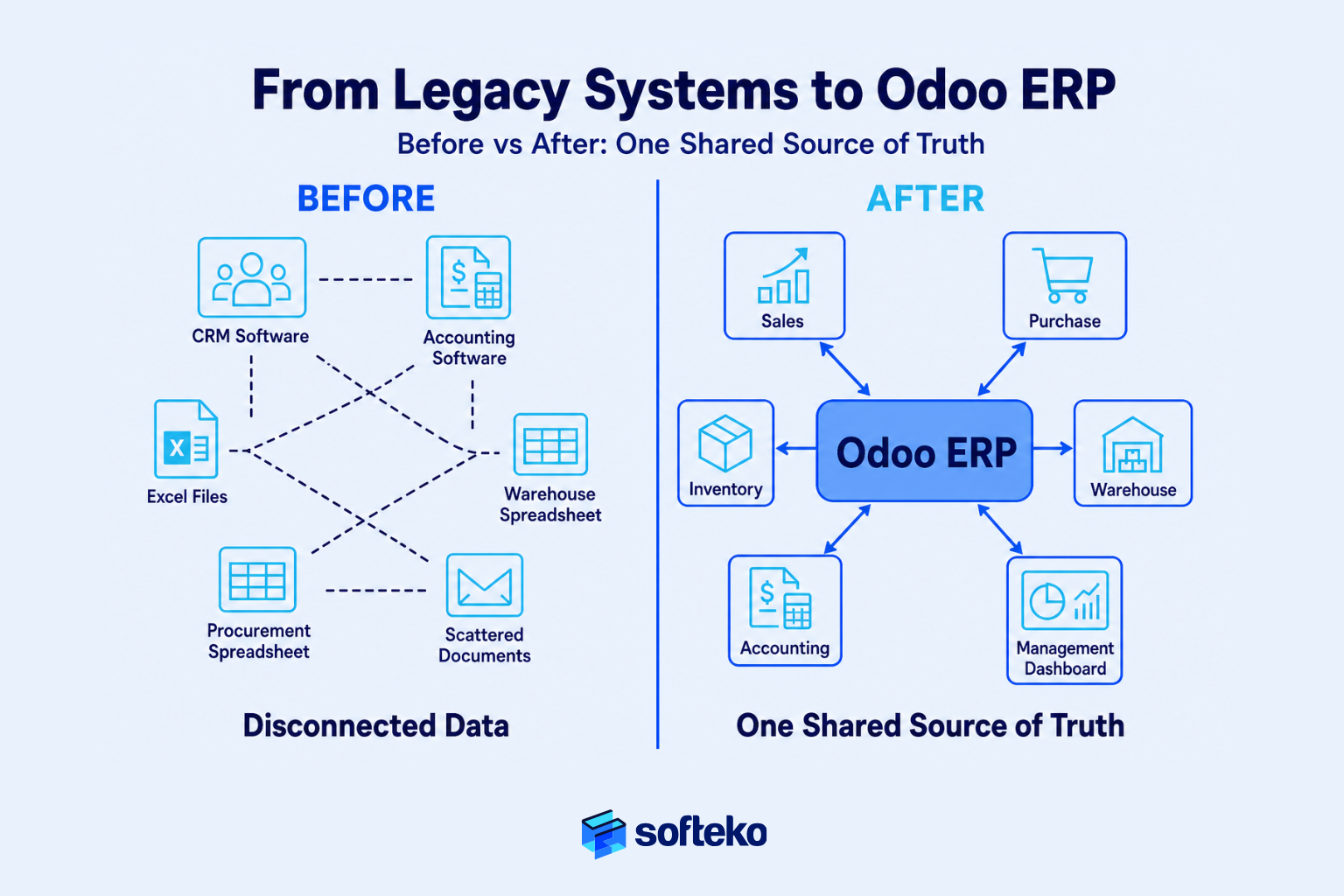
Many trading businesses operate with information spread across multiple applications. Customer records exist in CRM software. Inventory is tracked separately. Finance uses accounting software. Procurement relies on spreadsheets. Warehouse teams maintain independent stock records.
The result is fragmented decision-making. Different departments often work with different versions of the same information.
Odoo changes this by centralising operational data within one connected business platform. Instead of maintaining separate customer databases, supplier lists, inventory files, and financial records, every department works from the same approved master data.
For example:
- Sales creates a customer once
- Finance reviews the same customer for credit
- Procurement references the same delivery address
- Warehouse ships against the same customer record
- Management reports use the same underlying data
That consistency is only possible because the migration established a reliable master data foundation first.
Structured Master Data Supports Every Future Transaction
Earlier in this guide, we discussed why product, customer, supplier, and warehouse records require careful preparation before migration. Odoo reinforces that preparation by organising operational data into structured master records.
Rather than allowing every transaction to recreate information independently, operational workflows reference approved master data. For a trading business, that means:
- Customer quotations reference approved customer records
- Purchase Orders reference validated suppliers
- Inventory movements reference standardised products
- Financial transactions reference the same operational data
This approach reduces duplicate information and improves reporting because every department is working from the same operational foundation. Mature trading ERP implementations follow this same philosophy, maintaining centralised master records for customers, suppliers, products, warehouses, ports, packaging types, and service providers before allowing operational transactions to proceed.
Odoo’s Integrated Workflows Reduce Manual Reconciliation
One reason reconciliation becomes difficult in legacy environments is that departments often update separate systems independently. A customer order may exist in Sales. Inventory updates occur elsewhere. Finance posts invoices in another application. Management then spends considerable time reconciling information between systems.
After migration, Odoo connects these business processes through shared operational data. A confirmed sales order can trigger downstream warehouse and procurement activities. Inventory updates become visible across departments. Financial documents are generated from operational transactions rather than being recreated manually.
The benefit is not simply automation. Rather, the benefit is reducing the number of places where inconsistencies can develop after go-live.
Business Example: Before and After Migration
Consider a distributor operating across three warehouses.
Before ERP migration
Sales exports customer data into spreadsheets. Warehouse teams maintain separate inventory files. Procurement manages supplier information independently. Finance manually reconciles inventory values at month-end. Management receives different answers depending on which department prepared the report.
After structured migration into Odoo
Customer information exists once. Products are standardised. Warehouse balances update from operational transactions. Procurement references approved suppliers. Finance receives information generated from the same operational workflow. Instead of reconciling multiple databases, departments collaborate around one operational system.
The improvement comes from standardised processes supported by clean data — not simply from installing new software.
Odoo Supports Controlled Data Import During Implementation
During implementation, migration activities are typically organised around business data categories rather than departments. Examples include customer master, supplier master, product master, Bills of Materials (where applicable), warehouse locations, opening inventory, opening balances, open receivables, open payables, and selected operational transactions.
Each migration cycle follows a structured process:
- Prepare and validate source data
- Map business fields to the ERP structure
- Execute a test migration
- Review results with business owners
- Correct issues
- Repeat testing
- Execute the final production migration
Notice that migration remains an iterative business process. The import itself represents only one step within that framework.
Odoo Reinforces Governance After Go-Live
Importantly, migration does not end when the ERP becomes operational. Without ongoing governance, data quality gradually declines. Duplicate customers reappear. Products are created inconsistently. Supplier information becomes outdated. Reporting becomes less reliable.
Odoo helps organisations maintain the governance established during implementation by supporting role-based permissions, approval workflows, standardised master data, document version control, centralised operational records, and audit history. These controls reduce the likelihood of returning to the fragmented practices that existed before implementation.
Mature trading ERP business requirements demonstrate this approach through structured approval workflows, document version control, mandatory validations, and approval routing across Sales, Procurement, Finance, and Supply Chain before critical operational activities proceed.
Odoo Supports Growth Without Repeating the Migration Project
One of the long-term benefits of structured migration is scalability. As trading businesses expand into new warehouses, new countries, new legal entities, additional product lines, more suppliers, or larger customer bases, they should not need to redesign their operational data from scratch.
Instead, the governance model established during migration continues to support future growth. New records follow existing standards, new workflows use approved master data, new departments work within established operational controls. The migration project becomes the foundation for future expansion rather than a one-time technical exercise.
What Odoo Does — and Does Not — Do During Data Migration
| Odoo supports | Odoo does not replace |
|---|---|
| Structured master data | Business ownership |
| Connected workflows | Data cleansing decisions |
| Controlled imports | Master data validation |
| Approval workflows | Executive governance |
| Audit history | Reconciliation activities |
| Shared operational data | Department accountability |
| Centralised reporting | Business process design |
This distinction helps organisations set realistic expectations. ERP software improves consistency. Business leadership ensures accuracy. Both are necessary for a successful implementation.
The Value of Odoo Depends on the Quality of Your Preparation
After working through hundreds of migration decisions, many organisations reach an interesting realisation. The most successful ERP projects are rarely those with the most sophisticated technology. Rather, they are the ones with:
- Clear governance
- Reliable master data
- Department ownership
- Thorough testing
- Strong reconciliation
- Careful cutover planning
Odoo provides the operational platform that enables those practices to continue every day after implementation. Without them, even the best ERP struggles to produce reliable business information. With them, the ERP becomes a dependable operational control system that supports growth for years.
Implementation Lesson
Businesses often ask: “Is Odoo capable of handling our migration?”
A better question is: “Have we prepared our business so that any modern ERP can be implemented successfully?”
Once governance, data quality, and operational ownership are in place, Odoo provides a structured environment to carry those decisions into daily operations. That is why successful migrations are remembered for stable business operations — not for the migration tools that were used.
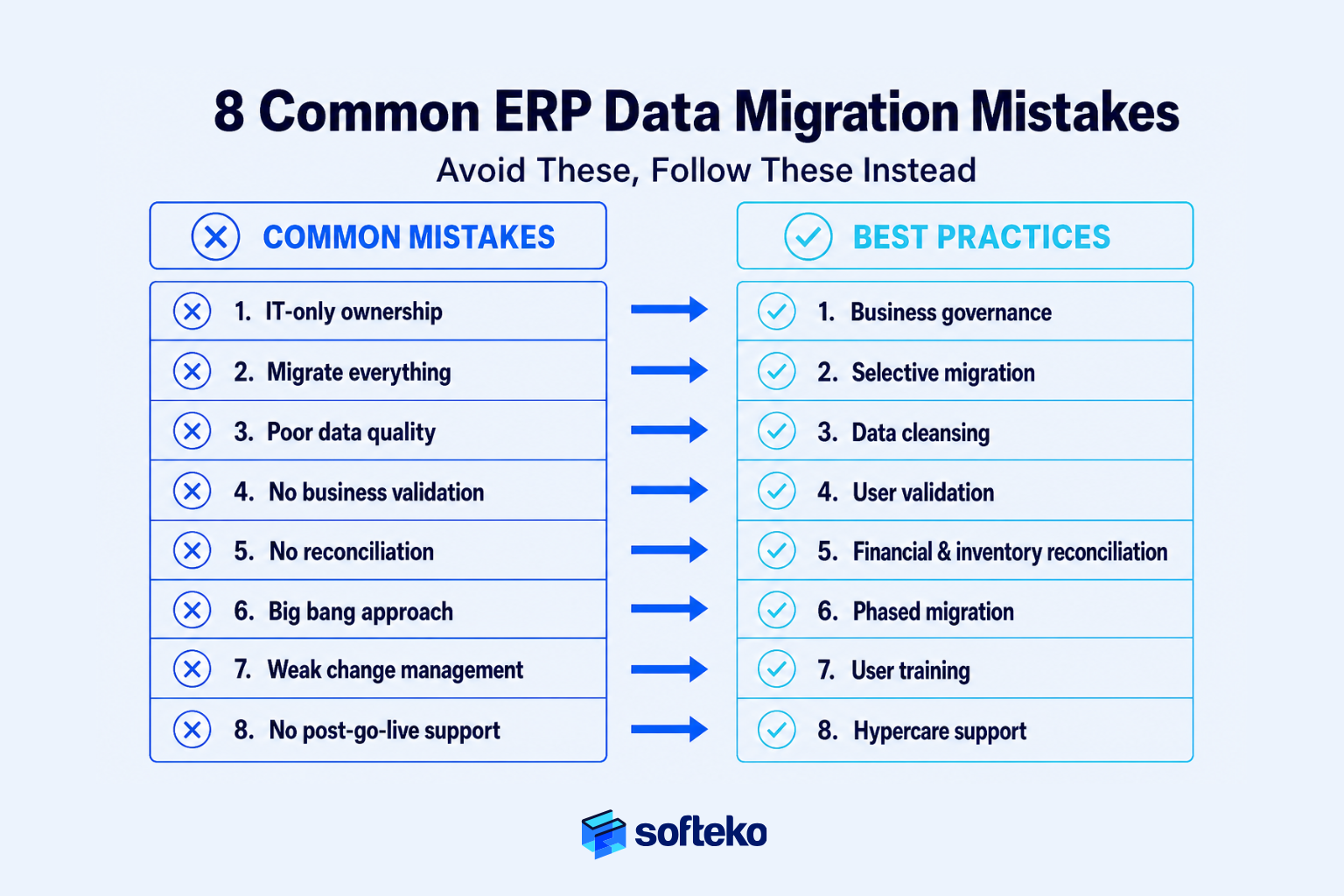
8 Common ERP Data Migration Mistakes Trading Businesses Should Avoid
Notably, most ERP data migration problems do not happen because the migration software fails. Rather, they happen because businesses make avoidable decisions long before go-live.
After supporting ERP implementations across trading companies, wholesalers, distributors, and import-export businesses, the same patterns appear repeatedly. Different industries may sell different products, but the underlying migration mistakes are remarkably similar.[7] The good news is that nearly all of them can be prevented with proper planning, governance, and business ownership.
Below are the mistakes that create the greatest operational risk — and the practical lessons that experienced implementation teams apply to avoid them.
Mistake 1: Treating Data Migration as an IT Project
Firstly, this is the most common mistake. Management assigns migration responsibility to the IT department because software is involved.
IT successfully extracts and imports data. After go-live, however, departments begin reporting problems:
- Customers are duplicated
- Product descriptions are inconsistent
- Supplier information is outdated
- Inventory quantities cannot be trusted
The migration was technically successful. The business migration failed.
Better Practice. Assign business ownership before technical execution. Every dataset should have an accountable business owner who approves its accuracy before migration begins. Technology moves data. Business teams validate it.
Mistake 2: Migrating Everything Without Asking Whether It Still Has Business Value
Similarly, many organisations assume every historical record should be migrated. The result is predictable: ten years of inactive customers, obsolete products, duplicate suppliers, expired price lists, completed quotations, closed purchase orders. None of this information improves daily operations. It only increases migration effort and testing complexity.
Better Practice. Classify every dataset. Ask:
- Is this information still actively used?
- Will employees need it after go-live?
- Does it support operational decisions?
- Can it remain in an archive instead?
Migration scope should be determined by business value, not database size.
Mistake 3: Ignoring Data Quality Until Testing Begins
In practice, poor-quality data rarely becomes visible during extraction. It becomes visible when employees start using the ERP. Sales cannot locate customers. Warehouse staff receive duplicate products. Finance questions account balances.
By that stage, correcting the data becomes significantly more expensive. Independent research shows the average business loses around $15 million annually to poor data quality, and employees spend up to 27% of their working time correcting bad data.[4] Those figures are not theoretical — they show up as friction in every trading operation that runs on unreliable master data.
Better Practice. Perform data profiling before migration starts. Review duplicate records, missing fields, naming inconsistencies, invalid master data, and outdated records. Cleaning data early reduces rework throughout the project.
Mistake 4: Skipping Business Validation
Additionally, some organisations trust migration reports more than business users. The migration completes with zero technical errors. Management approves go-live.
On Monday morning, Sales cannot process quotations. Warehouse users cannot locate inventory. Procurement identifies incorrect supplier information. The migration report was accurate. Operational validation, however, never happened.
Better Practice. Every department should validate its own workflows before approving production migration. Examples include Sales processing customer quotations, Procurement creating purchase orders, Warehouse receiving inventory, Finance issuing invoices, and Management reviewing dashboards. A migration is only complete when users can perform their daily work confidently.
Mistake 5: Failing to Reconcile Financial and Inventory Data
Notably, one of the fastest ways to lose user confidence is incorrect opening balances. Employees immediately begin asking: “Which system should we trust?” Once confidence is lost, users often return to spreadsheets — even though the ERP is live.
Better Practice. Never approve go-live without reconciliation. Confirm opening balances, Accounts Receivable, Accounts Payable, inventory valuation, physical inventory, goods in transit, and open operational transactions. Migration creates records. Reconciliation creates trust.
Mistake 6: Trying to Finish the Project with One Big Migration
For instance, a single production migration may appear efficient. In reality, however, it concentrates every risk into one weekend. If problems emerge, every department is affected simultaneously.
Better Practice. Use multiple test migrations. Each cycle should improve data quality, mapping accuracy, user confidence, operational validation, and cutover readiness. Testing is not repetition. It is risk reduction.
Mistake 7: Underestimating Change Management
Many ERP projects focus heavily on data and configuration. Very little attention is given to the people using the system. Your employees suddenly receive a new ERP with unfamiliar workflows and different business processes. Resistance follows.
The issue is not the software. It is the absence of preparation. This is precisely why PMI treats change management as a formal project workstream with its own identification, documentation, review, and approval steps — not as an afterthought.[10]
Better Practice. Prepare employees before go-live. Provide department-specific training, practice environments, updated operating procedures, clear communication, and accessible support during hypercare. Successful migration includes user readiness — not just system readiness.
Mistake 8: Assuming Go-Live Marks the End of the Project
In fact, go-live is an important milestone. It is not the finish line. The first few weeks determine whether employees fully adopt the ERP or gradually return to old habits. Without structured support, duplicate data begins to appear, manual workarounds return, governance weakens, and reporting quality declines.
Better Practice. Treat the first month after go-live as an operational stabilisation period. Monitor user adoption, transaction accuracy, support requests, process compliance, data quality, and executive reporting. Small issues corrected early rarely become long-term operational problems.
A Quick Self-Assessment Before Starting ERP Data Migration
Use the following checklist to evaluate your organisation’s readiness.
| Question | Yes | No |
|---|---|---|
| Have business owners been assigned to every major dataset? | ☐ | ☐ |
| Has duplicate master data been identified? | ☐ | ☐ |
| Has inactive data been reviewed for archiving? | ☐ | ☐ |
| Has physical inventory been verified? | ☐ | ☐ |
| Have financial opening balances been prepared? | ☐ | ☐ |
| Has at least one test migration been scheduled? | ☐ | ☐ |
| Are business users involved in validation? | ☐ | ☐ |
| Has a cutover checklist been approved? | ☐ | ☐ |
| Is hypercare support planned after go-live? | ☐ | ☐ |
If several answers are No, your business should strengthen its migration preparation before proceeding.
The Common Theme Behind Every Successful Migration
Although the mistakes differ, they usually share the same root cause. Organisations become focused on moving data instead of protecting operations.
The businesses that experience the smoothest ERP transitions approach migration differently. They focus on:
- Business ownership before technical execution
- Data quality before data volume
- Governance before automation
- Validation before go-live
- Operational continuity before project completion
That mindset produces better outcomes regardless of which ERP platform is being implemented.
Implementation Lesson
One experienced ERP consultant summarised data migration with a simple observation: “The migration weekend rarely determines project success. The months of preparation before it do.”
Trading businesses that invest in governance, validation, and structured planning typically experience shorter stabilisation periods, fewer operational disruptions, and greater confidence after go-live. Those that rush the preparation often spend months correcting problems that could have been prevented before the first record was ever migrated.
Frequently Asked Questions About Odoo ERP Data Migration
1. What is Odoo ERP data migration?
Odoo Data Migration is the process of transferring business information from existing systems into Odoo while preserving operational continuity. It includes much more than importing records. A successful migration involves reviewing data quality, deciding which information should be migrated or archived, validating master data, reconciling financial and inventory balances, testing business workflows, and preparing users for go-live. The objective is to ensure your business can continue operating confidently from the first day of implementation.
2. Should we migrate all historical data into Odoo?
Usually, no. Most trading businesses benefit from migrating only the information required for current operations, such as:
- Active customers
- Approved suppliers
- Product master data
- Current inventory
- Opening financial balances
- Outstanding receivables and payables
- Open sales and purchase transactions
Older quotations, completed shipments, closed invoices, and inactive records can often remain in an archived legacy system. Migrating only business-critical information reduces implementation risk, shortens testing time, and improves data quality.
3. How long does an Odoo ERP data migration take?
There is no standard timeline because migration depends on business complexity rather than company size. Typical factors include the number of legacy systems, data quality, number of products, customer and supplier records, historical transaction volume, number of warehouses, number of legal entities, and required testing cycles.
For many trading businesses, data preparation consumes significantly more time than the actual migration itself. Organisations that invest early in data cleansing and governance usually complete implementation with fewer delays.
4. Who should be responsible for ERP data migration?
The business — not the IT department. A successful migration requires participation from every department that owns business information. Typical responsibilities include:
- Sales: Customer master and pricing
- Procurement: Supplier records and purchasing data
- Warehouse: Inventory verification
- Finance: Opening balances and reconciliation
- Management: Governance and final approval
- Implementation Partner: Migration methodology, mapping, testing, and guidance
Technology teams execute the migration, but business teams remain responsible for validating the information.
5. How can we reduce the risk of data migration?
The most effective risk-reduction strategies include cleaning data before migration, assigning business ownership for every dataset, performing multiple test migrations, reconciling inventory and financial balances, validating workflows with business users, using a phased migration approach, and planning a structured cutover and hypercare period.
These practices reduce operational disruption far more effectively than trying to accelerate the migration process.
6. Can we continue running our business during ERP migration?
Yes. Most organisations continue normal operations throughout the implementation project. Only during the final cutover period are selected activities temporarily restricted to protect data consistency. Even then, experienced implementation teams carefully schedule the transition to minimise disruption to customer orders, warehouse operations, procurement, and finance.
The goal is business continuity — not business interruption.
7. Does Odoo automatically clean poor-quality data?
No. Odoo provides structured import tools and standardised business workflows, but it does not determine whether your source data is accurate. Duplicate customers, inconsistent product codes, outdated suppliers, or incorrect inventory balances should be identified and corrected before migration. Clean business data remains the responsibility of the organisation implementing the ERP.
8. What is the biggest mistake companies make during ERP data migration?
The most common mistake is believing migration is primarily a technical exercise. Organisations often focus on importing data while overlooking business ownership, data quality, governance, reconciliation, user validation, and operational readiness. Successful ERP projects spend more time preparing business information than moving it.
9. When should inventory be counted during ERP migration?
Physical inventory verification should be completed as close to the planned go-live date as practical. This reduces differences between physical stock and migrated opening balances. Businesses with multiple warehouses, goods in transit, or third-party logistics providers should also reconcile inventory movements before final migration to ensure stock quantities accurately reflect operational reality on the first day of ERP use.
10. How do I know my business is ready for Odoo ERP data migration?
Your business is generally ready when:
- Master data has been reviewed and cleaned
- Every dataset has a business owner
- Financial and inventory reconciliation procedures are complete
- Business users have validated test migrations
- A cutover plan has been approved
- Employees have received training
- Executive management has approved the final go-live decision
Readiness is measured by operational confidence — not by whether the migration files are complete.
Conclusion: Successful ERP Data Migration Starts Long Before Go-Live
Implementing a new ERP is an important milestone for any trading business. However, the software itself is only one part of the transition.
The real work begins much earlier — when your business decides which information it can trust, which processes should be standardised, and which operational controls will guide future growth.
Organisations that approach Odoo Data Migration as a business governance initiative consistently achieve better outcomes than those that treat it as a technical import exercise. They invest time in improving data quality, assign ownership across departments, validate information through testing and reconciliation, and plan cutover carefully. Most importantly, they protect business continuity throughout the implementation.
By the time Odoo goes live, the migration should no longer feel like a leap into the unknown. It should feel like the final step in a well-prepared business transformation.
If your organisation is planning an ERP implementation, resist the temptation to measure success by how quickly data can be imported. Instead, evaluate your readiness using the framework discussed throughout this guide:
Business Governance ↓ Clean Master Data ↓ Department Ownership ↓ Migration Planning ↓ Testing & Validation ↓ Financial & Inventory Reconciliation ↓ Controlled Cutover ↓ Stable Operations
When these elements are in place, Odoo becomes much more than an ERP platform. It becomes a reliable business operating system built on trusted information, standardised processes, and operational discipline.
At Softeko, we help trading businesses design and execute Odoo data migration projects that protect operational continuity — from governance and cleansing through validation, reconciliation, and cutover.
Continue Your ERP Implementation Journey
If you are planning a complete ERP implementation for your trading business, these guides will help you evaluate each stage of the journey:
References
- Gartner — What IT Leaders Must Do to Avoid Disappointing ERP Initiatives — https://www.gartner.com/en/information-technology/insights/what-it-leaders-must-do-to-avoid-disappointing-erp-initiatives
- Rand Group — What percentage of ERP implementations fail? — https://www.randgroup.com/insights/services/solution-implementation/what-percentage-of-erp-implementations-fail/
- Oracle — Put Your Data First or Your Migration Will Come Last — https://www.oracle.com/a/ocom/docs/middleware/data-integration/data-migration-wp.pdf
- Actian — The Costly Consequences of Poor Data Quality — https://www.actian.com/blog/data-management/the-costly-consequences-of-poor-data-quality/
- Gartner — 80 Percent of Data and Analytics Governance Initiatives Will Fail by 2027 — https://www.gartner.com/en/newsroom/press-releases/2024-02-28-gartner-predicts-80-percent-of-data-and-analytics-governance-initiatives-will-fail-by-2027-due-to-a-lack-of-a-real-or-manufactured-crisis-
- Trax Group — ERP Data Migration Problems: Why Data Fails and How Organisations Can Get It Right — https://traxgroup.com/erp-data-migration-problems/
- Panorama Consulting — 6 ERP Data Migration Challenges (& Their Solutions) — https://www.panorama-consulting.com/erp-data-migration-challenges/
- DAMA International — Data Management Body of Knowledge (DAMA-DMBOK) — https://dama.org/learning-resources/dama-data-management-body-of-knowledge-dmbok/
- APQC — Process Classification Framework (PCF) — https://www.apqc.org/process-frameworks
- PMI — Change Management Process for Project — https://www.projectmanagement.com/wikis/396744/change-management-process-for-project